
Free Software Download Center
Software for industrial data
collection, monitoring and analysis.
BUILT-IN FUNCTIONS FOR VIRTUAL DATA
EOS SCADA software supports not only the direct monitoring of real data collected from devices, but also the creation of new data by performing various mathematical, logical and conditional operations on these values.
Virtual Data are derived values that are not read directly from any physical device; they are created by processing existing SCADA data using functions, mathematical operations, conditions or other data processing methods.
Built-in functions available in EOS SCADA make complex data processing operations easier to define. Users can combine these functions within the Virtual Data Editor to create new SCADA data according to operational requirements.

The EOS SCADA virtual data infrastructure includes various built-in functions for processing collected data for different purposes. These functions can be used to combine, convert, validate and generate values from different data types.
tcsb(x) : returns
1 if x is even, otherwise 0.
bstb(x;y) :
combines x and y values by placing a dot between them.
bo3i(x;y)
: if x ≥ 1 the result is 1, if y ≥ 1 the result is 2, if both x and y are ≥ 1 the
result is 3, otherwise the result is 0.
bo2i(x) :
returns 1 if x ≥ 1, otherwise 0.
bo2t(x)
: returns 0 if x ≥ 1, otherwise 1.
si16(x) : if x >
32768, the result is x - 65536; otherwise the result is x.
ui32(x;y) : the
result is calculated as (x * 65535) + y.
si32(x;y) : if x
> 32768, the result is ((x - 65536) * 65535) + y; otherwise
(x * 65535) + y.
ie32(x;y)
: converts x and y values to a 32-bit real number according to IEEE 754.
These functions are especially useful for converting raw values read from devices in different formats into meaningful values that can be used within EOS SCADA. Values that are not directly provided as a single data item by a driver can therefore be created through virtual data.
Example:bo3i(MSTART@UNITE1.EUAS;MSTOP@UNITE1.EUAS)
Evaluates two different operating states within a single virtual data item.
Example:si16(MSTART@UNITE1.EUAS)
Interprets the 16-bit raw value read from the device as a signed integer.
EOS SCADA also supports conditional expressions as virtual data. This structure allows one or more values read from devices to be evaluated according to defined conditions and a different value to be assigned to the virtual data depending on the result.
x:y:z:⋯:u:FUNC[conditional expression line]
Expressions within a conditional definition are evaluated as blocks enclosed in square brackets and separated by semicolons. When a condition is met, the value specified in the corresponding block is used as the virtual data result. If no condition is met, the final block beginning with else is evaluated.
This method can be used to create status information, alarm indicators, operating modes and similar derived values based on one or more real SCADA data points.
Example 1:
A status value producing 0 or 1 can be created from a single SCADA data point.
[MSTART@UNITE1.EUAS;gt;5;1;else;0]
When MSTART@UNITE1.EUAS is greater than 5, the virtual data becomes 1; otherwise it becomes 0.
Example 2:
Multiple SCADA data points can be evaluated within the same condition.
MSTART@UNITE1.EUAS:MSTOP@UNITE1.EUAS:FUNC[v1lt5ndv2lt5eq0;v1gt5ndv2gt5eq10;else-1]
For example, MSTART@UNITE1.EUAS and MSTOP@UNITE1.EUAS can be evaluated together.
If both values are below 5, the virtual data can be 0; if both are above 5 it can be 10; in all other cases it can be -1.
Various comparison, logical connection and time-related parameters can be used to create conditional expressions.
Simple regression can be applied to collected SCADA data using virtual data. Regression is a method that mathematically models and predicts the relationship between a dependent variable and an independent variable.
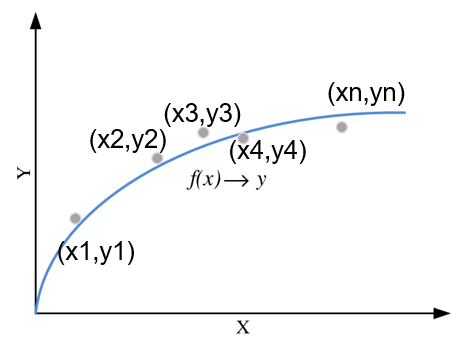
Here, X represents the independent variable and Y represents the dependent variable that changes according to X. The (X,Y) data pairs used for regression can be specified in the virtual data definition and applied to a value read from the device.
Example:
The following approach can be used to linearly convert a 4-20 mA analog signal to a 0-100 range.
If the device value is 4, the virtual data becomes 0; if the value is 20, it becomes 100.
When the read value is between 4 and 20, the virtual data is calculated between 0 and 100 according to the linear relationship between these two points.
This feature can be used to convert analog signals into engineering units, rescale measurement ranges and calculate values not directly provided by the device.
EOS SCADA virtual data also allows standard mathematical functions to be applied to collected SCADA data, enabling direct mathematical transformations on values read from devices.
For example, the following expressions can be used directly in a virtual data definition:
abs(MSTART@UNITE1.EUAS)
sin(MSTOP@UNITE1.EUAS)
sqrt(MHIZARTIR@UNITE1.EUAS)
Mathematical functions can be used to transform, filter, normalize or calculate other mathematical quantities from measurement values.
EOS SCADA virtual data can also perform bit-level operations on numerical values read from devices.
This is especially useful for devices where multiple status information items are stored as bits within a single numerical register. The numerical value can be separated into binary bits and each bit can be evaluated as an independent virtual data value.
Here, x represents the SCADA data read from the device. Individual bits can be specified and used separately within the virtual data expression.
Example:
If the read value of MSTART@UNITE1.EUAS is 120, it can be evaluated as individual binary bits.
Each bit can then be used as a separate virtual data value.
For example;
MSTART@UNITE1.EUAS{b1} returns the value of the relevant bit.
MSTART@UNITE1.EUAS{b12+b3} evaluates the values of b12 and b3 together.
In the example, since b12 = 1 and b3 = 0, the result is 1.
Bit operations are particularly useful for status registers, alarm registers, device diagnostics and protocols in which multiple digital states are carried in a single word or integer.
The ping function available in EOS SCADA virtual data can be used to check the accessibility of a device on the network.
Using this function, ping requests can be sent periodically to a specified IP address. This makes it possible to monitor through virtual data whether the device is connected to the network or responds to ICMP requests.
Usage:
ping(IP No;Scan Interval)
Example:ping(192.168.1.180;10)
This expression sends a ping request to 192.168.1.180 once every 10 virtual data scan cycles.
The ping function can be used to monitor communication infrastructure, verify remote device accessibility and display communication problems on SCADA screens.
Virtual data can be used not only for simple mathematical operations but also to generate meaningful operational information from real data. Therefore, the operational meaning represented by the resulting value should be clearly defined.
Data addresses used in virtual data expressions must be entered correctly, and function parameters must be provided in the proper order. Complex expressions depending on many data points should be tested under different input values.
For newly created or edited virtual data to become active in the SCADA runtime environment, click the Save button after editing.
EOS SCADA virtual data makes it possible to create new and meaningful values that are not read directly from physical devices but are obtained by processing existing SCADA data.
Built-in functions support data conversion, logical evaluation, mathematical calculation, regression, bit operations and network device accessibility checks.
Through conditional expressions and mathematical functions, raw device data can be transformed into status information, alarms, calculated measurements and performance indicators required by the operation.
This approach allows the SCADA system to go beyond simple data collection and become a stronger monitoring infrastructure that processes data and produces meaningful operational information.
Free Software Download Center
Software for industrial data
collection, monitoring and analysis.

Technical Support
Documentation, sample code and practical
technical information for EOS software.
You can contact us regarding EOS software, technical documentation, or industrial data communication.