
Free Software Download Center
Software for industrial data collection, monitoring, and analysis.
TYPICAL SCADA DESIGN STAGES
Successfully developing a SCADA project involves more than simply preparing screens. The project database, field devices, communication structure, process data, users, alarm system, and historical data archives must all be considered together.
The EOS SCADA Editor allows the different components of a SCADA project to be configured in a defined sequence and as an integrated structure. This enables the project development process to be carried out in a more systematic, controlled, and sustainable manner.
The following sections of this user guide are organized around this typical workflow that can be followed when developing a SCADA project.

Before starting development work on a typical SCADA project, it is necessary to determine which devices the system will collect data from, which data will be monitored, which users will access the system, which alarms will be generated, and how the data will be archived.
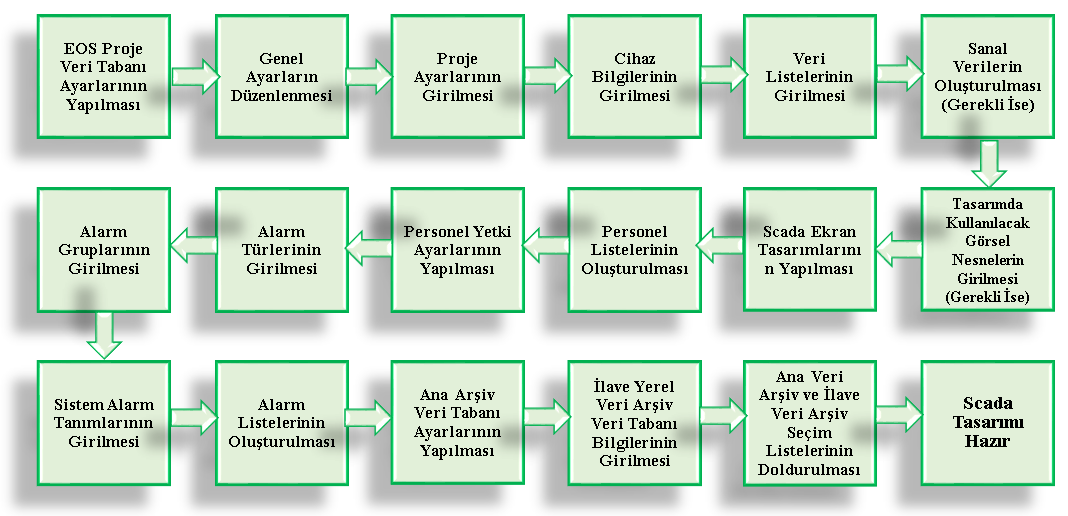
After these preparations, the project configuration is performed and the SCADA screens are created. In the final stage, user permissions, alarm mechanisms, data archives, and operational checks are completed, making the project ready for use.
Important: The sequence below represents a typical SCADA project development workflow. Depending on the size of the project, the devices used, and the requirements, the order of some steps may change, or some steps may not be required for a particular project.
To create the basic data structure of the SCADA project, the necessary settings related to the EOS Project Database should first be configured.
This step provides the basic data environment on which the other project configuration components will be built.
The User Can Use the Default Settings.
The general operating parameters and system behavior to be used in the project should be defined.
These settings include the basic configurations that determine the general operating characteristics of the SCADA application and the working environment presented to the user.
The User Can Use the Default Settings.
The project name, description, security settings, and other project-level information to be used within the project should be defined.
These settings form the basic configuration information that defines the project as a whole, independently of its other components.
The User Can Use the Default Settings. However, it is recommended to configure separate settings for each project.
Field devices, controllers, RTUs, or other data sources with which the SCADA system will communicate must be defined.
The communication method, address information, and other parameters related to the communication protocol used by the devices are configured at this stage.
Correct device definitions are one of the fundamental requirements for the SCADA system to access field data reliably.
The process data to be read from field devices or used by the SCADA system must be defined.
For each data item, the relevant address, data type, description, engineering unit, scaling, and other required parameters can be specified.
This stage is critical for establishing the data model between field communication and the SCADA application.
If the project requires data that is not directly read from a physical field device but is needed for calculations, logical operations, status evaluation, or screen design, virtual data can be created.
This step depends on the project requirements and is not required in every SCADA project.
Optional if the use of derived data is not required.
If custom graphical objects or user controls are required for use on SCADA screens, these objects should be prepared before starting screen design.
Prepared visual objects enable process equipment and system statuses to be presented to the user in a clearer and more understandable manner.
In projects where custom visual objects are not required, this stage can be completed using the available predefined objects directly.
Once the project's basic data structure and the visual objects to be used have been prepared, SCADA screen design can begin.
Process equipment, measurement values, status information, control elements, alarm indicators, and other user interface components are created on the screens.
The primary objective of screen design is to enable the operator to quickly and accurately perceive the process status and safely intervene when necessary.
Design Recommendation: Unnecessary visual clutter should be avoided on SCADA screens. Critical information should be easy to identify, and screens should be designed consistently and in a manner compatible with the operator's usage habits.
If only Event Recorder software is used, SCADA screen design is not required.
Personnel records should be created for operators, engineers, maintenance personnel, and other users who will use the SCADA system.
User access to the system and the operations they are permitted to perform can be managed based on this information.
The operations that each person defined in the system is permitted to perform must be determined.
User authorization enables an access level appropriate to each user's duties and responsibilities to be established.
Appropriate authorization is particularly important for operational security when performing operations such as control, changing settings, project management, and critical system functions.
The alarm types to be used in the SCADA system must be defined.
Alarm types are used to classify different conditions occurring in the system and present them to the operator in a meaningful manner.
REQUIRED if alarm monitoring will be performed; otherwise OPTIONAL.
The necessary alarm groups should be created so that alarms can be organized by plant, unit, system, or function.
Appropriate alarm grouping enables operators to more easily monitor important events among a large number of alarms, particularly in large SCADA projects.
REQUIRED if alarm monitoring will be performed; otherwise OPTIONAL.
System alarm definitions should be created to report the operating status of the SCADA system or system-related problems.
Communication problems, data quality issues, operating conditions of system components, and similar conditions can be evaluated within this scope.
System Alarms have not yet been integrated.
Alarm lists to be monitored in the project should be created using the defined alarm types, alarm groups, and system alarm information.
Alarm lists should be organized so that operators can identify abnormal conditions in the process in a timely manner and perform the necessary intervention.
REQUIRED if alarm monitoring will be performed; otherwise OPTIONAL.
The necessary connection and configuration settings for the main archive database where historical process data will be stored should be configured.
Proper planning of the data archiving structure is important so that historical process information can later be used for trending, reporting, and analysis.
The User Can Use the Default Settings.
If additional local data archives are to be used according to the project requirements, the database information for these archives must be defined.
This structure can be used particularly in projects where different plant sections, local systems, or special data groups need to be stored in separate archives.
The relevant selection lists should be created to determine which data will be stored in the main data archive and, where applicable, in additional local data archives.
At this stage, the process data to be stored historically is determined, preventing unnecessary data storage and ensuring that the archive structure meets the project requirements.
REQUIRED if data archiving will be performed; otherwise OPTIONAL.
Once the project database, device, data, screen, user, permission, alarm, and archive configurations have been completed, an overall review of the SCADA design should be performed.
At this stage, it should be verified that the screens operate correctly, data is read from the correct sources, alarm conditions are generated as expected, user permissions are correctly applied, and historical data is properly archived.
Once the necessary checks have been completed, the project can be prepared for the operating environment and the commissioning process.
After the SCADA design has been completed, it is recommended that the system be tested before transitioning to actual operating conditions.
Communication connections, data values, data quality, screens, control operations, alarm generation, user permissions, and data archiving functions should be checked.
After identified errors have been corrected and the system has been verified to operate as expected, the SCADA project can be commissioned.
Recommendation: During testing and commissioning, checking only the appearance of the screens is not sufficient. It must also be verified that the SCADA system communicates with field devices, processes real data correctly, and presents accurate information to the operator.
The development of a typical SCADA project using the EOS SCADA Editor can generally be carried out according to the following workflow:
The primary objective in developing a SCADA project is not merely to create a functioning user interface, but to establish a reliable operating environment that addresses field data, communication, operator interaction, alarm management, and historical data archiving as an integrated whole.
Therefore, during the project development process, it is appropriate to first establish the data and device structure, followed by the user interface, and then configure the user, alarm, and archive functions.
The following sections of the EOS SCADA Editor User Guide have also been prepared according to this approach and explain each of the above stages separately.
Conclusion: A well-planned SCADA project should have a correct data model, reliable communication, clear screens, controlled user access, proper alarm management, and reliable historical data archiving.
Free Software Download Center
Software for industrial data collection, monitoring, and analysis.

Technical Support
Software documentation, sample code, and practical technical information.
You can contact us regarding EOS software, technical documentation, or industrial data communication.