
Free Software Download Center
Software for industrial data collection, monitoring, and analysis.
LANGUAGE • MULTILINGUAL SUPPORT • DICTIONARY FILES • PROGRAM LANGUAGE
In EOS SCADA software, the program language can be changed by the user through the LANGUAGE menu.
The user can select the preferred language from the options available in the LANGUAGE menu and use the program's user interface in a different language.

To change the program language, the application's LANGUAGE menu must be used.
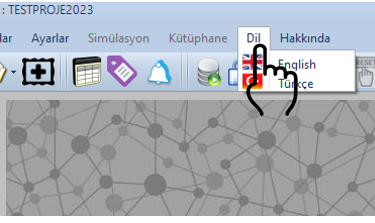
The user can change the program language by selecting the desired language from the language options available under the LANGUAGE menu.
Language change procedure:
Thanks to the multilingual support infrastructure of EOS SCADA software, users can add different language options.
For this purpose, it is sufficient to translate the dictionary files located under the project folder into the relevant language.
No modification to the software itself is required to add a new language option.
Information: Users can create different language options by translating the dictionary files located in the project folder. No source-code modification is required in EOS SCADA software for this process.
Dictionary files located in the project folder are used to translate the expressions displayed in the program interface into different languages.
Users can perform the necessary translations based on the existing dictionary files and thereby create a different language option suitable for their operating environment.
Basic approach:
Although EOS SCADA software has a multilingual support infrastructure, language libraries for all software components may not yet be complete.
CAUTION: Although EOS SCADA software provides a multilingual support infrastructure, language libraries for all software components may not yet be complete. If you have a need or encounter a problem related to language support, please contact the EOS project group.
| Feature | Description |
|---|---|
| Language Selection | The program language can be changed through the LANGUAGE menu. |
| Multilingual Support | EOS SCADA software has a multilingual support infrastructure. |
| Dictionary Files | Different language options can be created by translating the dictionary files in the project folder. |
| Software Modification | No modification to the software is required to add new language options. |
| Language Libraries | Language libraries for all software components may not yet be complete. |
The Language Change feature is one of the fundamental features of the multilingual support provided by EOS SCADA software, enabling the software to be used according to different user requirements.
Users can change the program language by selecting their preferred language through the LANGUAGE menu.
In addition, different language options can be created by translating the dictionary files located in the project folder. No modification to the software itself is required for this process.
However, it should be taken into consideration that language libraries for all EOS SCADA software components may not yet be complete. For requirements related to language support, it is recommended to contact the EOS project group.
Free Software Download Center
Software for industrial data collection, monitoring, and analysis.

Technical Support
Software documentation, sample code, and practical technical information.
You can contact us regarding EOS software, technical documentation, or industrial data communication.