
Free Software Download Center
Software for industrial data collection, monitoring, and analysis.
USER CONTROLS • QUICK ACCESS LIBRARY • TEMPLATES • DRAG AND DROP
User controls used in EOS SCADA Editor can be added to screen designs quickly and systematically. For this purpose, the User Controls Quick Access Library can be used.
The Quick Access Library consists of group tabs that can also be organized by the user. Users can group their own user control templates according to their requirements and reuse them easily and quickly whenever needed.

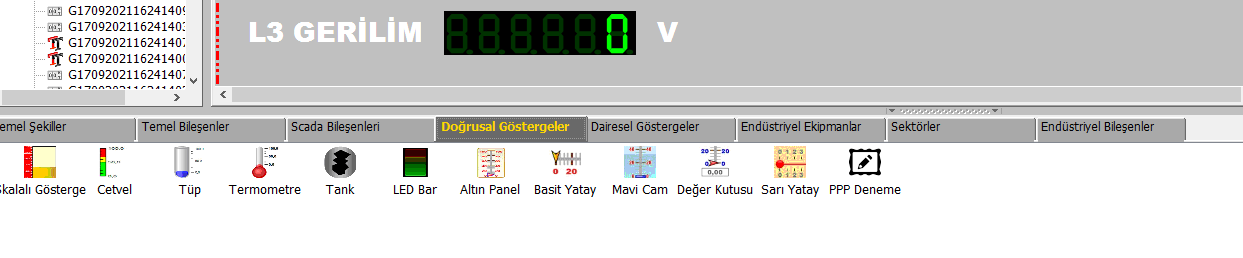
The User Controls Quick Access Library provides quick access to previously prepared user control templates. The group tabs within the library allow different control types or user-created templates to be classified in an organized manner.
Information: Users can collect their own templates under appropriate group tabs, allowing them to access the controls they need more quickly during screen design.
To add any user control template from the library to the SCADA screen design, simply move the pointer over the relevant template, click and hold it with the mouse, and drag it to the design screen.
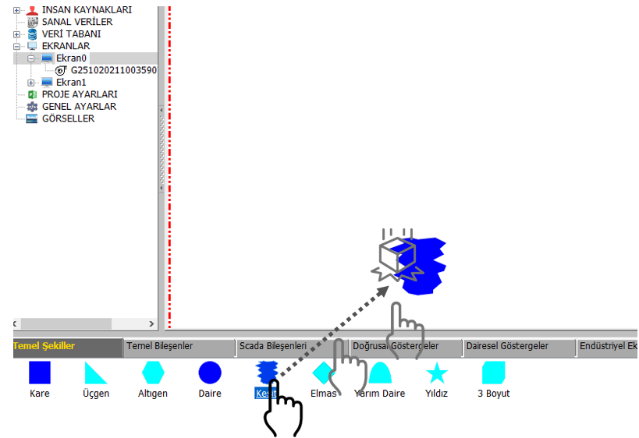
Basic usage: Dragging and dropping a template from the library onto the screen is sufficient to add the corresponding user control to the design screen.
The ability to organize the Quick Access Library by the user makes the design process easier, especially in large SCADA projects containing a large number of user controls. Users can organize their templates into different group tabs according to their purpose or area of use.
This makes it possible to add previously prepared and reusable user controls directly from the library to the screen design without having to recreate them.
The User Controls Quick Access Library is a practical tool that enables user controls used in SCADA screen design to be reused and added to screens quickly.
Grouping user-created templates and adding them to the screen design using the drag-and-drop method helps engineering work proceed more quickly and systematically, especially in large-scale projects.
Free Software Download Center
Software for industrial data collection, monitoring, and analysis.

Technical Support
Software documentation, sample code, and practical technical information.
You can contact us regarding EOS software, technical documentation, or industrial data communication.