
Free Software Download Center
Software for industrial data collection, monitoring, and analysis.
SCRIPT EDITOR • PYTHON • VISUALBASIC • C# • EVENT • DERIVED DATA • FORCE_MACHINE
EOS SCADA provides scripting capabilities for special calculation, analysis, and automation requirements beyond standard SCADA functions. Through TOOLS → SCRIPT EDITOR in the main menu, script files can be created and compiled using Python, VisualBasic, and CSharp (C#).
Prepared scripts are not limited to standalone code. They can be connected to user-control events, executed at defined intervals to generate virtual (derived) data, or executed through the PR_FORCE_MACHINE user control according to defined conditions and schedules.

The script development process is carried out through the Script Editor included in EOS SCADA Editor. The user can select the required programming language, create the script file, edit the code, and compile it. This makes it possible to develop project-specific calculation and control logic programmatically in addition to standard configuration.
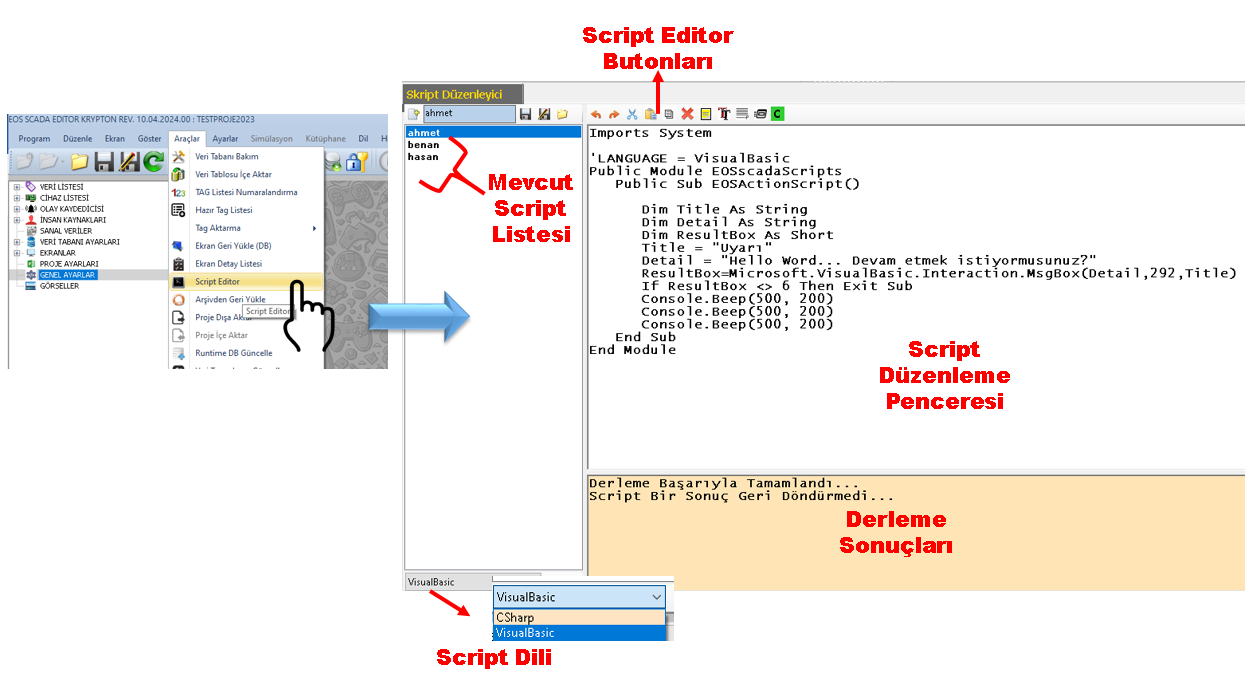
Supported scripting languages:
The ability of scripts to read data from SCADA TAGs and write results back to TAGs makes the scripting mechanism more than a programming tool; it becomes part of the SCADA real-time data processing and automation infrastructure.
A prepared script can basically be used in three different ways within SCADA. These methods address different requirements, from event-based execution to periodic data generation and condition- or time-based automation.
By adding an event to a user control, the Runscript — "Run Script" function can be selected. This allows a user-prepared script to be executed as a function after an action occurs on the relevant control.
Example use:
When a button is pressed, specific TAGs can be read, their values can be analyzed inside a script, and the calculation result can be written to another TAG. Thus, a custom calculation or automation operation can be initiated through operator interaction.
Scripts can be executed at defined intervals and their results can be assigned to virtual data. This allows new values calculated from real SCADA data, rather than directly received from a field device, to be used within the system like TAGs.
For example, multiple measurement TAGs can be evaluated in a script to create an efficiency value, performance indicator, calculated limit, status score, or another derived value. The resulting virtual data can then be displayed on screens, used in trends, and incorporated into alarm logic where appropriate.
The PR_FORCE_MACHINE user control can be used to execute scripts when specific conditions occur or according to defined operating intervals. Its configuration can include the script name, input and output parameters, and execution interval.
| Field | Description |
|---|---|
| _ScriptName | Name of the script to be executed. |
| _InputParams | Input parameters to be passed to the script. |
| _OutputParams | Output parameters to be used as the result of the script. |
| _ForceInterval | Defines the interval or schedule at which the script will be executed. |
| _OperationHour / _OperationMinute | Hour and minute information used when execution at a specific time is selected. |
| _ForceType | Defines the operation type; the script execution option is Runscript. |
The FMForceType selection defined in PR_FORCE_MACHINE determines the operation performed by the control. For script usage, the Runscript option is particularly important.
The FMOperInterval selection in PR_FORCE_MACHINE determines how frequently the script will be executed. This allows the same script to operate according to the required real-time or periodic execution model.
| Selection | Execution Interval |
|---|---|
| Everyminute | Every Minute |
| Every5minutes | Every 5 Minutes |
| Every10minutes | Every 10 Minutes |
| Every15minutes | Every 15 Minutes |
| Every20minutes | Every 20 Minutes |
| Everyhalfhour | Every Half Hour |
| Everyscaninterval | Every Scan Cycle |
| Everyhour | Every Hour |
| Every6hours | Every 6 Hours |
| Every12hours | Every 12 Hours |
| Everyday | Every Day |
| Atspecifictime | At a Specific Time |
One of the most important uses of scripts is the ability to transfer real SCADA data into a script as input for calculation and analysis. The script can use the supplied TAG values to produce a result and transfer that result back to SCADA TAGs as output.
Real Data → Script → Derived Data
One or more real measurement TAGs form the input to the script. The script evaluates these values using mathematical operations, conditions, comparisons, or custom algorithms. The resulting value can then be transferred to a new virtual/derived TAG or an appropriate output TAG.
When required, a FORCE (write) operation can also be performed on a controller based on the script result. Thus, scripts can be used not only for observation and calculation, but also to initiate a controlled process operation within the defined control logic.
One of the strongest results of scripting from a SCADA perspective is the creation of derived data that is not directly measured in the system but can be calculated from existing real data. This creates a data-processing layer that produces new information rather than merely monitoring raw values received from field devices.
Examples of derived-data scenarios:
Derived TAGs can subsequently be displayed on screens, used in trends and reporting, or become inputs to alarm generation. Combining script-based calculations with TAG, event, and alarm mechanisms allows complex data-processing and automation requirements to be structured.
Standard SCADA configurations can satisfy many monitoring, alarm, and control requirements. However, some applications require multiple TAGs to be evaluated together, a custom calculation to be performed, a specific condition to be monitored, or a different operation to be performed according to a calculation result. The scripting mechanism adds a programmable processing layer to SCADA for these situations.
Important: In applications where a script can perform a FORCE/write operation on a controller, the write operation should be designed only within explicitly defined process conditions, authorization, and safety rules. Especially for periodically or automatically executed scripts, input values, limits, error conditions, and the effects of outputs should be carefully evaluated.
In conclusion, the EOS SCADA Script mechanism is a flexible application layer that enables real field data to be read, processed programmatically, new derived data to be created, this data to be displayed and transferred into alarm logic, as well as control operations to be automated where required by the defined scenario.
Free Software Download Center
Software for industrial data collection, monitoring, and analysis.

Technical Support
Software documentation, sample code, and practical technical information.
You can contact us regarding EOS software, technical documentation, or industrial data communication.