
Free Software Download Center
Software for industrial data
collection, monitoring, and analysis.
SYSTEM DATABASE • FIREBIRD • DATABASE CONNECTION • RUNTIMEDB
The first step in SCADA design with EOS SCADA Editor is to create a new project and configure the general project settings according to project and user requirements.
EOS SCADA stores all information belonging to the created project in a Firebird Database called the System Database.
System Database connection information can be configured from DATABASE → SYSTEM DATABASE in the SCADA tree menu.

To configure the System Database settings, click the DATABASE menu item in the SCADA tree menu.
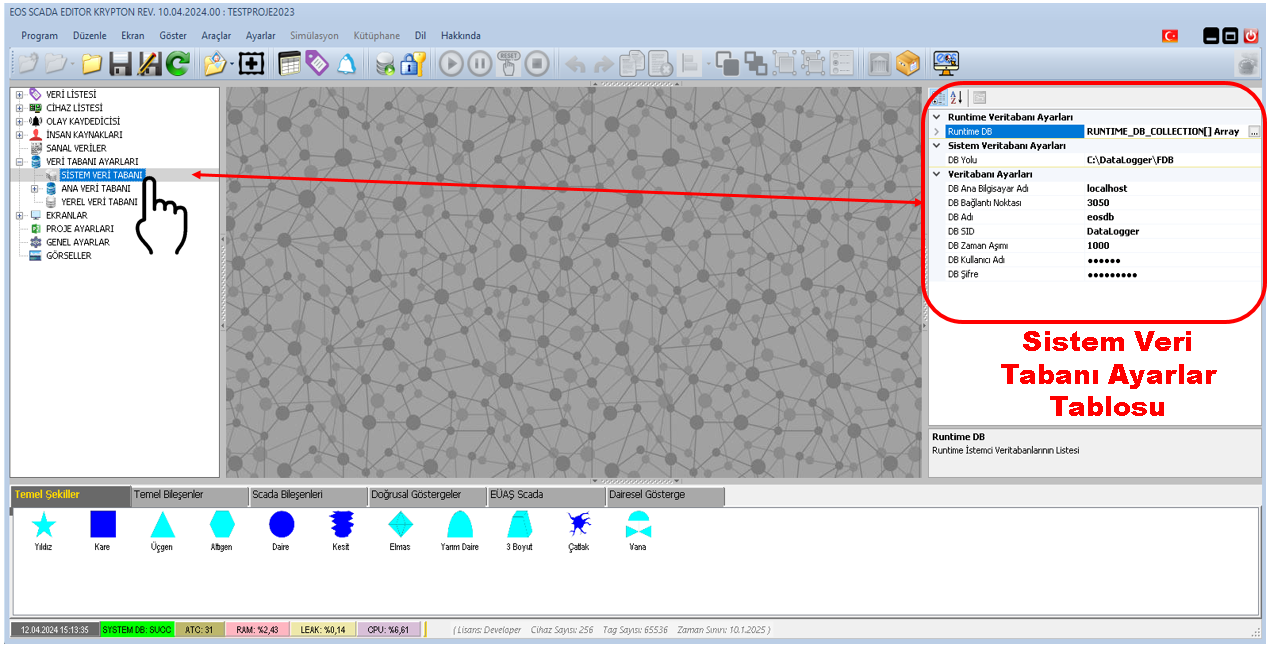
After selecting the SYSTEM DATABASE node in the expanded structure, the relevant settings are displayed in the settings table on the right.
Navigation path:
DATABASE → SYSTEM DATABASE → SETTINGS TABLE
The System Database section contains various properties used to connect to the Firebird database. These properties include the connection host, port, database path, database name, user credentials, and the list of Runtime computers.
| Property Name | Description | Default Value |
|---|---|---|
| DBHostName | System Database Host Name | localhost |
| DBPort | System Database Connection Port | 3050 |
| DBPath | System Database Path | C:\DataLogger\FDB |
| DBName | System Database Name | eosdb |
| DBSID | System Database Session ID (SID) | DataLogger |
| DBTimeOut | System Database Timeout Period | 1000 |
| DBUserName | System Database User Name | sysdba |
| DBPassword | System Database Password | masterkey |
| RuntimeDB | System Database list of Runtime computers | [LIST] |
DBHostName specifies the name of the host computer where the System Database is located, while DBPort specifies the connection port used to connect to the System Database.
In the default configuration, the System Database is located on the same computer, so DBHostName is set to localhost and the connection port is 3050.
Default values:
DBHostName = localhost
DBPort = 3050
DBPath specifies the path where the System Database is located.
DBName specifies the name of the System Database to be used.
Default configuration:
DBPath = C:\DataLogger\FDB
DBName = eosdb
The DBSID, DBUserName, and DBPassword properties are used for the System Database connection.
| Property | Default Value | Description |
|---|---|---|
| DBSID | DataLogger | System Database Session ID (SID). |
| DBUserName | sysdba | System Database user name. |
| DBPassword | masterkey | System Database password. |
DBTimeOut specifies the timeout period for the System Database connection.
The default value of this property is 1000.
Default value:
DBTimeOut = 1000
The RuntimeDB property allows the System Database addresses of computers on the same network running SCADA Runtime to be defined as a list.
This structure makes it possible to easily send changes made to the System Database containing project information to other computers running Runtime software over the network.
RuntimeDB: The list in which the System Database addresses of Runtime computers are defined.
Default value: [LIST]
Configuring the System Database settings of projects using the default values provides convenience for the user.
However, if the user has specific requirements for the System Database, the relevant settings can be changed.
NOTE: Configuring projects with the default values provides convenience. At the same time, users can apply their own specific System Database settings when required.
| Property | Default |
|---|---|
| DBHostName | localhost |
| DBPort | 3050 |
| DBPath | C:\DataLogger\FDB |
| DBName | eosdb |
| DBSID | DataLogger |
| DBTimeOut | 1000 |
| DBUserName | sysdba |
| DBPassword | masterkey |
| RuntimeDB | [LIST] |
The System Database is the fundamental database structure in which EOS SCADA stores information belonging to the created project.
Firebird database connection and access settings can be configured through DATABASE → SYSTEM DATABASE in EOS SCADA Editor.
Default settings provide convenience for most standard project configurations, while the relevant properties can be changed according to different system architectures and user requirements.
In particular, the RuntimeDB property allows the System Database addresses of Runtime computers on the same network to be defined as a list. This can simplify sending changes made to project information to Runtime computers over the network.
Free Software Download Center
Software for industrial data
collection, monitoring, and analysis.

Technical Support
Software documentation, sample code, and
practical technical information.
You can contact us regarding EOS software, technical documentation, or industrial data communication.