
Free Software Download Center
Software for industrial data collection, monitoring, and analysis.
SINGLEDATA • 7SEGMENTDISPLAY • 14SEGMENTDISPLAY • 16SEGMENTDISPLAY
In EOS LIVE DASH, some displays are not intended to generate charts or examine long-term trends, but rather to provide the operator with an immediate and directly readable value. This approach is particularly important on SCADA screens where information such as generation power, meter readings, KPIs, alarm counts, and equipment measurements must be perceived quickly.
SingleData presents a single scalar value in the simplest possible form, while 7SegmentDisplay, 14SegmentDisplay, and 16SegmentDisplay use the classic digital panel aesthetic to make numerical values more prominent, clearly defined, and suitable for a panel-style display.

The SingleData display type is one of the most basic yet critical indicator types used in SCADA and operational dashboards for presenting a single (scalar) value in the simplest and clearest possible way. The purpose is not to draw a chart, but to answer the question “What is the current value?” with the shortest possible perception time.
A single numerical value is displayed in a large font, with clean typography and, when required, together with its unit. There is no chart, trend, or complex visual layer; the focus is on the principle of pure information + fast perception.
SingleData is particularly suitable for instantaneous measurements, meter readings, and calculated KPIs. When the value itself is sufficient for decision-making, presenting it directly without unnecessary graphical layers helps keep the operator screen simple.
| Application Area | Example SingleData Values |
|---|---|
| Power Generation Facilities | Net generation (MW), plant load ratio (%), daily / monthly energy (MWh) |
| Switchyards & Distribution | Energized line count, busbar voltage, number of breakers open / closed |
| Thermal & Gas Power Plants | Boiler pressure, fuel consumption rate, NOx and CO emission values |
7SegmentDisplay is a display type in which numerical values are presented using the classic digital counter and panel aesthetic. It is particularly useful in SCADA and industrial monitoring screens where instantaneous measurements and meter readings need to be perceived in a sharp, fast, and direct manner.
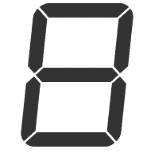 7SegmentDisplay simulates the principle of forming digits using
7 individual LED segments. Rather than creating an analog-gauge
impression, its primary objective is direct numerical reading.
7SegmentDisplay simulates the principle of forming digits using
7 individual LED segments. Rather than creating an analog-gauge
impression, its primary objective is direct numerical reading.
14SegmentDisplay is an enhanced approach to the 7-segment display. In addition to numerical values, it allows digits 0–9, letters A–Z, and a limited set of symbols to be displayed more clearly. This makes it possible to present a short status or label within the same digital visual language when required.
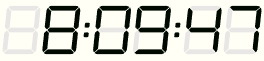 The main advantage of the 14-segment approach is that, compared with a 7-segment
numerical display, it provides better rendering of letters and short text.
The main advantage of the 14-segment approach is that, compared with a 7-segment
numerical display, it provides better rendering of letters and short text.
16SegmentDisplay is a more advanced version of the classic digital-panel approach represented by 7- and 14-segment displays. Because it can display letters, numbers, and symbols more flexibly, it is better suited to presenting status + message + value information within the same visual language in SCADA and industrial dashboards.
 The 16-segment approach can be designed to display not only numerical values,
but also short status messages and symbols in a more readable form.
The 16-segment approach can be designed to display not only numerical values,
but also short status messages and symbols in a more readable form.
The common purpose of these four display types is to allow the operator to read a value quickly. The difference lies in whether the information is presented as only a numerical value, using a classic digital segment aesthetic, or in a form that also includes short text and status information.
| Display | Primary Purpose | Best Use | Key Feature |
|---|---|---|---|
| SingleData | Display a single value in the simplest possible form | Instantaneous measurement, KPI, alarm count | Minimal and fast perception |
| 7SegmentDisplay | Present a numerical value in the form of a classic digital counter | Meter and precise numerical readings | Sharp 7-segment aesthetic |
| 14SegmentDisplay | Display letters and short text in addition to numbers | Value + short label / status | Improved character rendering |
| 16SegmentDisplay | Present value + status + message information more flexibly | Operational digital panel | Most flexible classic segment approach |
Basic selection principle for operator screens: SingleData can be considered when the value itself is sufficient; 7SegmentDisplay for numerical measurements where a digital-counter appearance is preferred; 14SegmentDisplay where short text or status information is required; and 16SegmentDisplay where a more flexible status + message + value presentation is needed.
The actual value displayed by these indicators on a SCADA screen comes not only from visual design, but from transferring up-to-date process information to the display through Live Data. When the value changes, automatically reflecting the new value on the screen allows the operator to monitor the current process condition without manually refreshing the page.
Example: If instantaneous generation power is displayed as 142 MW on SingleData and the current value increases to 148 MW, the display can automatically reflect the new value. This keeps the focus on the current operating value without creating a chart.
SingleData and segment-based displays can be considered not so much alternatives to large charts as fast information layers that complement them. Especially on main operator screens, displaying a few critical values in a large and clear format makes it easier to understand the current process condition before moving to detailed trend or analysis screens.
Note: The display examples presented here are intended to explain the usage logic of the indicator types. Whether a particular display type is actually available in the relevant EOS LIVE DASH version depends on the supported features, data binding, and visualization capabilities of that version. If a display approach is not currently supported, it may be developed in the future.
Free Software Download Center
Software for industrial data collection, monitoring, and analysis.

Technical Support
Software documentation, sample code, and practical technical information.
You can contact us regarding EOS software, technical documentation, or industrial data communication.