
Free Software Download Center
Software for industrial data collection, monitoring, and analysis.
HTTP SERVER • WEB GATEWAY • JSON • XML • HTML • PNG
The embedded HTTP Server within EOS SCADA Runtime allows information from the SCADA system to be provided to end users over the network in a read-only manner. This structure enables a direct Web Gateway to be established between SCADA Runtime and standard web browsers or HTTP clients.
The server listens for HTTP requests and can return the requested data in JSON, XML, or HTML Table format. It can also generate PNG charts for selected SCADA data over a specified time range.
To use the EOS SCADA Runtime HTTP Server, the relevant feature must first be enabled in the project settings. The server is activated by setting the HTTPServerActive option to true in the project configuration.
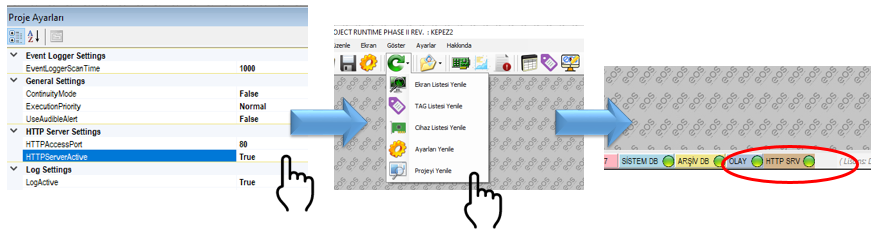
Active status indicator: When the HTTP Server is successfully enabled, HTTP SRV is displayed in the Runtime Status Bar, and a green LED appears next to it. This indicator provides a quick way to verify that the embedded HTTP Server is running.
After the HTTP Server is enabled, the EOS SCADA Web Gateway can be accessed from any web browser using the IP address and port defined in the project settings.
General access format:
http://IP_ADDRESS:PORT/command?parameterExample:
http://10.240.162.74:80/command?parameter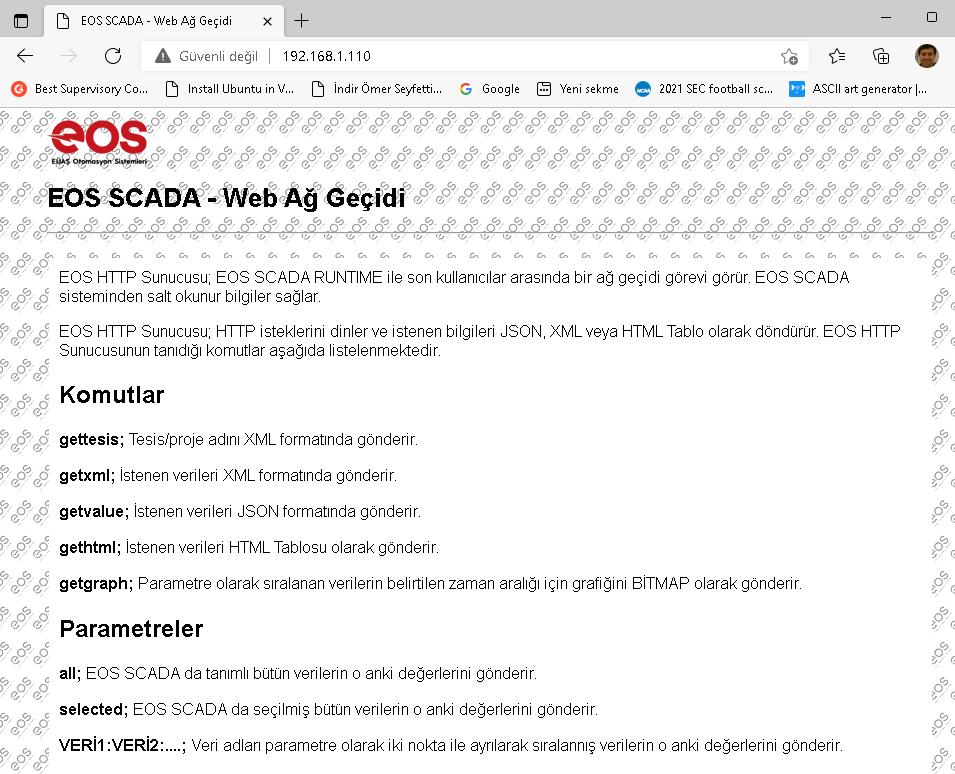
The IP_ADDRESS and PORT values correspond to the HTTP Server configuration used in the EOS SCADA Runtime project. The command specifies the operation requested from the server, while the parameter specifies the scope of the data to be returned.
Note: The information provided by the EOS HTTP Server is read-only. This interface is intended for displaying SCADA data and transferring it to external systems; it is not used to modify process values within Runtime.
The EOS HTTP Server acts as a gateway between EOS SCADA Runtime and end users. By providing the SCADA data available within Runtime through the HTTP protocol, it enables access through standard web browsers and HTTP-enabled applications without requiring a separate SCADA client to be installed.
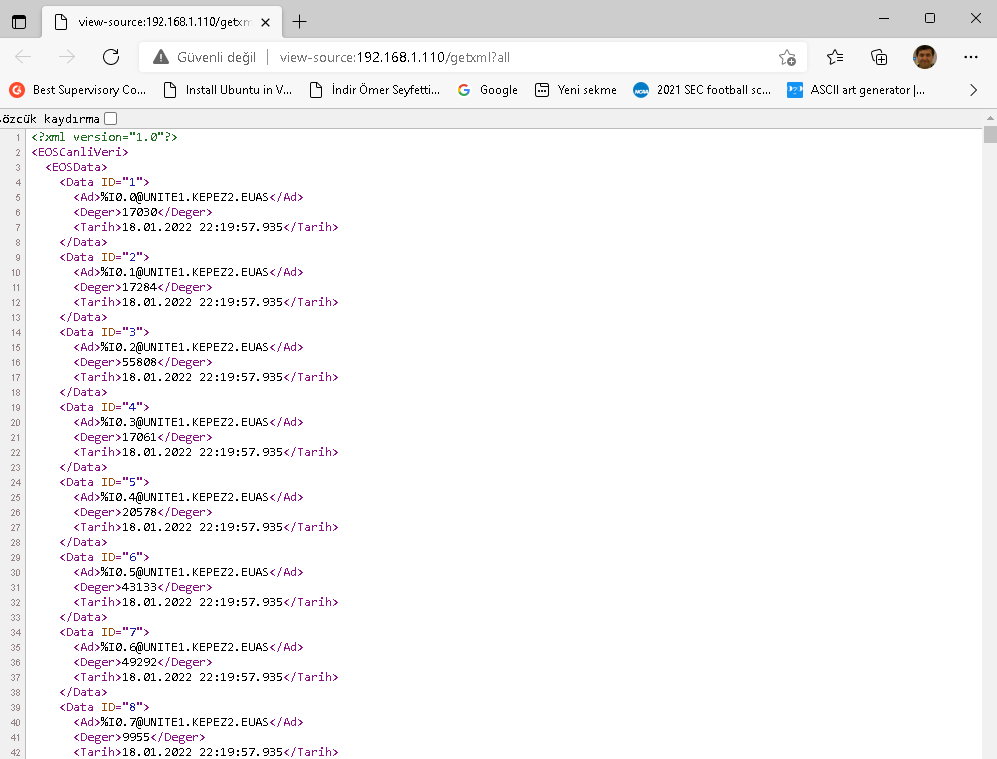
Incoming HTTP requests are evaluated according to their commands and parameters. The requested information is converted into the appropriate output format and sent to the client. Thus, the same SCADA data can be provided in JSON/XML format suitable for machine processing, HTML format suitable for user viewing, or PNG charts for visual analysis, depending on the requirement.
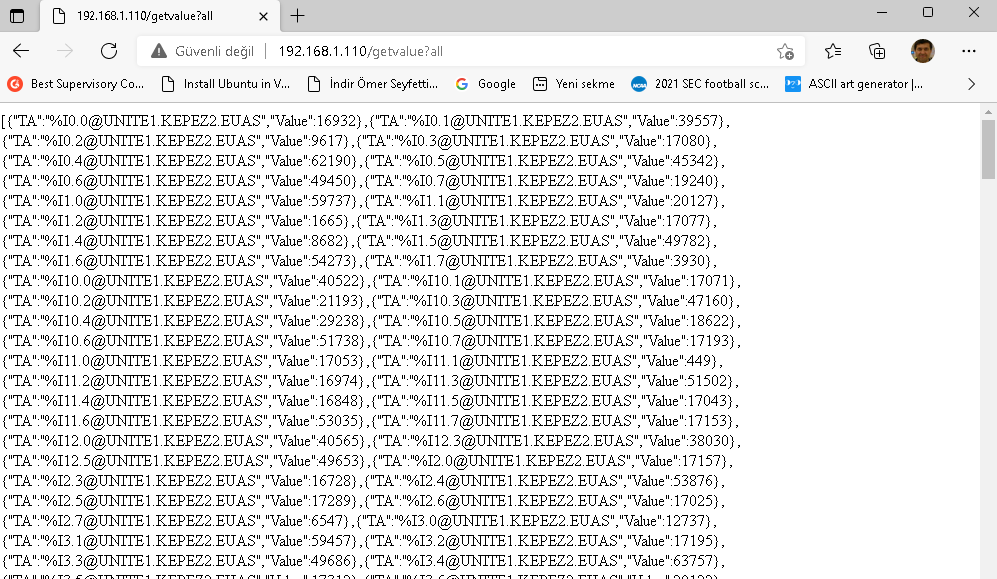
| Output Format | Purpose |
|---|---|
| XML | Retrieving SCADA information as structured XML data. |
| JSON | Providing a data structure that can be easily processed by web applications and software. |
| HTML Table | Displaying data directly in a web browser in tabular form. |
| PNG | Presenting specified SCADA data as historical charts. |
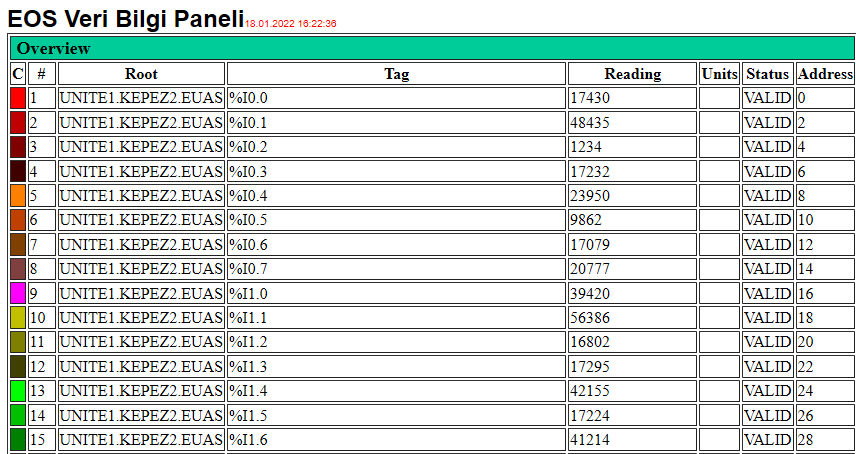
The EOS HTTP Server supports various commands for different data access requirements. The command specifies the type of operation in the URL, while the parameter following the command specifies which data and what scope of data should be returned.
| Command | Description | Output |
|---|---|---|
| gettesis | Returns the plant/project name. | XML |
| getxml | Returns the requested SCADA data in XML format. | XML |
| getvalue | Returns the requested SCADA data in JSON format. | JSON |
| gethtml | Returns the requested SCADA data as an HTML Table. | HTML |
| getgraph | Generates a chart of the specified data for the specified time range. | PNG |
gethtml automatic refresh: The HTML Table generated by the gethtml command is automatically refreshed every 15 seconds. This feature makes it easier to monitor live SCADA values through a web browser.
The parameters used with the commands specify which SCADA data should be returned by the HTTP Server. The basic supported parameter formats are as follows.
| Parameter | Description |
|---|---|
| all | Returns the current values of all data defined in EOS SCADA. |
| selected | Returns the current values of all data selected in EOS SCADA. |
| DATA1:DATA2:... | Allows the requested data names to be listed separated by colons (:). Only the current values of the specified data are returned. |
Requesting specific data: When multiple data items are to be queried, their names can be separated by colons and sent within the same parameter.
DATA1:DATA2:DATA3The EOS SCADA Runtime HTTP Server can also provide historical values of SCADA parameters as charts. The getgraph command is used for this purpose. The number of data items, data name, time range, chart dimensions, and resolution are specified as parameters in the chart request.
getgraph parameter structure:
number of data items&data name (or names)&time range (minutes)&chart width (pixels)&chart height (pixels)&chart dpi value| Order | Parameter | Description |
|---|---|---|
| 1 | Number of data items | Specifies the number of data items to be displayed in the chart. |
| 2 | Data name / names | Specifies the names of the SCADA data to be included in the chart. Multiple data items are separated by &. |
| 3 | Time range | Specifies the period covered by the chart in minutes. |
| 4 | Chart width | Specifies the width of the PNG chart to be generated, in pixels. |
| 5 | Chart height | Specifies the height of the PNG chart to be generated, in pixels. |
| 6 | DPI | Specifies the chart resolution as the number of pixels per unit length. |
The following request retrieves the current values of all data defined in EOS SCADA in XML format.
http://10.240.162.74:80/getxml?allThe following request retrieves the current values of the data selected in EOS SCADA in JSON format.
http://10.240.162.74:80/getvalue?selectedIn this example, two data names are specified and separated by a colon. The server returns the requested values in HTML Table format.
http://10.240.162.74:80/gethtml?%I0.0@UNITE1.KEPEZ2.EUAS:%I0.1@UNITE1.KEPEZ2.EUASIn the following example, the last 10 minutes of data are requested for one data item, and the chart is generated at a resolution of 300 DPI with dimensions of 640 × 480 pixels.
http://10.240.162.74:80/getgraph?1&%I0.0@UNITE1.KEPEZ2.EUAS&10&640&480&300Interpreting the examples: The part after / in the URL specifies the command, while the part after ? specifies the parameters associated with the command. The & character is used specifically to separate parameters in the getgraph command.
The EOS HTTP Server can be used to provide SCADA data to different users and applications in a controlled manner. It provides a practical access layer, particularly for scenarios such as quickly viewing data from standard web browsers, supplying data to web-based monitoring applications, and presenting historical data as charts.
| Requirement | Recommended Command |
|---|---|
| Retrieving all SCADA values in a structured format | getxml?all |
| Processing selected values in software applications | getvalue?selected |
| Monitoring specific values as a table in a web browser | gethtml |
| Visually reviewing historical values | getgraph |
The EOS SCADA Runtime HTTP Server is an embedded Web Gateway that makes data within SCADA Runtime available to external systems through the HTTP protocol. Activated by enabling the HTTPServerActive option, this architecture provides data access in XML, JSON, and HTML formats, while chart access is provided in PNG format.
Through its command- and parameter-based structure, users can query all data, selected data, or specific data names. This approach provides a simple and functional access mechanism for integrating the existing EOS SCADA Runtime data infrastructure with different web applications and monitoring solutions.
Free Software Download Center
Software for industrial data collection, monitoring, and analysis.

Technical Support
Software documentation, sample code, and practical technical information.
You can contact us regarding EOS software, technical documentation, or industrial data communication.