
Free Software Download Center
Software for industrial data collection, monitoring, and analysis.
MANUAL LOGOUT • USB KEY • AUTOMATIC LOGOUT • USER AUTHORIZATION
An authorized user who has completed SCADA operations in EOS SCADA Runtime can safely log out of the system. The manual logout operation is performed through the user name displayed in the upper-right section of the Runtime main window after the user has logged in.
EOS SCADA Runtime also allows users to log in using a USB key for authentication. With this method, removing the authorized USB flash drive from the computer automatically initiates the logout process for the corresponding user.
A user logged into EOS SCADA Runtime can manually log out of the system after completing the required operations. The logout operation is performed through the user name displayed in the upper-right section of the Runtime program window after the user has logged into the system.
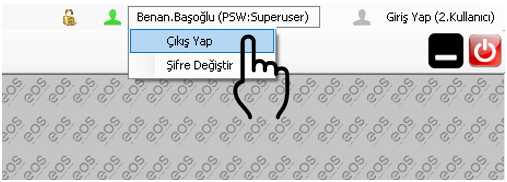
To log out manually:
When the logout operation is completed, the user's session in EOS SCADA Runtime is terminated. Therefore, a new login by an authorized user is required to perform SCADA operations that require user authorization.
If a user has logged into EOS SCADA Runtime using an authorized USB flash drive, the user session can be terminated by removing the USB key without manually selecting the LOG OUT option.
How the USB key works:
This method is particularly useful in shift-based operations because it simplifies user changes. After completing their work, the user only needs to remove the authorized USB flash drive from the computer to terminate the user session.
Important: For a user who has logged in using a USB key, continued user authorization depends on the USB flash drive remaining connected to the system. When the flash drive is removed, the corresponding user is automatically logged out.
In EOS SCADA Runtime, user logout can be performed manually or automatically depending on the method used to log into the system.
| Login Method | Logout Method | Operation |
|---|---|---|
| Username and Password | Manual Logout | Click the user name in the upper-right section and select LOG OUT from the menu that opens. |
| USB Key | Automatic Logout | When the authorized USB flash drive is removed from the computer, the corresponding user is automatically logged out. |
Logging out of the system terminates the user's authorization session. After this, an authorized user must log into the system again before SCADA operation and management options available according to the user's authorization level can be used.
Particularly in shift-based operations, properly completing the logout process when changing users is important for clearly and controllably managing which user's authorization is active in Runtime.
Free Software Download Center
Software for industrial data collection, monitoring, and analysis.

Technical Support
Software documentation, sample code, and practical technical information.
You can contact us regarding EOS software, technical documentation, or industrial data communication.