
Free Software Download Center
Software for industrial data collection, monitoring, and analysis.
EOS SCADA • ALARM_INDICATOR • ALARM INDICATOR • USER CONTROL
ALARM INDICATOR is a user control designed to visually notify operators of the number of active alarms on EOS SCADA screens. When the number of active alarms changes, the control flashes to attract the operator's attention.
When the Use Alarm Indicator option is enabled, SCADA links the relevant alarm to the ALARM_INDICATOR user control. When the operator clicks the control, flashing stops; when the mouse pointer hovers over the control, a list of active alarms can be displayed.

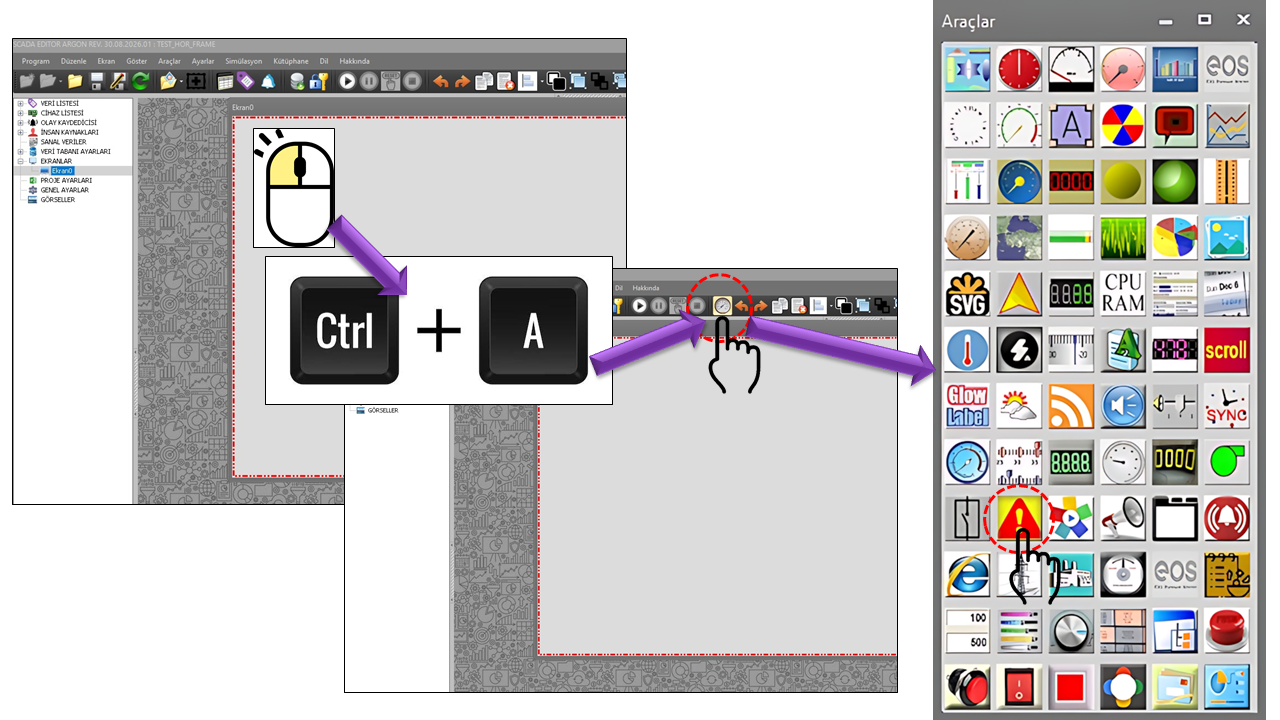
ALARM INDICATOR is a user control used in EOS SCADA to quickly notify the operator of active alarm conditions. Its primary purpose is to communicate changes in the number of alarms through visual behavior, without requiring the operator to constantly read text.
When the number of active alarms changes, ALARM_INDICATOR starts blinking. The blinking stops when the operator clicks the user control. This provides a visual indication that the operator has noticed the new or changed alarm condition.
When the operator hovers the mouse pointer over the user control, a list of active alarms can be displayed. This behavior makes the alarm indicator more than just a visual warning element; it becomes a SCADA interface component that provides quick access to active alarm information.
When Use Alarm Indicator is selected, SCADA links the
relevant alarm to the ALARM_INDICATOR user control. Active
alarm information is then communicated to the operator through this control.
When configuring ALARM INDICATOR, first specify the general properties, then configure the indicator's appearance and the position where the active alarm count will be displayed.
The control blinks when the number of active alarms changes. The blinking stops when the operator clicks the control. Hovering the mouse pointer over the control can display the list of active alarms.
The basic identity, update interval, and general appearance of the ALARM INDICATOR control are defined by the following properties.
| Property | EOS Turkish Equivalent | Default | Purpose | Where It Is Used |
|---|---|---|---|---|
UCType |
Control Type | ALARM_INDICATOR |
Defines the User Control type within EOS SCADA. | Defines the basic type of the alarm indicator user control. |
UCName |
Control Name | — | Specifies the name of the user control. | Identifies and distinguishes the control on the SCADA screen. |
UpdateInterval |
Update Interval | 1000 ms |
Specifies the control's update interval. | Alarm screens where active alarm information is checked periodically. |
UCBackColor |
Control Background Color | Transparent |
Specifies the background color of the user control. | Integrates the alarm indicator with the background of the SCADA screen. |
UCForeColor |
Control Text Color | Black |
Specifies the text color of the control. | Controls the appearance of the alarm count and other textual information. |
UCFont |
Control Font | Arial Narrow, 9.75 pt |
Specifies the font used by the user control. | Adjusts the readability of the active alarm count and control text. |
The indicator settings define the visual appearance of the alarm indicator and how the alarm count is presented on the user control.
| Property | EOS Turkish Equivalent | Default | Purpose | Where It Is Used |
|---|---|---|---|---|
IndicatorBackColor |
Indicator Background Color | Transparent |
Specifies the background color of the alarm indicator. | Adjusts the visual appearance of the indicator on the SCADA screen. |
AutoDisappear |
Automatic Disappearance | false |
Defines the automatic disappearance behavior of the indicator. | Designs where the alarm indicator is intended to be hidden automatically under certain conditions. |
IndicatorShape |
Indicator Shape | Triangle |
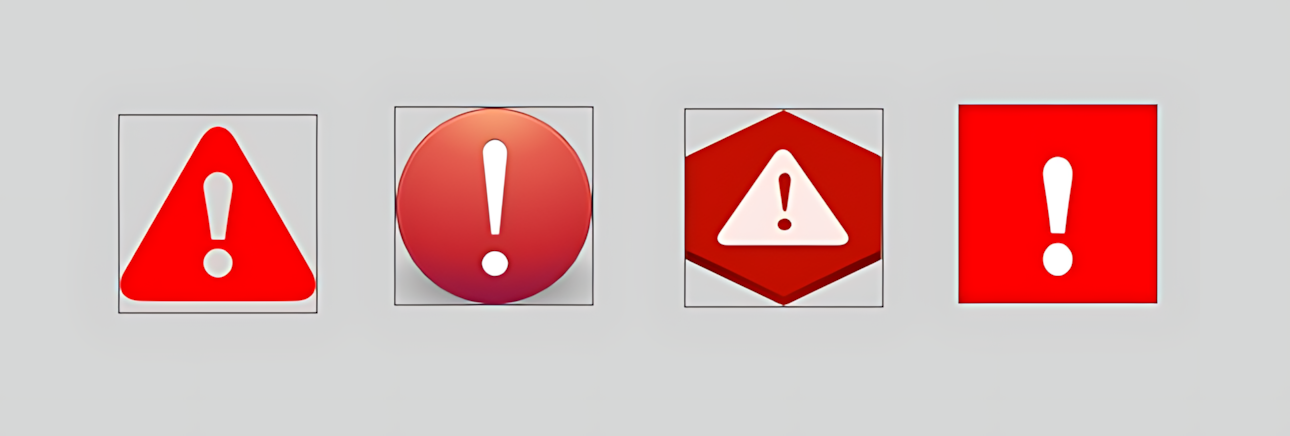
Defines the geometric shape of the alarm indicator. | Alarm indicators using triangular, circular, hexagonal, or rectangular shapes. |
IndicatorLocation |
Indicator Position | Topleft |
Defines the position of the active alarm count on the user control. | Specifies where the alarm count appears on the control. |
IndicatorShape defines the geometric shape of the alarm indicator.
| Enum Value | English Description |
|---|---|
Triangle |
Triangle |
Circle |
Circle |
Hexagon |
Hexagon |
Rectangle |
Rectangle |
IndicatorShape = TriangleThis setting displays the alarm indicator in a triangular shape.
IndicatorLocation defines the position of the active alarm
count on the user control.
| Enum Value | Position |
|---|---|
Topleft |
Top Left |
Topmiddle |
Top Center |
Topright |
Top Right |
Middleleft |
Middle Left |
Middleright |
Middle Right |
Bottomleft |
Bottom Left |
Bottommiddle |
Bottom Center |
Bottomright |
Bottom Right |
Bottomleftdiagonal |
Bottom Left Diagonal |
Bottomrightdiagonal |
Bottom Right Diagonal |
When the number of active alarms changes, ALARM_INDICATOR starts blinking. This behavior helps the operator notice changes in alarm information.
The blinking stops when the operator clicks the user control.
The list of active alarms can be displayed when the operator hovers the mouse pointer over the user control.
When Use Alarm Indicator is selected in SCADA, the relevant alarm is linked to the ALARM_INDICATOR user control.
ALARM_INDICATOR user control.Basic usage with the default indicator shape and position:
UCType             = ALARM_INDICATOR
UpdateInterval     = 1000
IndicatorShape     = Triangle
IndicatorLocation  = Topleft
AutoDisappear = falseDisplaying the active alarm count in the upper-right area of the user control:
IndicatorShape     = Circle
IndicatorLocation  = Topright
IndicatorBackColor = TransparentLinking an alarm to the ALARM_INDICATOR control when Use Alarm Indicator is selected for the relevant alarm:
Use Alarm Indicator = true
UCType = ALARM_INDICATOR| Group | Key Properties |
|---|---|
| General |
UCType, UCName,
UpdateInterval, UCBackColor,
UCForeColor, UCFont
|
| Indicator Settings |
IndicatorBackColor, AutoDisappear,
IndicatorShape, IndicatorLocation
|
| Indicator Shape |
Triangle, Circle,
Hexagon, Rectangle
|
| Indicator Position |
Topleft, Topmiddle,
Topright, Middleleft,
Middleright, Bottomleft,
Bottommiddle, Bottomright,
Bottomleftdiagonal, Bottomrightdiagonal
|
| Alarm Behavior | Blinking when the number of active alarms changes, stopping the blinking when clicked, and displaying the active alarm list when the mouse pointer hovers over the control |
ALARM INDICATOR (ALARM_INDICATOR) is a User Control used on EOS SCADA screens to quickly notify the operator of changes in the number of active alarms.
The indicator's shape and position can be configured. When the number of active alarms changes, the control blinks; the blinking stops when the operator clicks it, and the active alarm list can be accessed by hovering the mouse pointer over the control.
Documentation Standard: The property names on this page are the technical names used in the EOS SCADA source code. ENUM values are retained in their English technical form, with their Turkish equivalents displayed separately. The Turkish equivalents provided for EOS user interface terminology follow the naming conventions in the terminology dictionary.
Free Software Download Center
Software for industrial data collection, monitoring, and analysis.

Technical Support
Software documentation, sample code, and practical technical information.
You can contact us regarding EOS software, technical documentation, or industrial data communication.