
Free Software Download Center
Software for industrial data collection, monitoring, and analysis.
EOS SCADA • ANALOG_CLOCK • ANALOG CLOCK • USER CONTROL
ANALOG CLOCK (ANALOG_CLOCK) is a user control designed to add analog clocks with different designs to EOS SCADA screens.
The control allows detailed configuration of three different clock designs, clock hand movement types, time offsets, the appearance of the hour, minute, and second hands, hour and minute markers, numerals, the clock center, and the frame.

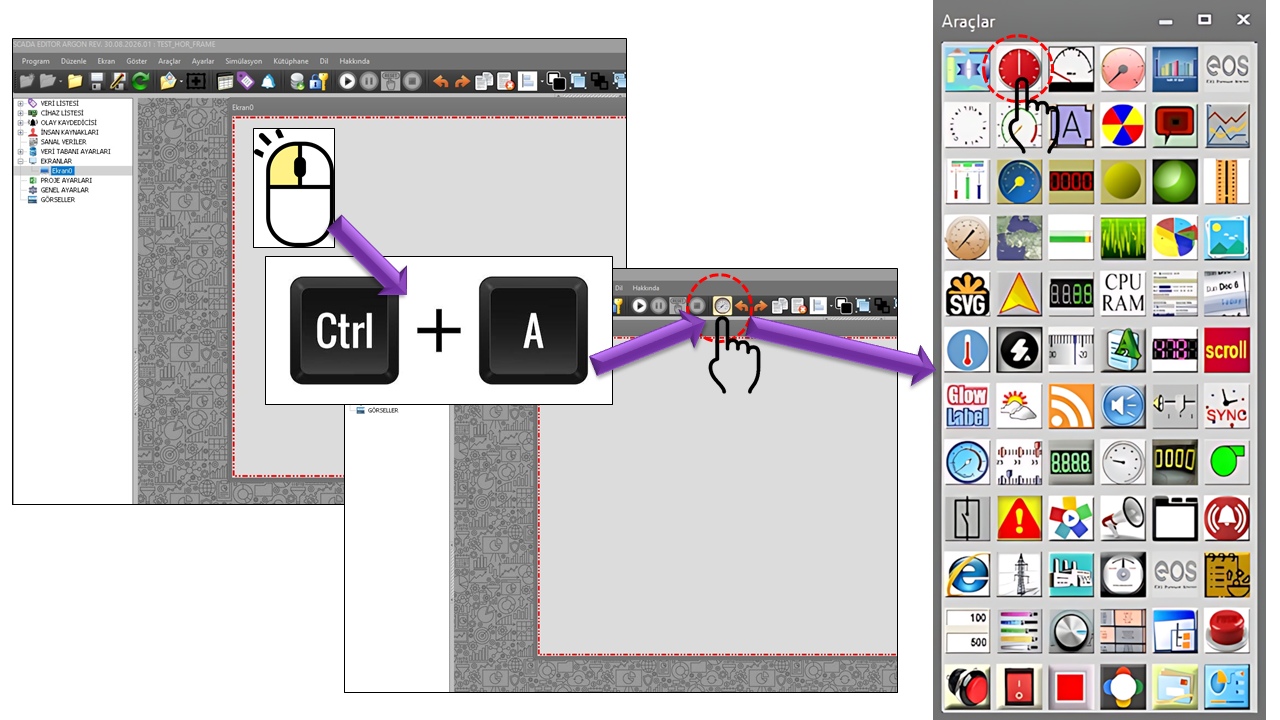
ANALOG CLOCK is a user control in EOS SCADA that uses the ANALOG_CLOCK User Control type and provides real-time analog clock display on SCADA screens.
The control does more than simply display the time. Many visual properties can be configured independently, including the overall clock design, pointer movement behavior, time offset, the geometry of the hour, minute, and second hands, hour and minute markers, numerals, clock center, and frame.
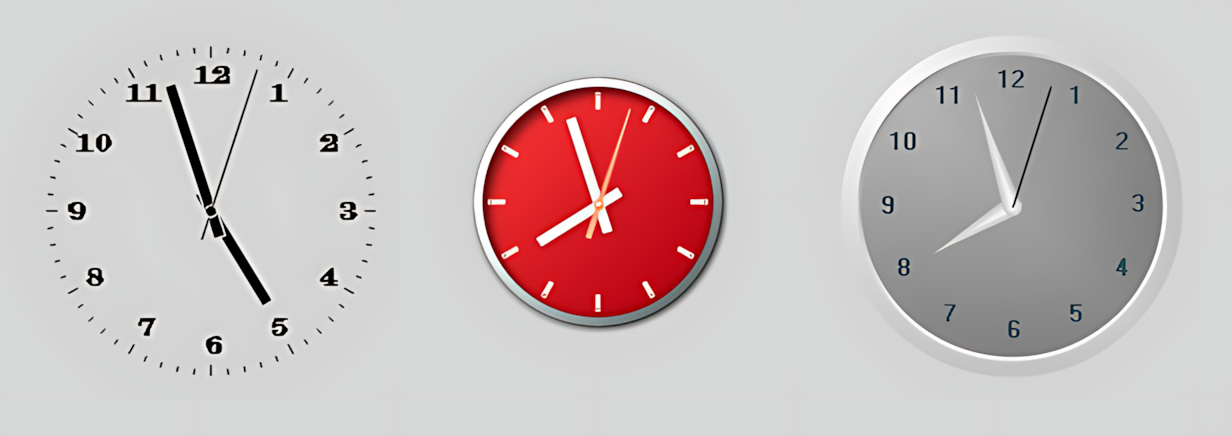
The ClockType property allows users to choose from three different clock designs. In addition, ClockPointersMovementType determines the movement characteristics of the hands. This allows the same user control to be adapted to different SCADA screen designs.
Basic Concept: ANALOG_CLOCK is not merely a simple control that adds a clock image to a SCADA screen. It is a user control whose visual components—including the hour, minute, and second hands, markers, numerals, center, and frame—can be configured independently, along with the clock design and pointer behavior.
When configuring ANALOG CLOCK, first define the general clock behavior. Then adjust the hands, hour and minute markers, numerals, center, and frame.
General properties define the control's identity within EOS SCADA, its update interval, and its basic color and font settings. The ClockType, ClockPointersMovementType, and time offset settings also form the foundation of the clock's behavior.
| Property | EOS Turkish Equivalent | Default | Purpose | Where It Is Used |
|---|---|---|---|---|
UCType |
Control Type | ANALOG_CLOCK |
Defines the User Control type within EOS SCADA. | Basic configuration where the control is defined as ANALOG_CLOCK. |
UpdateInterval |
Update Interval | 1000 |
Specifies the control's update interval. | Refreshes the displayed clock information at regular intervals. |
UCBackColor |
Control Background Color | Transparent |
Specifies the background color of the control. | Integrates the clock visually with the SCADA screen. |
UCForeColor |
Control Foreground Color | Black |
Specifies the control's default foreground color. | Defines the color scheme of the clock's basic visual elements. |
UCFont |
Control Font | Arial Narrow, 8.25 pt, Bold |
Specifies the control's basic font settings. | Defines the appearance of the basic text used by the control. |
These properties define the analog clock's overall appearance and how time is reflected by its hands. ClockType provides three different design options, while ClockPointersMovementType determines how the hands move.
| Property | EOS Turkish Equivalent | Default | Purpose | Where It Is Used |
|---|---|---|---|---|
ClockType |
Clock Type | Type1 |
Specifies the design to be used for the analog clock. | Selects among three clock designs for different SCADA screens. |
ClockPointersMovementType |
Clock Hands Movement Type | Step |
Defines how the clock hands move as time advances. | Determines the visual movement characteristics of the clock. |
TimeDifferenceHour |
Time Difference Hours | 0 |
Specifies the hour offset applied to the displayed time. | When an hour-based offset is required between the SCADA system time and the time to be displayed. |
TimeDifferenceMinute |
Time Difference Minutes | 0 |
Specifies the minute offset applied to the displayed time. | When the displayed time needs to be shifted by a number of minutes. |
TimeDifferenceSecond |
Time Difference Seconds | 0 |
Specifies the second offset applied to the displayed time. | When the displayed time needs to be shifted by a number of seconds. |
ClockType determines which of the three design options
the ANALOG_CLOCK control uses. The source definition specifies the
options as Type1, Type2, and Type3.
Important: The source definition provides descriptions
for the three options as Type 1, Type 2, and
Type 2 again. Therefore, the description provided in the
source for Type3 has not been changed; the technical value
is shown separately here.
| Enum Value | English Description | Description |
|---|---|---|
Type1 |
Type 1 | First analog clock design. |
Type2 |
Type 2 | Second analog clock design. |
Type3 |
Type 2 | Third technical clock type; the source Description value is defined as Type 2. |
This property determines how the analog clock hands move as time advances. It is particularly important for defining the visual movement characteristics of the second and minute hands.
| Enum Value | English Description | Description |
|---|---|---|
Step |
Step | Specifies stepwise movement of the hands. |
Sweep |
Sweep | Specifies continuous or sweeping movement of the hands. |
Default |
Default | Uses the control's default movement behavior. |
Rapid |
Rapid | Specifies rapid movement. |
Original |
Original | The original movement option defined in the source. |
The hour hand indicates the hour. The properties in this group allow its color, fill pattern, line thickness, length, tail length, width, and tip shape to be configured independently.
| Property | EOS Turkish Equivalent | Default | Purpose | Where It Is Used |
|---|---|---|---|---|
HourHandColor |
Hour Hand Color | Black |
Specifies the color of the hour hand. | Visually distinguishes the hour hand. |
HourHandFillPattern |
Hour Hand Fill Pattern | Solid |
Specifies the fill pattern of the hour hand. | Changes the visual fill style of the hand. |
HourHandLineWidth |
Hour Hand Line Width | 1 |
Specifies the thickness of the hour hand line. | Adjusts the visibility of the hour hand line. |
HourHandRelativeRadius |
Hour Hand Relative Radius | 65 |
Defines the hour hand length relative to the clock center. | Adjusts the length of the hour hand on the dial. |
HourHandTailRelativeRadius |
Hour Hand Tail Relative Radius | 20 |
Defines the length of the tail extending behind the center of the hour hand. | Adjusts the portion of the hand extending backward from the center. |
HourHandWidth |
Hour Hand Width | 5 |
Specifies the width of the hour hand. | Adjusts the visual distinction between the hour hand and the other hands. |
HourHandDialType |
Hour Hand Tip Type | Regular |
Specifies the shape of the hour hand tip. | Defines a regular, pointed, or custom tip appearance. |
The minute hand indicates the minutes. As with the hour hand, its color, fill pattern, line thickness, length, tail, width, and tip shape can be configured independently.
| Property | EOS Turkish Equivalent | Default | Purpose | Where It Is Used |
|---|---|---|---|---|
MinuteHandColor |
Minute Hand Color | Black |
Specifies the color of the minute hand. | Visually distinguishes the minute hand. |
MinuteHandFillPattern |
Minute Hand Fill Pattern | Solid |
Specifies the fill pattern of the minute hand. | Changes the visual fill style of the hand. |
MinuteHandLineWidth |
Minute Hand Line Width | 1 |
Specifies the thickness of the minute hand line. | Adjusts the visibility of the minute hand line. |
MinuteHandRelativeRadius |
Minute Hand Relative Radius | 80 |
Defines the minute hand length relative to the clock center. | Adjusts the length of the minute hand on the dial. |
MinuteHandTailRelativeRadius |
Minute Hand Tail Relative Radius | 20 |
Defines the length of the minute hand tail behind the center. | Adjusts the portion of the hand extending backward from the center. |
MinuteHandWidth |
Minute Hand Width | 5 |
Specifies the width of the minute hand. | Adjusts the visual weight of the minute hand. |
MinuteHandDialType |
Minute Hand Tip Type | Regular |
Specifies the shape of the minute hand tip. | Defines a regular, pointed, or custom tip appearance. |
The second hand settings determine whether the second hand is displayed and how it looks. This allows both simpler and more detailed analog clock designs to be created.
| Property | EOS Turkish Equivalent | Default | Purpose | Where It Is Used |
|---|---|---|---|---|
DisplaySecondHand |
Display Second Hand | true |
Specifies whether the second hand is displayed. | Displays seconds on the analog clock. |
SecondHandColor |
Second Hand Color | Black |
Specifies the color of the second hand. | Distinguishes the second hand from the other hands. |
SecondHandFillPattern |
Second Hand Fill Pattern | Solid |
Specifies the fill pattern of the second hand. | Defines the visual style of the second hand. |
SecondHandLineWidth |
Second Hand Line Width | 1 |
Specifies the thickness of the second hand line. | Adjusts the visibility of the hand. |
SecondHandRelativeRadius |
Second Hand Relative Radius | 90 |
Specifies the length of the second hand. | Adjusts the length of the second hand on the dial. |
SecondHandTailRelativeRadius |
Second Hand Tail Relative Radius | 20 |
Defines the length of the second hand tail behind the center. | Adjusts the rear section of the second hand. |
SecondHandWidth |
Second Hand Width | 1 |
Specifies the width of the second hand. | Defines whether the hand appears thin or thick. |
SecondHandDialType |
Second Hand Tip Type | Regular |
Specifies the shape of the second hand tip. | Defines a regular, pointed, or custom tip design. |
Hour markers define the appearance of the hour indicators on the dial. Their position, size, color, fill pattern, and marker type can be configured independently.
| Property | EOS Turkish Equivalent | Default | Purpose | Where It Is Used |
|---|---|---|---|---|
DisplayHoursPoint |
Display Hour Markers | true |
Specifies whether hour markers are displayed. | Enables hour markers on the dial. |
HoursPointLocation |
Hour Marker Position | 100 |
Defines the relative position of the hour markers on the dial. | Adjusts the distance between the hour markers and the center. |
HoursPointSize |
Hour Marker Size | 6 |
Specifies the size of the hour markers. | Controls the visual size of the hour markers. |
HoursPointColor |
Hour Marker Color | Black |
Specifies the color of the hour markers. | Defines the appearance of the hour markers. |
HoursPointFillPattern |
Hour Marker Fill Pattern | Solid |
Specifies the fill pattern of the hour markers. | Defines the visual style of the hour markers. |
HoursPointLineWidth |
Hour Marker Line Width | 1 |
Specifies the line thickness of the hour markers. | Defines the edge appearance of the hour markers. |
HoursPointWidth |
Hour Marker Width | 1 |
Specifies the width of the hour markers. | Defines the geometry of the hour markers. |
HoursPointType |
Hour Marker Type | Regular |
Specifies the geometric type of the hour markers. | Defines regular, circular, triangular, or custom hour markers. |
Minute markers form the minute indicators on the clock dial. They can be displayed and styled independently of the hour markers.
| Property | EOS Turkish Equivalent | Default | Purpose | Where It Is Used |
|---|---|---|---|---|
DisplayMinutesPoint |
Display Minute Markers | true |
Specifies whether minute markers are displayed. | Enables minute markers on the dial. |
MinutesPointLocation |
Minute Marker Position | 100 |
Defines the relative position of the minute markers on the dial. | Adjusts the distance between the minute markers and the center. |
MinutesPointSize |
Minute Marker Size | 3 |
Specifies the size of the minute markers. | Controls the visual size of the minute markers. |
MinutesPointColor |
Minute Marker Color | Black |
Specifies the color of the minute markers. | Defines the appearance of the minute markers. |
MinutesPointFillPattern |
Minute Marker Fill Pattern | Solid |
Specifies the fill pattern of the minute markers. | Defines the visual style of the minute markers. |
MinutesPointLineWidth |
Minute Marker Line Width | 1 |
Specifies the line thickness of the minute markers. | Defines the edge appearance of the minute markers. |
MinutesPointWidth |
Minute Marker Width | 1 |
Specifies the width of the minute markers. | Defines the geometry of the minute markers. |
MinutesPointType |
Minute Marker Type | Regular |
Specifies the geometric type of the minute markers. | Defines regular, circular, triangular, or custom minute markers. |
The numerals on the analog clock are configured in this group. Their position, color, style, angle usage, and font can be specified independently.
| Property | EOS Turkish Equivalent | Default | Purpose | Where It Is Used |
|---|---|---|---|---|
DisplayNumerals |
Display Numerals | true |
Specifies whether numerals are displayed on the clock dial. | Designs that use numeric hour markers. |
NumeralsLocation |
Numeral Position | 82 |
Defines the relative position of the numerals on the dial. | Adjusts the distance between the numerals and the center. |
NumeralsColor |
Numeral Color | Black |
Specifies the color of the clock numerals. | Adjusts numeral readability and visual design. |
NumeralsStyle |
Numeral Style | Numeric |
Specifies the display style used for the numerals. | Numeric or classic clock designs. |
UseAngleForNumerals |
Use Angle for Numerals | true |
Defines whether numerals are positioned according to the dial angle. | Positions clock numerals according to the dial geometry. |
NumeralsFont |
Numeral Font | Engravers MT, 9.75 pt, Bold |
Specifies the font used for the clock numerals. | Designs the numeric appearance of the clock. |
This property defines the fill pattern used by components such as the hour, minute, and second hands, hour and minute markers, and clock center.
| Enum Value | English Description | Description |
|---|---|---|
Gradient |
Gradient | Fill with a color gradient. |
Solid |
Solid | Uniform fill. |
Hatch |
Hatch | Fill using a hatch pattern. |
LinearGradient |
Linear Gradient | Fill with a linear color gradient. |
Pen |
Pen | Pen- or line-based appearance. |
| Enum Value | English Description | Description |
|---|---|---|
Regular |
Regular | Regular hand tip. |
Pointed |
Pointed | Hand with a pointed tip. |
Custom |
Custom | Custom hand tip. |
| Enum Value | English Description | Description |
|---|---|---|
Regular |
Regular | Regular hour marker. |
Ring |
Ring | Circular hour marker. |
Triangle |
Triangle | Triangular hour marker. |
Custom |
Custom | Custom hour marker. |
| Enum Value | English Description | Description |
|---|---|---|
Numeric |
Numeric | Numeric clock display. |
Classic |
Classic | Classic clock display. |
Custom |
Custom | Custom numeral display. |
The clock center defines the appearance of the central point where the hour, minute, and second hands meet.
| Property | EOS Turkish Equivalent | Default | Purpose | Where It Is Used |
|---|---|---|---|---|
DisplayClockCenter |
Display Clock Center | true |
Specifies whether the clock center is displayed. | Visually marks the point where the hands meet. |
ClockCenterRadius |
Clock Center Radius | 3 |
Specifies the radius of the clock center. | Adjusts the size of the center point. |
ClockCenterColor |
Clock Center Color | Black |
Specifies the color of the clock center. | Defines the appearance of the center point. |
ClockCenterFillPattern |
Clock Center Fill Pattern | Solid |
Specifies the fill pattern of the clock center. | Defines the visual style of the center geometry. |
ClockCenterLineWidth |
Clock Center Line Width | 1 |
Specifies the thickness of the clock center outline. | Controls the appearance of the center's edge. |
ClockCenterType |
Clock Center Type | Regular |
Specifies the geometric type of the clock center. | Creates regular, star-shaped, octagonal, or custom center designs. |
| Enum Value | English Description | Description |
|---|---|---|
Regular |
Regular | Regular clock center. |
Star8 |
Star | Eight-pointed star-shaped clock center. |
Octagon |
Octagon | Octagonal clock center. |
Custom |
Custom | Custom clock center. |
The clock's outer frame is configured using these properties. The frame style and inner and outer dimensions can be adjusted according to the selected design.
| Property | EOS Turkish Equivalent | Default | Purpose | Where It Is Used |
|---|---|---|---|---|
ClockBorderColor |
Clock Frame Color | Black |
Specifies the color of the clock frame. | Defines the appearance of the analog clock's outer boundary. |
ClockBorderStyle |
Clock Frame Style | None |
Specifies the style of the clock frame. | Adjusts the outer frame of the clock design. |
ClockBorderInnerSize |
Clock Frame Inner Size | 2 |
Specifies the inner size of the frame. | Adjusts the geometry of the inner part of the frame. |
ClockBorderOuterSize |
Clock Frame Outer Size | 8 |
Specifies the outer size of the frame. | Controls the outer thickness and dimensions of the clock frame. |
| Enum Value | English Description | Description |
|---|---|---|
None |
None | No frame is used for the clock. |
Round |
Rounded Edge | Frame with rounded edges. |
FixedSingle |
Fixed Single | Fixed single frame. |
RoundFrame |
Rounded Frame | Rounded frame. |
RoundFixedSingle |
Rounded Fixed Single | Rounded fixed single frame. |
FixedSingleRoundFrame |
Fixed Single Rounded Frame | Combination of a fixed single frame and a rounded frame. |
| Group | Key Properties | Main Purpose |
|---|---|---|
| General | UCType, UCName, UpdateInterval, colors, font |
Basic operating and appearance settings for the control |
| Clock Behavior | ClockType, ClockPointersMovementType, time offsets |
Clock design and time movement |
| Hour Hand | HourHand* |
Hour hand appearance |
| Minute Hand | MinuteHand* |
Minute hand appearance |
| Second Hand | SecondHand*, DisplaySecondHand |
Second hand appearance |
| Hour Markers | HoursPoint*, DisplayHoursPoint |
Hour markers |
| Minute Markers | MinutesPoint*, DisplayMinutesPoint |
Minute markers |
| Numerals | Numerals*, DisplayNumerals |
Numeric or classic clock markers |
| Clock Center | ClockCenter*, DisplayClockCenter |
Center point of the hands |
| Frame | ClockBorder* |
Outer clock frame |
A simple SCADA clock display can be created by setting
ClockType=Type1, enabling the second hand, hour markers,
minute markers, and numerals, and disabling the frame.
A more classic analog clock design can be created using options such as
NumeralsStyle=Classic, ClockBorderStyle=RoundFrame,
and ClockCenterType=Star8.
The displayed time can be adjusted using the
TimeDifferenceHour, TimeDifferenceMinute,
and TimeDifferenceSecond properties.
Design Approach: A more controlled configuration can
be achieved by first selecting the basic clock design with
ClockType, then adjusting the hands, markers, numerals,
center, and frame to suit that design.
ANALOG_CLOCK (ANALOG CLOCK) is a user control that displays time in analog form on EOS SCADA screens and offers extensive configuration of its appearance.
Three different clock designs, various hand movement options, time offset settings, and properties for the hour, minute, and second hands, hour and minute markers, numerals, center, and frame allow the same control to be adapted to different SCADA screen designs.
Technical property names and ENUM values have been retained in the forms used in the source definitions. The English descriptions have been prepared to clarify how the user control is used within SCADA.
Free Software Download Center
Software for industrial data collection, monitoring, and analysis.

Technical Support
Software documentation, sample code, and practical technical information.
You can contact us regarding EOS software, technical documentation, or industrial data communication.