Selected City
A specific city/location can be selected using SelectedLocation. In this configuration, the weather forecast for the selected city can be monitored continuously on the SCADA screen.
EOS SCADA • HAVA_DURUMU • MGM • CITY-BASED WEATHER FORECAST • USER CONTROL
HAVA_DURUMU is a specialized user control that displays city-based weather forecasts published by the Turkish State Meteorological Service (MGM) on EOS SCADA screens. It enables operators, particularly at power generation facilities, to monitor weather conditions and temperature forecasts for a selected city directly from the SCADA screen.
Forecast data is retrieved from the MGM XML source specified in the configurable RSSAddress property. Depending on the use case, a single city can be displayed continuously, or multiple cities can be shown in rotation according to the configured operating logic.

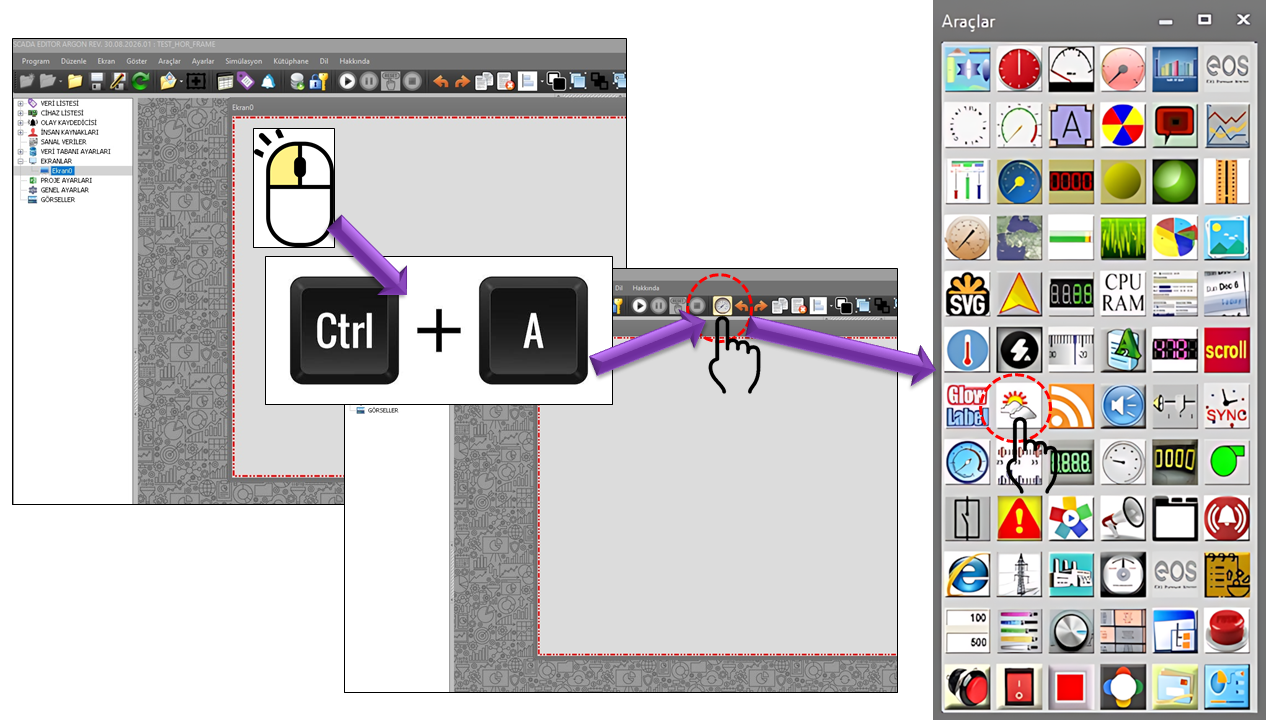
HAVA_DURUMU is a user control developed to retrieve meteorological forecast information for cities in Türkiye over the internet and display it on EOS SCADA screens on a city-by-city basis. In its basic use, the city name, a short weather description, and the minimum/maximum temperature forecasts are presented together in a single panel.
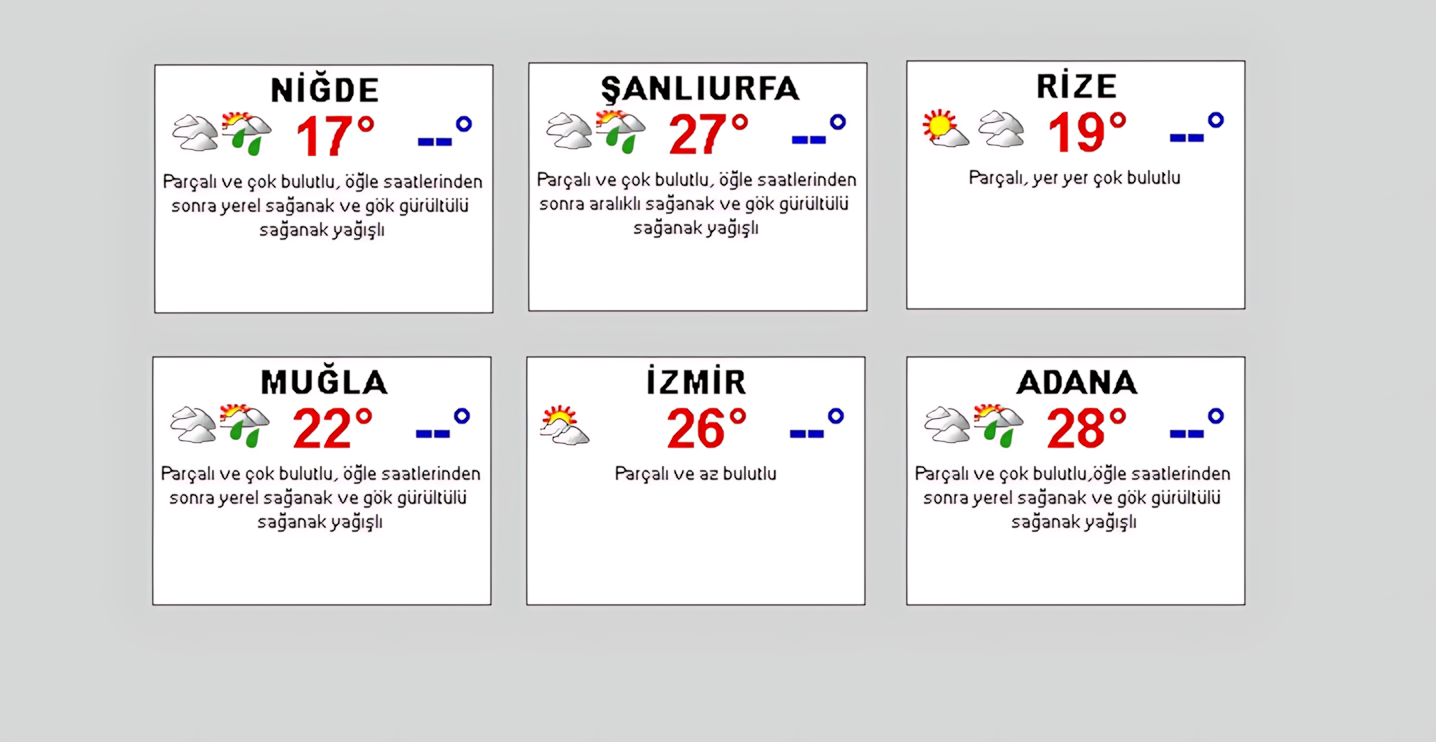
The provincial and district forecasts published by MGM include weather conditions along with minimum and maximum temperatures. MGM's official documentation also states that hourly forecast products are published for provincial centers, while daily and five-day forecast products are available for provincial and district centers.
An important feature of the HAVA_DURUMU control is that it is not limited to displaying a single city on the SCADA screen. A specific location can be selected using SelectedLocation. For applications that require cities to be displayed alternately, properties such as LocationUpdateInterval, HoldInPreferredLocation, and WaitingTimeInPreferredLocation can be used.
To keep the data up to date, the SCADA computer running the control must be able to access the MGM data source over the internet. Therefore, HAVA_DURUMU is not a control that relies solely on local SCADA process data; it is an information display control that depends on an external data source.
Fixed size: The size of the HAVA_DURUMU control cannot be changed. Since the control operates at a fixed size, the area in which it will be placed must be considered in advance during SCADA screen design, and other objects on the screen must be positioned accordingly.
The operating sequence of the HAVA_DURUMU control can be summarized as accessing the MGM data source, selecting a city, reading forecast information, and displaying it on the SCADA screen.
Data flow: MGM XML source → HAVA_DURUMU → city selection / rotating display → weather description + minimum temperature + maximum temperature → SCADA screen.
The control has two distinct timing mechanisms. UpdateInterval defines the control's general update interval, and the default value in the source code is 3,600,000. Interpreted in milliseconds, this value corresponds to one hour.
LocationUpdateInterval is a separate property that determines the update behavior for city/location display. This allows the timing of data retrieval to be separated from the behavior governing the rotating display of cities.
Internet connection required: The SCADA computer must be able to access the MGM data source for the HAVA_DURUMU control to retrieve current forecasts. Without internet access, new forecast data cannot be obtained from the external source.
The location to be displayed by the HAVA_DURUMU control can be specified using SelectedLocation. The default value in the source code is defined as GNTurkSehirleri.HEPSI. This indicates that the control is designed to work with cities in Türkiye.
A specific city/location can be selected using SelectedLocation. In this configuration, the weather forecast for the selected city can be monitored continuously on the SCADA screen.
Location update and waiting properties can be used together on screens where cities need to change at defined intervals.
When HoldInPreferredLocation is enabled, the behavior for keeping the control at the preferred location can be configured.
Note: The provided source code excerpt does not list all GNTurkSehirleri options individually. Therefore, the technical table below shows only the HEPSI value explicitly visible in the source.
The primary purpose of the control is to present city weather forecasts in a compact panel that operators can read quickly. According to the supplied functional description, the panel displays a short weather description, a visual representation of the weather conditions, and the minimum/maximum temperature forecasts together.
Clearly identifies the city/location to which the displayed forecast applies.
The short weather description from the MGM source and its corresponding visual representation are displayed in the panel.
The minimum and maximum temperature forecasts for the city are displayed together.
The main properties defined in the source code of the HAVA_DURUMU control are shown in the table below. The terminology follows the equivalents specified in the current EOS Turkish dictionary.
| Property | EOS English Equivalent | Type | Default Value | Description |
|---|---|---|---|---|
UCType |
Control Type | string | HAVA_DURUMU |
Specifies the type of user control within EOS SCADA. |
UpdateInterval |
Update Interval | int | 3600000 |
Defines the control's general update interval. Interpreted in milliseconds, the source value corresponds to one hour. |
DecimalPoint |
Decimal Places | int | 0 |
Specifies the number of decimal places used to display numeric values. |
UCBackColor |
Control Background Color | Color | Transparent |
Defines the control's background color. |
UCForeColor |
Control Text Color | Color | Black |
Defines the control's primary text color. |
UCFont |
Control Font | Font | Arial Narrow, 8.25 pt |
Defines the control's primary font settings. |
The external data source, location management, and display behavior of the HAVA_DURUMU control are configured using the following properties.
| Property | EOS English Equivalent | Type | Default Value | Description |
|---|---|---|---|---|
LocationUpdateInterval |
Location Update Interval | int | 10800 |
Defines the interval used for city/location update behavior. |
RSSAddress |
Weather Data XML Address | string | https://www.mgm.gov.tr/FTPDATA/analiz/sonSOA.xml |
Specifies the XML data source from which MGM weather forecast information is retrieved. |
SelectedLocation |
Selected Location | GNTurkSehirleri | HEPSI |
Specifies the city/location to be displayed. |
HoldInPreferredLocation |
Hold at Preferred Location | bool | false |
Defines the behavior for keeping the control at the preferred location. |
WaitingTimeInPreferredLocation |
Waiting Time at Preferred Location | int | 30000 |
Defines the waiting time at the preferred location. |
ShortForm |
Short Form | bool | false |
Specifies whether the weather control uses its short-form display. |
The SelectedLocation property uses the GNTurkSehirleri type. In the supplied source code, the default option is explicitly defined as HEPSI.
| Technical Value | English Equivalent | Description |
|---|---|---|
| HEPSI | All | Indicates operation with all city/location options in the GNTurkSehirleri enumeration. |
Source scope: Since the source code excerpt does not include all city options of the GNTurkSehirleri type, only the explicitly visible HEPSI option is listed here.
One important difference between the HAVA_DURUMU control and many other user controls is that its size cannot be freely changed during design. Because the control has a fixed size, the space it will occupy must be planned in advance when placing it on a SCADA screen.
The width and height of the control cannot be freely scaled by the user.
The control should be positioned with due consideration for the space allocated to it in the screen design.
Sufficient space should be left around the control so that the city name, weather conditions, and temperature information can be read in a single panel.
Monitoring precipitation, temperature, and general meteorological conditions as supplementary information on plant screens.
Displaying meteorological conditions in an accessible panel on generation monitoring screens.
Presenting meteorological information for the plant's city or other cities on centralized screens.
Displaying city weather forecasts as supplementary information during scheduled field work and daily operational monitoring.
Monitoring facilities in different cities on a single operator screen, together with city-specific weather information.
Displaying weather forecasts for the facility's location in operational information areas outside SCADA.
| Topic | Property / Value | Summary |
|---|---|---|
| Control | UCType = HAVA_DURUMU |
Weather display control for cities in Türkiye. |
| Data Source | RSSAddress |
MGM XML forecast source. |
| General Update | UpdateInterval = 3600000 |
One hour, assuming the source value is in milliseconds. |
| Location | SelectedLocation |
The city/location to display. |
| Rotating Display | LocationUpdateInterval |
Timing of location changes. |
| Preferred Location | HoldInPreferredLocation |
Behavior for remaining at the preferred location. |
| Waiting | WaitingTimeInPreferredLocation = 30000 |
Waiting time at the preferred location. |
| Short Form | ShortForm |
Short display option. |
| Screen Design | Fixed size | The control size cannot be changed; the screen layout must accommodate it. |
| Connection | Internet access | Required to retrieve current data from the MGM source. |
The MGM XML address specified by the user is used as the data source for the HAVA_DURUMU control. MGM publishes provincial and district forecasts, minimum and maximum temperatures, and meteorological forecast products covering different time scales through its current web services.
RSSAddress = https://www.mgm.gov.tr/FTPDATA/analiz/sonSOA.xmlData source note: The forecast products published on MGM's web pages may differ in content structure and update timing from the XML data source read by the HAVA_DURUMU control. For the control's operation, the authoritative source is the XML address defined by the RSSAddress property.
HAVA_DURUMU is a specialized user control that brings city weather forecasts from the Turkish State Meteorological Service into EOS SCADA screens using an external data source. Its city selection, rotating location display, periodic forecast retrieval, and short-form features allow weather information to be added to process monitoring screens as supplementary information.
Two aspects require particular attention when designing the control: internet access to the MGM data source and the fixed control size. The first directly affects whether data can be updated, while the second is essential for proper SCADA screen layout.
Summary: MGM XML source → HAVA_DURUMU → city selection / rotating display → weather description + minimum temperature + maximum temperature → SCADA screen.

Free Software Download Center
Software for industrial data collection, monitoring, and analysis.

Technical Support
Software documentation, sample code, and practical technical information.
You can contact us regarding EOS software, technical documentation, or industrial data communication.