
Free Software Download Center
Software for industrial data collection, monitoring, and analysis.
MASTER_NAV — A specialized user control that unifies SCADA screens within a single navigation structure
MASTER_NAV is a specialized user control designed to integrate multiple screens developed in EOS SCADA under a single operational and navigation framework. This structure does more than provide navigation between screens; it manages the header, navigator, screen, and alarm areas together to create a unified SCADA operator interface.
MASTER_NAV MASTER NAVIGATOR Designed for EOS SCADA Full-Screen Navigation
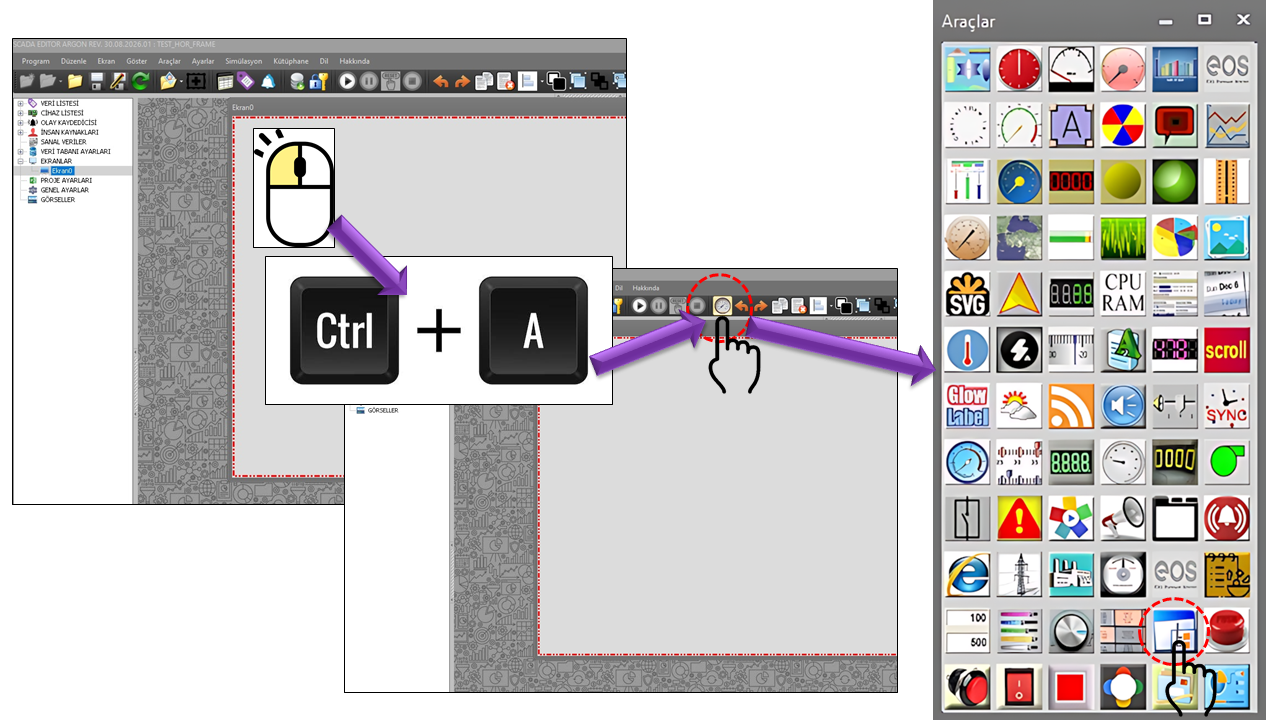
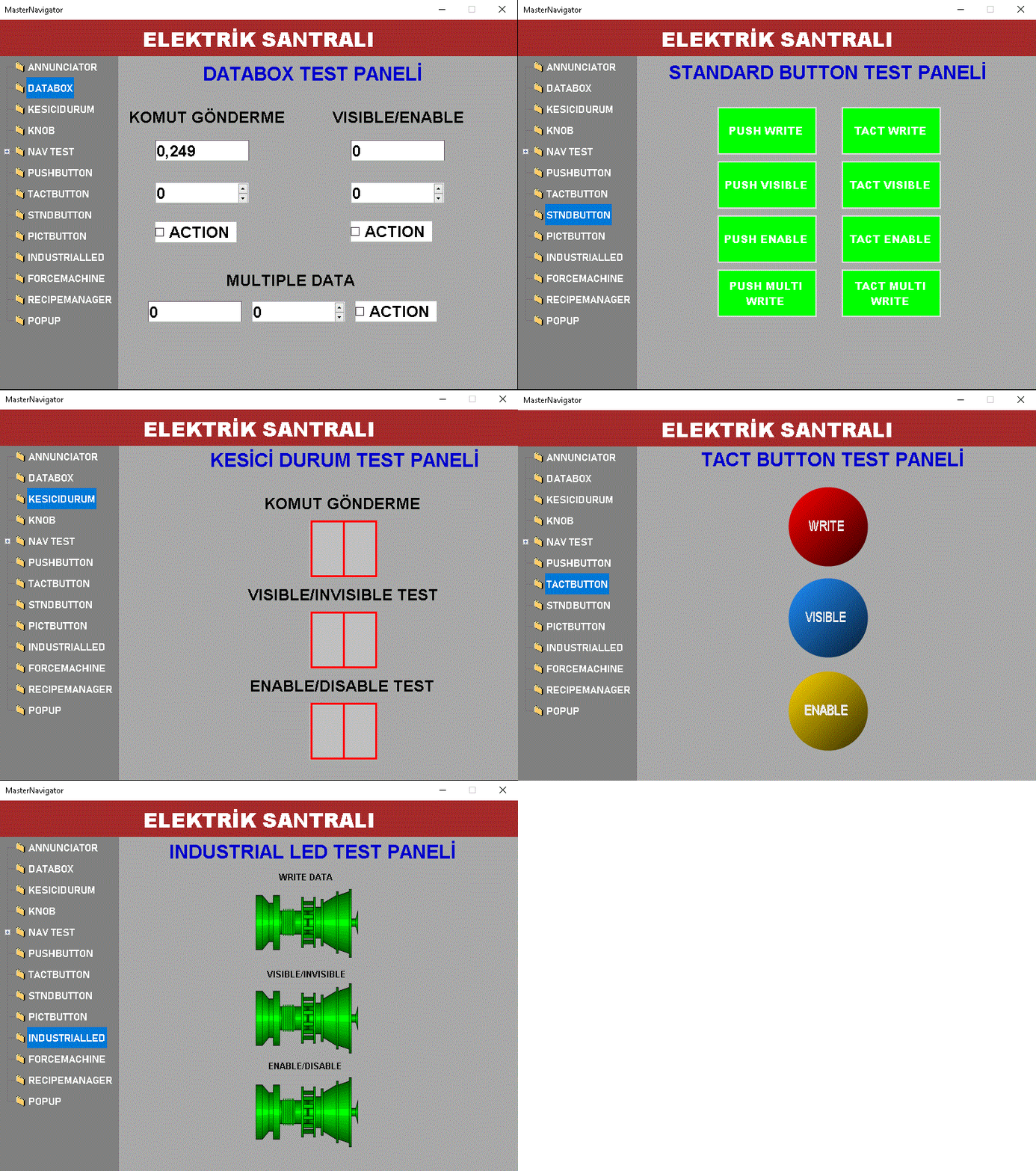
The primary purpose of MASTER_NAV is to allow operators to open screens prepared separately within a SCADA project through a single navigation structure. Navigation nodes are linked to specific screens; when an operator selects a node, the corresponding screen is displayed in the central screen area of MASTER_NAV.
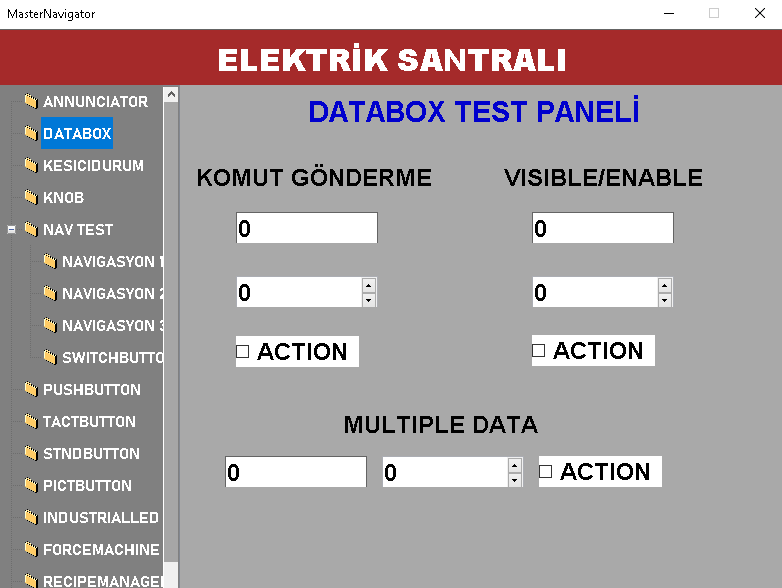
Therefore, MASTER_NAV should not be considered a small control placed inside a conventional screen. It should be designed as a main shell that occupies the entire screen area allocated to MASTER_NAV.
Only the MASTER_NAV user control should be placed on the screen designated for MASTER_NAV. No other user controls should be placed on this screen. MASTER_NAV creates the title, navigation, selected-screen, and alarm areas internally and uses the screen space according to this layout.
MASTER_NAV operates around four main visual areas. Their dimensions and visibility can be managed through the corresponding properties. The integrated layout presented to the operator may consist of a title area at the top, navigation at the side, the selected screen in the center, and an alarm area at the bottom.
A title screen can be linked using TitleScreenID. The visibility and height of the title panel can also be configured.
This is the main navigation area containing screen nodes. TreeView, ToolStrip, or automatic switching can be used.
This is the central area where screens selected in the navigator are displayed. The actual process screens run here.
An alarm list or a screen containing alarm information can be linked using AlarmScreenID.
In a SCADA project using MASTER_NAV, the main design challenge is not simply creating navigation buttons. Since the navigation, title, and alarm areas occupy part of the screen, the screens opened within MASTER_NAV must also be designed with this layout in mind.
It is incorrect to assume that a process screen provides an unrestricted design area covering the entire screen. Since MASTER_NAV reserves areas for the title, navigation, and alarms, user controls on the process screen must be positioned according to the remaining screen area.
MASTER_NAV does more than define which screen should open; it also includes a node-level PARAMETER_COLLECTION structure. This structure is used to define a parameter name and the data associated with that parameter.
| Source Property | English Equivalent | Role |
|---|---|---|
| ParameterName | Parameter Name | Specifies the name of the parameter associated with the navigation node. |
| ConnectedTag | Connected Data Tag | Specifies the SCADA data tag associated with the parameter. |
| TagPrefix | Tag Prefix | Contributes to the naming structure of data tags at the node level. |
| TagSuffix | Tag Suffix | Defines the additional text appended to the end of the tag name. |
The navigation area in MASTER_NAV is not purely functional. Many visual properties can be configured, including navigation orientation, dimensions, node height, icons, text layout, and the display style of the tool strip.
| Property | English Equivalent | Source Default | Description |
|---|---|---|---|
| NavigationOrientation | Navigation Orientation | Vertical | Determines whether the navigation panel is arranged horizontally or vertically. |
| NavigationPanelSize | Navigation Panel Size | 120 × 240 | Determines the dimensions of the navigation area. |
| NavigationPanelLocation | Navigation Panel Location | 0, 95 | Determines the position of the navigation panel on the screen. |
| TreeViewNodeHeight | Tree View Node Height | 35 | Determines the height of TreeView nodes. |
| TreeViewNodeMargin | Tree View Node Margin | 19 | Adjusts the visual spacing between tree nodes. |
| DisplayIcon | Display Icon | true | Determines whether icons are used in navigation nodes. |
| IconSize | Icon Size | 16 × 16 | Determines the size of navigation icons. |
Used to define the title screen displayed in the upper section of MASTER_NAV.
Used to define the alarm screen displayed in the bottom alarm area.
Determines the width and height of the alarm panel.
Title and alarm screens are integral parts of MASTER_NAV's main screen architecture. Therefore, instead of placing separate title or alarm user controls on top of the MASTER_NAV screen, the preferred architecture is to link the relevant screens through the TitleScreenID and AlarmScreenID properties.
ManagementPassword is one of the distinctive features of MASTER_NAV. In the source code, this property is defined as a management password.
According to the architectural explanation provided by the user, this mechanism can be used to allow a SCADA navigator designed for local control to switch to a broader plant-wide navigation structure using a management password when required emergency conditions arise.
Local Navigator
Manages screens belonging to a specific controller, unit, or local operating area.
↓
Management Password
The authorized transition mechanism is activated.
↓
Main SCADA Navigator
A transition to the plant-wide navigation structure can be configured.
The management password should be treated as a critical mechanism that may affect the scope of operational permissions across the plant. In a real project, the password value should not be left in plain text in the source code; access, authorization, logging, and emergency procedures should also be considered.
This page documents the ManagementPassword property found in the provided source code and the operating scenario described by the user. Since the password verification algorithm is not included in the source code provided here, no further assumptions have been made about its implementation.
When NavigationType = Autoswitch is used, automatic navigation between screens can be configured based on defined switching durations instead of requiring the operator to click each navigation node.
The ScreenSwitchDuration property, available in each NAVIGATION_NODE_COLLECTION record, can be used to define the duration for which the corresponding screen is displayed in an automatic switching scenario. The default value in the source code is specified as 10000.
This feature provides a navigation approach that can be useful when continuous operator interaction is not required and specific screens need to be monitored in sequence.
| Property | English Equivalent | Default | Description |
|---|---|---|---|
| UCType | Control Type | MASTER_NAV | Defines the type of the user control. |
| UpdateInterval | Update Interval | 1000 | Determines the control's general update interval. |
| DecimalPoint | Decimal Places | 0 | General numerical display setting. |
| UCBackColor | Control Background Color | Gray | Determines the control's background color. |
| UCForeColor | Control Foreground Color | Black | Determines the control's text color. |
| UCFont | Control Font | Bahnschrift 12 Bold | Determines the control's base font. |
| ScreenBorderStyle | Screen Border Style | Fixedsingle | Determines the appearance of the MASTER_NAV screen frame. |
| DisplayTitlePanel | Display Title Panel | true | Determines whether the title area is displayed. |
| TitleScreenID | Title Screen ID | "" | Determines the screen displayed in the title area. |
| DisplayAlarmPanel | Display Alarm Panel | true | Determines whether the alarm area is displayed. |
| AlarmScreenID | Alarm Screen ID | "" | Determines the screen displayed in the alarm area. |
| DefaultScreen | Default Screen | "" | Defines the default screen used when MASTER_NAV starts. |
| NavigationType | Navigation Type | Treeview | Determines the Tool Strip, Tree View, or Automatic Switching approach. |
| NavigationOrientation | Navigation Orientation | Vertical | Determines the navigation orientation. |
| DisplayScreenPanel | Display Screen Panel | true | Determines whether the central screen area is displayed. |
| FitToScreen | Fit to Screen | false | Determines the fitting behavior of the content within the screen layout. |
| DisplayFixedOpen | Display Fixed Open | true | Controls the display of screens opened using the Fixed opening type. |
| DisplayIndependentOpen | Display Independent Open | true | Controls the display of screens opened using the Independent opening type. |
| DisplayMaximizeScreen | Display Screen Maximization | false | Determines whether screen maximization is available. |
| UseSeparator | Use Separator | false | Determines whether separators are used between navigation elements. |
| ManagementPassword | Management Password | admin | The special password field defined in the source code for management transitions. |
| Property | Option Set |
|---|---|
| GNCerceveTuru | None · Single Fixed · Fixed 3D |
| GNNavTuru | Tool Strip · Tree View · Automatic Switching |
| GNOrientasyon | Horizontal · Vertical |
| MNMetinYonu | Vertical 270 Degrees · Vertical 90 Degrees · Horizontal |
| MNOrientasyon | Table · Flow · Vertical Overflow Stack · Horizontal Overflow Stack |
| MNGoruntuTuru | None · Text · Image · Image and Text |
| MNResimYerlesimi | Cover · Image Over Text · Text Over Image · Image Before Text · Text Before Image |
| MNAcilisTuru | The source code shows Fixed as the default option; details of other values are not defined in the provided source excerpt. |
Determine from the outset how the MASTER_NAV screen will be arranged in terms of title, navigation, central screen, and alarm areas.
Screens designed without considering the areas occupied by MASTER_NAV may lose important portions of their content during operation.
The relationships between NodeID, ParentNodeID, and ScreenID form the basis of a consistent navigation tree.
Managing title and alarm screens through MASTER_NAV helps maintain a consistent, integrated operator interface.
Icons, node height, text layout, and navigation orientation should be arranged to support quick screen access for operators.
Special management mechanisms such as ManagementPassword should be handled together with controlled access and the organization's emergency procedures.
MASTER_NAV integrates the operator's working environment by combining independently developed screens within EOS SCADA under a single navigation architecture. Managing the title, navigation, screen, and alarm areas through the same user control distinguishes it from an ordinary screen navigation control.
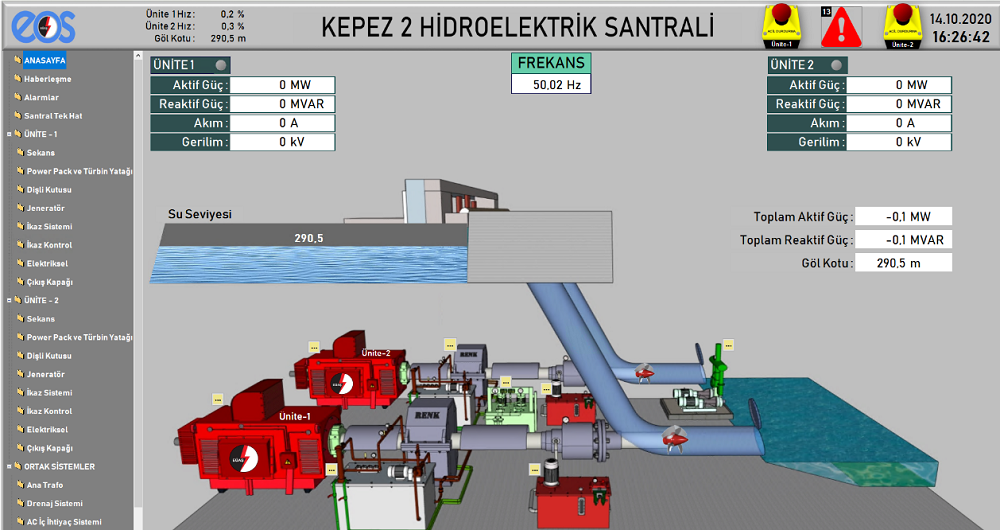
Particularly in large SCADA projects, as the number of screens increases, this structure provides a centralized interface that allows operators to navigate between different screens in a controlled and organized manner.
The most critical design principle is: No user control other than MASTER_NAV should be placed on the screen allocated to MASTER_NAV. Process screens opened within MASTER_NAV must also be designed with the space occupied by the title, navigation, and alarm areas taken into account.
Free Software Download Center
Software for industrial data collection, monitoring, and analysis.

Technical Support
Software documentation, sample code, and practical technical information.
You can contact us regarding EOS software, technical documentation, or industrial data communication.