Precise Numerical Value
Displays a measurement, counter reading, or process value directly as a number, allowing the operator to read the current value quickly.
OSG_NUMERIC • NUMERICAL VALUE • COMPACT DIGITAL DISPLAY
NUMERIC DIGITAL INDICATOR (OSG_NUMERIC) is a numeric digital indicator user control designed to display process and system data on screen in a prominent, compact, and easily readable format. It is particularly suitable for screens where a numerical value needs to stand out.
The control can be customized with different visual styles using properties such as center and surrounding colors, inner and outer border colors, border width, shadow effects, and text color. This allows the same numerical display to be presented in various styles, ranging from a simple appearance to a more prominent design with a three-dimensional effect.

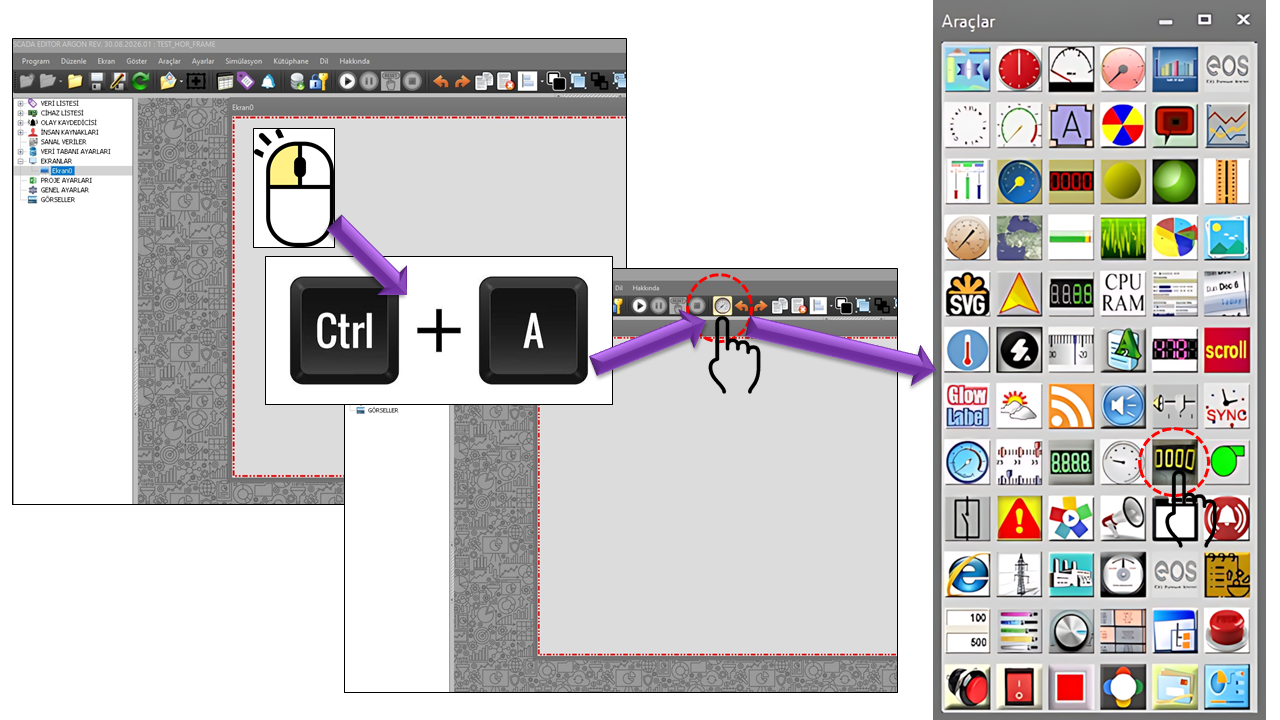
NUMERICAL DIGITAL INDICATOR (OSG_NUMERIC) is a compact digital display user control designed to allow operators to monitor numerical information obtained from processes and systems quickly, directly, and easily. It can be used particularly in applications where a specific numerical value needs to be highlighted and distinguished from other information on the screen.
The fundamental approach of OSG_NUMERIC is to place the numerical information itself at the visual center, rather than surrounding the displayed value with complex graphical components. At the same time, the control can be adapted to different screen designs through its frame style, inner and outer border colors, center and surrounding colors, text color, and shadow properties. This allows the same control to be used in a variety of styles, ranging from a simple numerical display to a more prominent digital indicator with a three-dimensional appearance.
Displays a measurement, counter reading, or process value directly as a number, allowing the operator to read the current value quickly.
A simple, information-dense display area can be created to highlight a specific value in limited screen space.
The visual boundaries of the indicator can be defined using None, Fixed Single, or Fixed 3D frame options.
Center, surrounding, inner border, outer border, and text colors can be configured independently to create different visual presentation styles.
Text shadow and shadow offset settings can change the visual prominence of numerical characters and the perceived depth of the indicator.
On screens where the current numerical value matters more than graphical trends, the display can direct the operator's attention straight to the measurement value.
The primary purpose of OSG_NUMERIC is to make a numerical value as directly perceptible as possible on the screen. Therefore, the main function of its visual effects is to support readability. While the frame, color, and shadow properties define the display's visual character, the numerical value remains the primary information element on the screen.
OSG_NUMERIC can be a suitable display option when an operator needs to monitor a specific value continuously and quickly on a process screen. For example, a value such as current temperature, line pressure, motor speed, production count, or energy consumption can be highlighted in a dedicated display area.
When more comprehensive graphical scales, multiple indicator elements, or advanced numerical display components are required, other numerical indicator structures can also be considered.
The visual structure of OSG_NUMERIC can be understood in terms of two main areas: the numerical text area and the indicator frame surrounding it. The display's visual character is created by adjusting the frame's inner and outer colors, center color, surrounding color, and shadow properties together.
Determines the color of the main display area containing the numerical value.
Defines the visual tone of the area surrounding the center.
Can be used to emphasize the inner boundary of the display area.
Emphasizes the control's outer boundary, making it more distinct on the screen.
The perceived depth of the numerical indicator can be changed using the shadow offset.
Determines the primary and shadow colors of the numerical characters.
The border structure defines the visual boundary around the OSG_NUMERIC indicator. Without a border, the indicator has a simpler appearance, while fixed or 3D border options can strengthen the perception of the numerical value as a separate indicator object.
| Option | Type | Description |
|---|---|---|
None |
None | No border is used, resulting in a simpler, more integrated display. |
Fixedsingle |
Fixed Single | Creates a single, fixed border appearance. |
Fixed3d |
Fixed 3D | Provides a fixed border appearance that creates a sense of three-dimensional depth. |
For simple process screens, the None option can be selected so that the numerical value becomes a direct part of the screen design. When the value should appear as a separate instrument or panel indicator, the Fixed Single or Fixed 3D options can be used.
The NUMERICAL DIGITAL INDICATOR (OSG_NUMERIC) is not limited to changing the text color. The center and surrounding colors of the indicator surface, as well as the border colors, can be defined separately. Text shadow color and shadow offset can also be used to change the visual prominence of numerical characters.
| Property | Description | Default |
|---|---|---|
CenterColor |
Determines the primary color of the indicator's center. | WhiteSmoke |
SurroundColor |
Determines the color surrounding the indicator. | Silver |
BorderColorInside |
Determines the inner border color. | White |
BorderColorOutside |
Determines the outer border color. | White |
TextColor |
Determines the primary color of the numerical text. | Black |
TextShadowColor |
Determines the shadow color of the numerical text. | Gray |
ShadowBias |
Determines the offset of the text or visual shadow. | 1 |
OSG_NUMERIC can be used on screens where operators need to read a specific process value quickly and directly. Measurement values, counter readings, production quantities, speed, temperature, pressure, flow rate, and similar numerical information can be presented in a compact display area. It can be an effective display component, particularly in applications where reading the exact current numerical value is more important than viewing its graphical trend.
Temperature values from furnaces, boilers, tanks, process lines, or machinery can be displayed numerically.
Pressure values from lines, pumps, compressors, or process equipment can be presented in a prominent numerical display area.
Instantaneous flow rates, flow quantities, and similar measurement values can be displayed numerically.
Speed or RPM information for motors, fans, pumps, and similar rotating equipment can be presented in a compact digital display.
It can be used for counter values such as production counts, total quantities, part counts, or cycle counts.
Electrical values such as instantaneous energy, consumption, power, and related measurements can be displayed numerically.
Product quantities on production lines, package counts, inventory quantities, or completed operation counts can be displayed.
Numerical status codes, operation numbers, or error codes can be communicated directly to the operator.
The primary purpose of OSG_NUMERIC is to present precise numerical information directly to the operator. On screens where a single process value must be monitored continuously, a large, high-contrast, uncluttered numerical display can help the operator recognize the value quickly. Segment-based digital indicators can also be used to display information such as process values, counter readings, and error codes.
OSG_NUMERIC can be considered when a specific numerical value needs to stand out on the screen instead of being presented through complex graphical displays. For example, while the overall process state is monitored using other graphical indicators, an important temperature, pressure, speed, or production counter can be displayed in a separate value area using OSG_NUMERIC.
If a production screen needs to monitor process temperature, motor speed, instantaneous production count, and line pressure simultaneously, a separate OSG_NUMERIC indicator can be used for each value. This allows different process information to be presented in a consistent and readable numerical display layout on the same screen.
| Property | Type | Description | Default |
|---|---|---|---|
UCType |
string | Specifies the type of the user control. | OSG_NUMERIC |
UpdateInterval |
int | Determines the control's update interval. | 1000 ms |
DecimalPoint |
int | Determines the number of decimal places for the numerical value. | 3 |
UCBackColor |
Color | Determines the control's background color. | Transparent |
UCForeColor |
Color | Determines the control's text color. | Black |
UCFont |
Font | Determines the control's default font. | Arial Narrow, 8.25 |
BorderStyle |
GNCerceveTuru | Determines the indicator's border style. | None |
BorderColorInside |
Color | Determines the inner border color. | White |
BorderColorOutside |
Color | Determines the outer border color. | White |
BorderWidth |
int | Determines the border width. | 2 |
CenterColor |
Color | Determines the indicator's center color. | WhiteSmoke |
ShadowBias |
int | Determines the shadow offset. | 1 |
SurroundColor |
Color | Determines the color surrounding the indicator. | Silver |
TextColor |
Color | Determines the primary color of the numerical text. | Black |
TextShadowColor |
Color | Determines the shadow color of the numerical text. | Gray |
The GNCerceveTuru option set used in OSG_NUMERIC determines the indicator's frame structure. This selection directly affects the visual presentation of the numerical value on the screen.
| Value | Description | Usage |
|---|---|---|
None |
None | Simple numerical display without a frame. |
Fixedsingle |
Fixed Single | Prominent display with a single fixed border. |
Fixed3d |
Fixed 3D | Fixed frame display that creates a three-dimensional appearance. |
The visual design of OSG_NUMERIC can be kept simple to support quick reading of numerical information or enhanced to make the indicator stand out as a separate object on the screen. The center color, surrounding color, borders, text color, and shadow properties can be considered together to create different display styles.
High-contrast text and a prominent frame may be preferred for a critical pressure value. For simpler information, such as a production counter, a frameless design or one with less visual emphasis may be used. The main objective is to preserve the readability of the numerical information before adding decorative effects.
Unlike a comprehensive numerical indicator engine such as NUMERICAL_FRAME, OSG_NUMERIC is a separate display option focused on presenting numerical values directly and compactly. Its frame, color, and shadow properties allow the same basic display to be adapted to different screen designs.
Therefore, users can choose more comprehensive numerical display structures when detailed visual configuration is required, or select the OSG_NUMERIC control when they need a clear, prominent numerical value display.

Free Software Download Center
Software for industrial data collection, monitoring, and analysis.

Technical Support
Software documentation, sample code, and practical technical information.
You can contact us regarding EOS software, technical documentation, or industrial data communication.