Recipe Data List
The data names to be included in the recipe and the headings displayed to the user are defined.
EOS SCADA • RECIPE MANAGER • RECIPE MANAGEMENT • USER CONTROL
RECIPE MANAGER is a user control that allows multiple settings and data values required for a process to be managed together as a recipe, rather than entering each value individually. The user first defines the data to be included in the recipe and can then create multiple sub-recipes containing different values for the same data structure.
When one of the prepared sub-recipes is selected, the APPLY RECIPE operation transfers the values contained in the recipe to the associated controller data points. This makes it possible to apply numerous settings in a single operation.

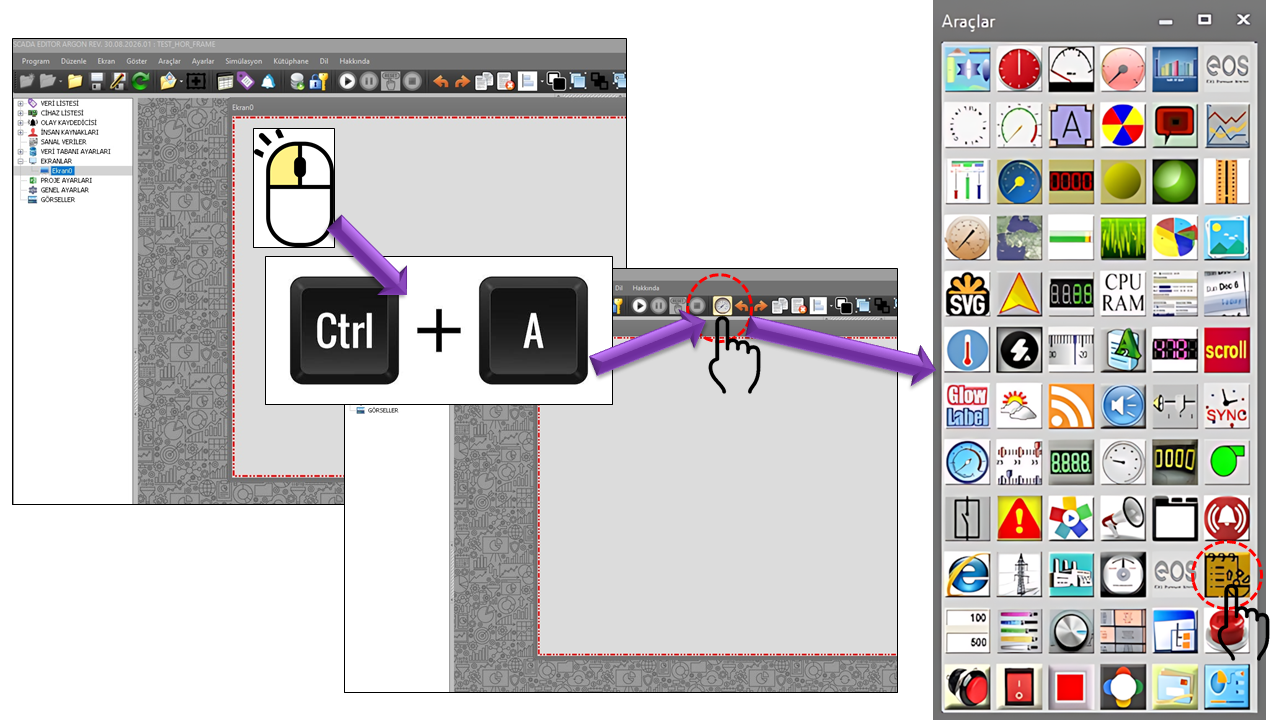
RECIPE MANAGER is a recipe management user control designed especially for applications where machine and process settings need to be applied to multiple data points together. The basic approach is to create a recipe data list, add controller-related data to this list, and create sub-recipes containing different sets of values based on the same data list.
For example, if several settings such as temperature, pressure, speed, duration, and level need to be changed together on a production line, the operator can select a predefined sub-recipe instead of entering each value individually. The values in the selected recipe are then written to the controller using the APPLY RECIPE operation.
This structure supports not only applying recipes but also a workflow that allows users to add new recipes and edit or modify existing ones. This makes it possible to store multiple recipes for different products, operating conditions, or process settings using the same data structure.
Important — Data Is Written to the Controller: RECIPE MANAGER is not merely a display control. The APPLY RECIPE operation can transfer multiple values from the selected recipe to the associated controller data points. Therefore, recipe creation, editing, and especially application must be restricted to users with an appropriate Authorization Level. Since applying an incorrect recipe may change process settings at multiple points simultaneously, recipe contents must be verified before being put into operation.
Recommended English Naming: The name Recipe Manager can be used in the user interface. Here, a "recipe" refers not to a single value but to a set of values stored together for multiple related data points. A "sub-recipe" is an applicable recipe record containing a different combination of values within the same data list.
The operating principle of RECIPE MANAGER begins with preparing the recipe data structure. Different sets of values associated with this structure are then stored as recipe records. During operation, the user can select the desired recipe record to review its values, make the necessary changes, and, if authorized, apply the selected recipe to the controller.
The data names to be included in the recipe and the headings displayed to the user are defined.
Multiple recipe records containing different values can be created for the same data structure.
Authorized users can edit existing recipes, modify their values, and add new recipes.
The values in the selected recipe are transferred to the associated controller data points in a single application operation.
The basic operating characteristics of the RECIPE MANAGER control are defined by the following parameters. Property names are preserved as they appear in the source code, and their English equivalents are provided according to the terminology used in Türkçe_set2(2).txt.
| Property | EOS English Equivalent | Default | Purpose | Where It Is Used |
|---|---|---|---|---|
UCType |
Control Type | RECIPE_MANAGER |
Defines the user control type. | When defining the control used for recipe management. |
UpdateInterval |
Update Interval | 1000 ms |
Determines the control's update period. | For periodically refreshing recipe values and control status. |
UCBackColor |
Control Background Color | White |
Determines the control's background color. | For the visual background of the recipe table. |
UCForeColor |
Control Foreground Color | Black |
Determines the general text color within the control. | For general text in the recipe list and data table. |
UCFont |
Control Font | Arial Narrow, 8.25 |
Determines the control's general font. | For recipe data names, values, and control text. |
The recipe table allows users to view the data names included in a recipe and their corresponding values. As shown in the illustration, the upper section contains recipe selection and operation buttons, while the main area is reserved for the table displaying recipe data.
| Property | EOS English Equivalent | Default | Purpose |
|---|---|---|---|
HeaderBackColor |
Header Background Color | White |
Determines the background color of the recipe table's header row. |
HeaderForeColor |
Header Foreground Color | Black |
Determines the text color of the table headers. |
HeaderFont |
Header Font | Arial Narrow, 8.25 |
Determines the font used for recipe table headers. |
DataNameColumnWidth |
Data Name Column Width | 40 |
Determines the width of the data name column. |
ValueColumnWidth |
Value Column Width | 250 |
Determines the width of the column displaying recipe values. |
DataNameColumnHeaderText |
Data Name Column Header Text | Veri |
Determines the header text for the data name column. |
ValueColumnHeaderText |
Value Column Header Text | Değer |
Determines the header text for the value column. |
RecipeListName |
Recipe List Name | recipelist |
Determines the name of the recipe list associated with the control. |
RecipeDataItems |
Recipe Data Items | RECIPE_DATA_COLLECTION[] |
Defines the collection of data items to be used in the recipe. |
RECIPE_DATA_COLLECTION: Each item in the recipe data collection is represented in the source code by the RecipeDataName and DataTitleText fields.
This structure is used to associate the name of the data item to be used in the recipe with the heading displayed for that item in the user interface.
| Source Field | Description |
|---|---|
RecipeDataName |
Represents the technical data name of the recipe data item. |
DataTitleText |
Defines the heading displayed for the data item in the user interface. |
Since RECIPE MANAGER can write multiple data values to the controller, the AuthorizationLevel setting is critical. Viewing recipes and changing recipe values before applying them to the controller should not be treated as activities requiring the same authorization level. The application design must define an appropriate authorization level for write operations.
Safe Use: Recipe editing and, in particular, the APPLY RECIPE operation must be restricted to users with an authorization level appropriate for the process. When creating recipe values, limit values, units, process conditions, and controller-side safety logic must also be evaluated.
| Option Set | English | General Meaning in Use |
|---|---|---|
None |
No Authorization | No authorized operation can be performed on the control. |
Monitor |
Monitoring | Can be used to monitor recipe information. |
Operation |
Operation | Can be used for recipe operations at the operation level. |
Engineering |
Engineering | Can be used to manage recipe structures and values at the engineering level. |
Superuser |
Superuser | Can be used for management operations requiring the broadest authorization level. |
Storing process values such as temperature, speed, and duration for different products in separate recipes.
Managing multiple machine settings together under a single recipe name.
Storing different combinations of values for a process as recipe records and applying them when needed.
Reducing the need for operators to recreate the same values by naming and storing reusable sets of settings.
| Group | Properties | Focus |
|---|---|---|
| General | UCType, UpdateInterval, UCBackColor, UCForeColor, UCFont |
Basic control appearance and update behavior |
| Recipe Table | HeaderBackColor, HeaderForeColor, HeaderFont, column widths, and header text |
Appearance of the recipe data list |
| Recipe Structure | RecipeListName, RecipeDataItems, RecipeDataName, DataTitleText |
Definition of the recipe data list and data headings |
| Authorization | AuthorizationLevel |
Authorization for recipe management and applying data to the controller |
RECIPE MANAGER provides a recipe-based operating model for processes in which multiple controller values must be managed together. The user creates a recipe data list to define the relevant data, creates sub-recipes containing different values for this structure, and can edit, modify, or add recipes as needed.
Transferring the selected recipe to the controller using the APPLY RECIPE operation allows multiple write operations to be managed through a single user action. Therefore, one of the most important design considerations is the Authorization Level and verification of recipes before they are applied.
Summary: RECIPE MANAGER combines the workflow for creating a recipe data list, defining sub-recipes, editing and modifying recipes, adding new recipes, selecting a recipe, and applying the selected recipe to the controller within a single user control.

Free Software Download Center
Software for industrial data collection, monitoring, and analysis.

Technical Support
Software documentation, sample code, and practical technical information.
You can contact us regarding EOS software, technical documentation, or industrial data communication.