1. Weather
Used to include regional and city-level weather forecasts in the information stream through the Meteorological Service's sonSOA.xml source.
EOS SCADA • RSS NEWS • NEWS AND WEATHER FEEDS • USER CONTROL
The RSS NEWS user control is designed to display content retrieved from online RSS sources on a SCADA screen in the form of scrolling text.
An important feature of this control is its ability to combine content from multiple RSS sources into a single information feed. This allows weather updates, corporate news, and national news to be monitored separately and then presented together in a single scrolling text stream.

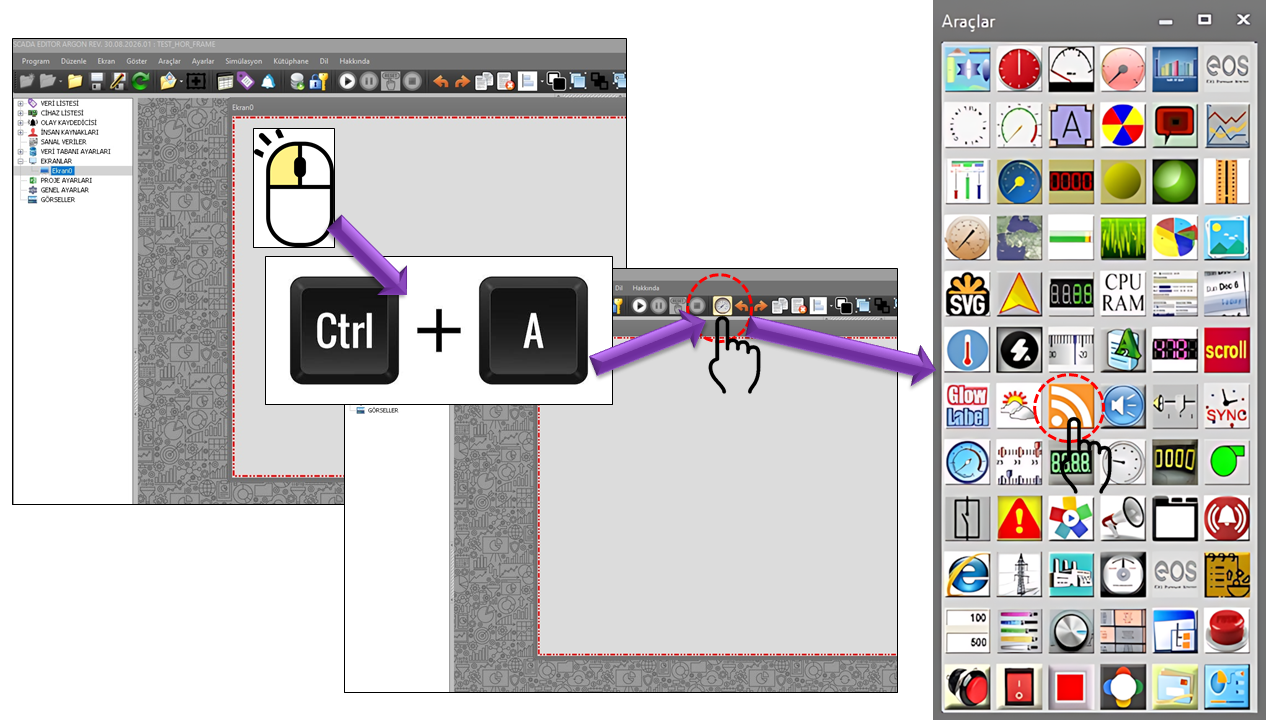
The RSS_HABER user control is used to display content such as news, announcements, and weather information obtained from RSS feeds on the internet as a scrolling ticker that can be continuously monitored on a SCADA screen. The control provides a regular, readable flow of information from external sources to the operator's screen.
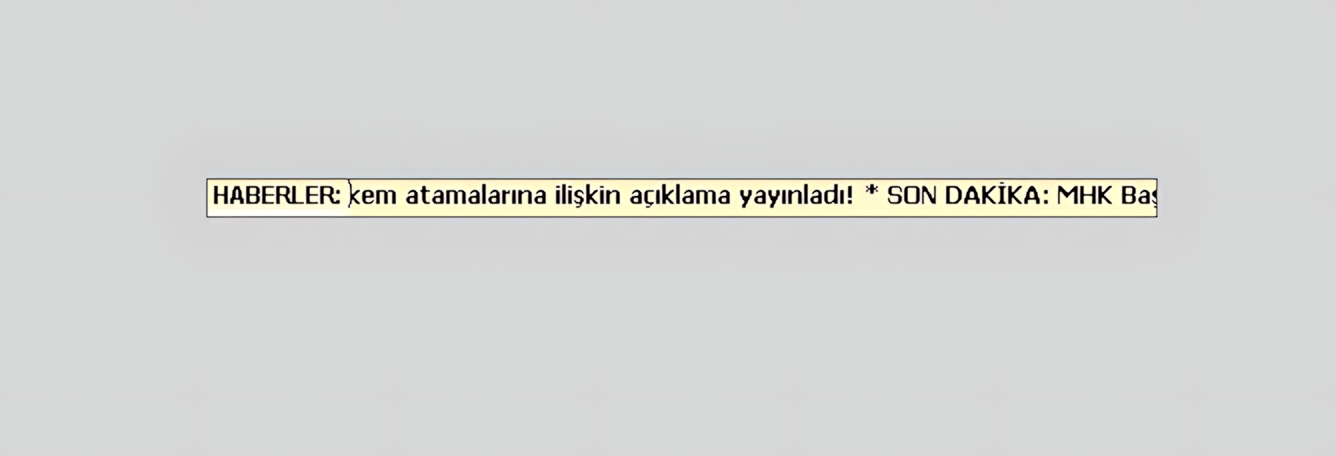
RSS_HABER is a specialized user control that retrieves content from internet sources in RSS format and displays it as a scrolling ticker on a SCADA screen.
The control can be configured to use multiple RSS addresses rather than being limited to a single source. By defining the addresses and enabling each source independently, different information categories can be combined on the same screen.
Using three separate information channels together is particularly useful: weather, corporate news, and national news. This allows current external information relevant to operations to remain visible alongside process information on the operator's screen.
Basic approach: RSS_HABER retrieves content from different RSS sources, combines content from enabled sources into a single information stream, and displays news headlines as a scrolling ticker on the SCADA screen.
RSS_HABER can be configured to retrieve different information categories from independent RSS sources. Weather, corporate news, and national news can be defined as separate channels; content from enabled channels can then be presented to the operator in the same scrolling ticker.
Used to include regional and city-level weather forecasts in the information stream through the Meteorological Service's sonSOA.xml source.
Allows corporate news and announcements published by a business, institution, or organization to be retrieved from a separate RSS source and added to the stream.
Allows news headlines concerning national affairs to be retrieved from a third RSS source and displayed alongside the other information channels.
This source allows meteorological information to be included in the information stream on the SCADA screen. Weather information retrieved from the RSS/XML source provided by the Turkish State Meteorological Service can be displayed alongside other news content or used in a stream dedicated exclusively to weather information.
The source code defines the following XML/RSS address from the Turkish State Meteorological Service for weather information. The purpose is to include regional and city-level forecasts in the scrolling ticker on the SCADA screen.
https://www.mgm.gov.tr/FTPDATA/analiz/sonSOA.xmlThe weather channel can be enabled independently of other news sources. This makes it possible to create either a stream displaying only meteorological information or a combined stream using all three sources.
This source allows news, announcements, and informational updates published by a business or institution to be included in the RSS stream on the SCADA screen. This enables operators to stay informed about corporate developments on the same screen where they monitor process information.
The second RSS source can be used for corporate news. The NewsFeed2Active and NewsFeed2Address properties in the source code are used to enable this channel and define its RSS address.
This source is used to include national news headlines in the RSS_HABER information stream. By displaying national news alongside weather and corporate news in the same scrolling ticker, it allows different information sources to be monitored on a single screen.
The third channel can be used for national news. This allows the operator to view RSS headlines concerning national affairs in the same scrolling ticker as weather information and corporate news.
RSS_HABER retrieves content from enabled RSS sources, combines it into a shared news stream, and displays the resulting headlines as a scrolling ticker on the SCADA screen. The RSS update interval determines how often sources are refreshed, while the news feed rate determines the speed at which content moves across the screen.
When RSS_HABER is used on the main SCADA screen, weather, corporate news, and national news can be configured through different sources. Content from enabled sources can be combined into a single scrolling ticker, allowing the operator to monitor this information without leaving the process screen.
Consider a facility using the RSS_HABER control on its main SCADA screen. The first source is configured for weather, the second for corporate news, and the third for national news. When all three channels are enabled, their content is presented to the operator as a single scrolling ticker.
This section describes the basic operating and appearance properties of the RSS_HABER control. The control type, update interval, text and background colors, font, and border settings can be configured here to define the control's general appearance and behavior.
| Property | EOS English Equivalent | Default | Description |
|---|---|---|---|
| UCType | Control Type | RSS_HABER | Specifies the type of user control. |
| UpdateInterval | Update Interval | 10800 | Specifies the control's general update interval. |
| DecimalPoint | Decimal Places | 0 | Specifies the number of decimal places for numeric display. |
| UCBackColor | Control Background Color | White | Specifies the control's background color. |
| UCForeColor | Control Text Color | Red | Specifies the control's text color. |
| UCFont | Control Font | Arial Narrow 8.25 | Specifies the control's font. |
| BorderStyle | Border Style | None | Specifies the style of the control's border. |
| NewsColor | News Color | Black | Specifies the color of the scrolling news text. |
This section configures the enabled status, source addresses, content types, and refresh settings of the news and weather sources used by RSS_HABER. Since each source can be enabled independently, only the information channels required for the application need to be used.
| Property | EOS English Equivalent | Default | Description |
|---|---|---|---|
| NewsFeed1Active | News Feed 1 Active | false | Specifies whether the first RSS source is enabled. |
| NewsFeed1Address | News Feed 1 Address | https://www.mgm.gov.tr/FTPDATA/analiz/sonSOA.xml | Specifies the address of the first RSS source. |
| NewsFeed1Type | News Feed 1 Type | Headline | Specifies the type of content retrieved from the first source. |
| NewsFeed2Active | News Feed 2 Active | false | Specifies whether the second RSS source is enabled. |
| NewsFeed2Address | News Feed 2 Address | http://rss.cnn.com/rss/edition.rss | Specifies the address of the second RSS source. |
| NewsFeed2Type | News Feed 2 Type | Headline | Specifies the type of content retrieved from the second source. |
| WeatherFeedActive | Weather Feed Active | false | Specifies whether the weather feed is enabled. |
| WeatherFeed2ddress | Weather Feed Address | https://www.mgm.gov.tr/FTPDATA/analiz/sonSOA.xml | Specifies the weather RSS address. |
| RSSUpdateInterval | RSS Update Interval | 10800 | Specifies the refresh interval for RSS sources. |
| NewsFeedRate | News Feed Rate | 50 | Specifies the speed of the scrolling news stream. |
Because RSS_HABER retrieves data from RSS sources on the internet, a network connection and access to the configured RSS addresses are required. Changes to a source address or to the RSS/XML content structure may affect the retrieval of information from that source. Therefore, it is important to ensure that the RSS addresses in use are current and accessible.
Internet connectivity requirement: RSS_HABER depends on RSS sources available on the internet. Network access, the availability of the RSS address, and the provision of valid RSS/XML content by the source are important for the news stream to operate correctly.
The source code includes an example news RSS address for NewsFeed2Address. In an actual application, the organization's current and authorized RSS address should be used. Changes made by the RSS provider to its address or content format may affect the control's news stream.
The NewsFeed type specifies how the content retrieved from an RSS source is classified by the control. The options defined in the source code are used to determine how the RSS_HABER control handles news content.
| Enumeration Option | English |
|---|---|
Headline |
Headline / Title |
RSS_HABER is a user control that allows external information sources to be monitored continuously alongside process information on a SCADA screen. Weather, corporate news, and national news can be configured as separate RSS sources, and content from enabled sources can be combined into a single scrolling ticker.
RSS_HABER is designed especially for main SCADA screens, keeping external information sources continuously visible to operators. Weather, corporate news, and national news can be handled as separate sources, with content from enabled sources combined into a single scrolling ticker.

Free Software Download Center
Software for industrial data collection, monitoring, and analysis.

Technical Support
Software documentation, sample code, and practical technical information.
You can contact us regarding EOS software, technical documentation, or industrial data communication.