
Free Software Download Center
Software for industrial data collection, monitoring, and analysis.
SOUND CONTROL FROM THE SCADA SCREEN
SOUND CONTROL is a specialized user control designed to manage the operating system's audio volume directly from the SCADA screen. Operators can increase or decrease the volume and mute the sound completely using a single control, without having to access Windows sound settings or open a separate audio control window.

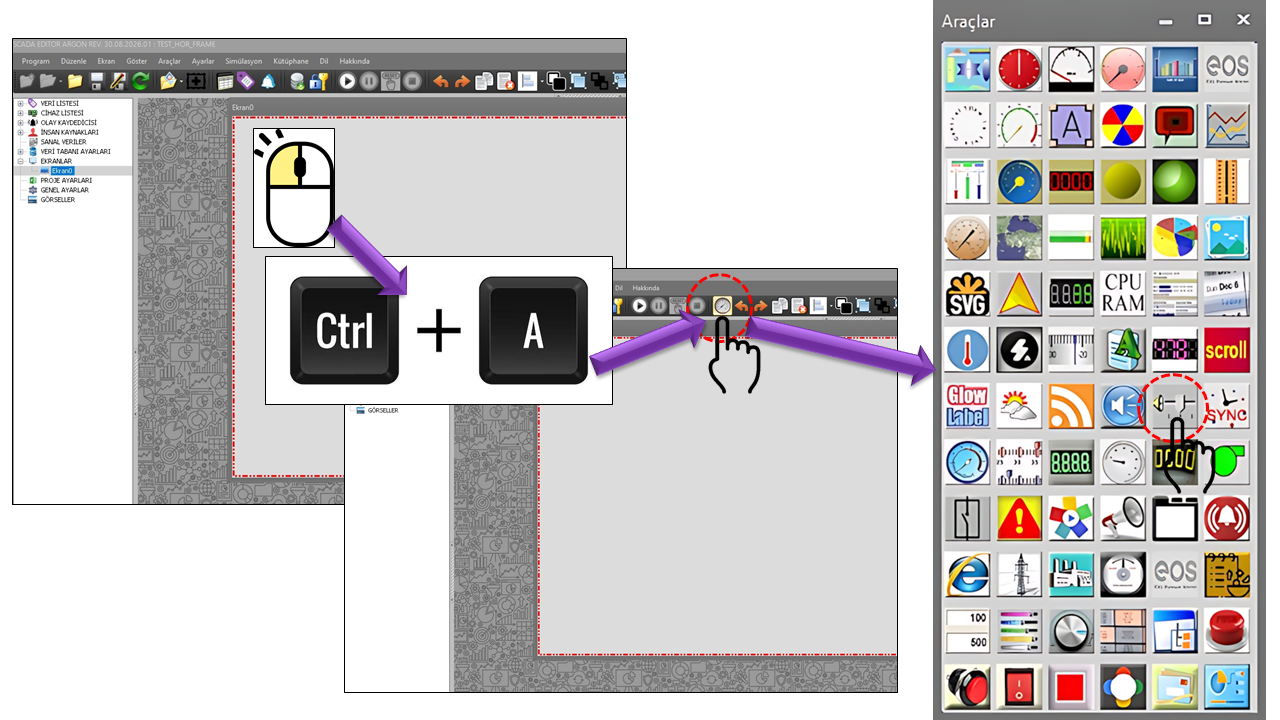
SESKONTROL is a user control that allows SCADA operators to manage the computer's audio output without leaving the operating screen. Its primary purpose is straightforward: adjusting the volume and muting the sound. This approach makes audio management a natural part of the SCADA screen, particularly in SCADA applications that use audible alarms and voice announcements.

Audio output is reduced by moving the volume slider to a lower level.
Audio output is increased by moving the slider to a higher level.
The sound can be muted completely, silencing audio output in a single operation.
The illustrated control features a horizontal volume slider, labels indicating the low-to-high range, and a separate Mute option. This layout allows the operator to perform two basic operations from the same area: adjusting the volume and muting the sound.
SCADA SCREEN · VOLUME LEVEL · MUTE
SESKONTROL allows the operator to manage the system's audio output directly without leaving the SCADA screen. The operator can decrease or increase the volume using the slider, or mute the sound completely by selecting the MUTE option. This makes it possible to control audible alarms and announcements quickly and conveniently from the SCADA screen, without switching to the Windows interface.
In SCADA systems, the ability of operators to perform necessary operations without leaving the process screen is important for ease of use and operational continuity. SESKONTROL brings volume settings directly to the SCADA screen, allowing operators to decrease, increase, or completely mute the sound without opening a separate Windows audio interface. This makes audio management a natural part of the screen on which the operator works.
SESKONTROL is particularly useful in operational environments where the SCADA screen also generates audible alarms or announcements. For example, control rooms, operator stations, panel-PC-based HMI applications, and continuous monitoring screens may require operators to adjust the volume quickly.
| Application Area | Role of SESKONTROL |
|---|---|
| Audible Alarm Screens | Adjusting the alarm volume or muting it directly from the operating screen. |
| Voice Announcement Systems | Allowing operators to quickly set announcements to an audible level. |
| Control Rooms | Keeping audio management within the process screen. |
| Panel PC / HMI | Providing basic audio control without switching to external Windows interfaces. |
| Operation and Monitoring Screens | Adjusting the volume according to operating conditions and muting it when necessary. |

On Windows, the Core Audio / EndpointVolume API family can be used to programmatically manage the master volume and mute state of audio endpoints. Microsoft's IAudioEndpointVolume interface supports retrieving and changing an audio endpoint's volume level and MUTE state. Volume can be managed in a normalized range of 0.0–1.0 or in decibels; it can also be controlled in discrete steps.
Microsoft also states that the EndpointVolume API can use hardware volume controls when available, and provide software-based control when hardware support is unavailable. Therefore, the purpose of an interface such as SESKONTROL is to provide a dedicated SCADA user control for Windows audio management. However, since the source code for SESKONTROL's internal implementation is not provided on this page, it is not assumed that any specific Windows API call is used.
The distinguishing feature of SESKONTROL is not that it provides a complex audio management screen, but that it combines the two basic operations operators need in a very simple interface: adjusting the volume and muting the sound. This makes audio management a natural part of the process screen in SCADA applications that use audible alarms and announcements.
SESKONTROL is a dedicated audio management user control added to the SCADA screen. It allows operators to decrease the volume, increase it, and mute the sound completely without switching to the Windows audio screen. Its horizontal volume slider and separate mute option make the purpose of the control clear and easy to understand.
Free Software Download Center
Software for industrial data collection, monitoring, and analysis.

Technical Support
Software documentation, sample code, and practical technical information.
You can contact us regarding EOS software, technical documentation, or industrial data communication.