Hourly Alarm
This is the Hourlyalarm option. It is used to create a regular, time-based audible notification scenario. It can provide the operator with an audible time signal at specified hourly intervals.
EOS SCADA • SOUND • AUDIBLE ALARM AND ANNOUNCEMENT CONTROL
SOUND is a specialized user control that provides SCADA screens with more than visual alarm indicators. It can generate audible alarms and announcements based on time, process values, or prayer times.
The control brings together different types of audible notifications within a single user control, ranging from time-based alarms and alarms scheduled for one, two, or three times to single-, dual-, or three-level warnings triggered by data values, as well as location-based prayer call (Adhan) scenarios.

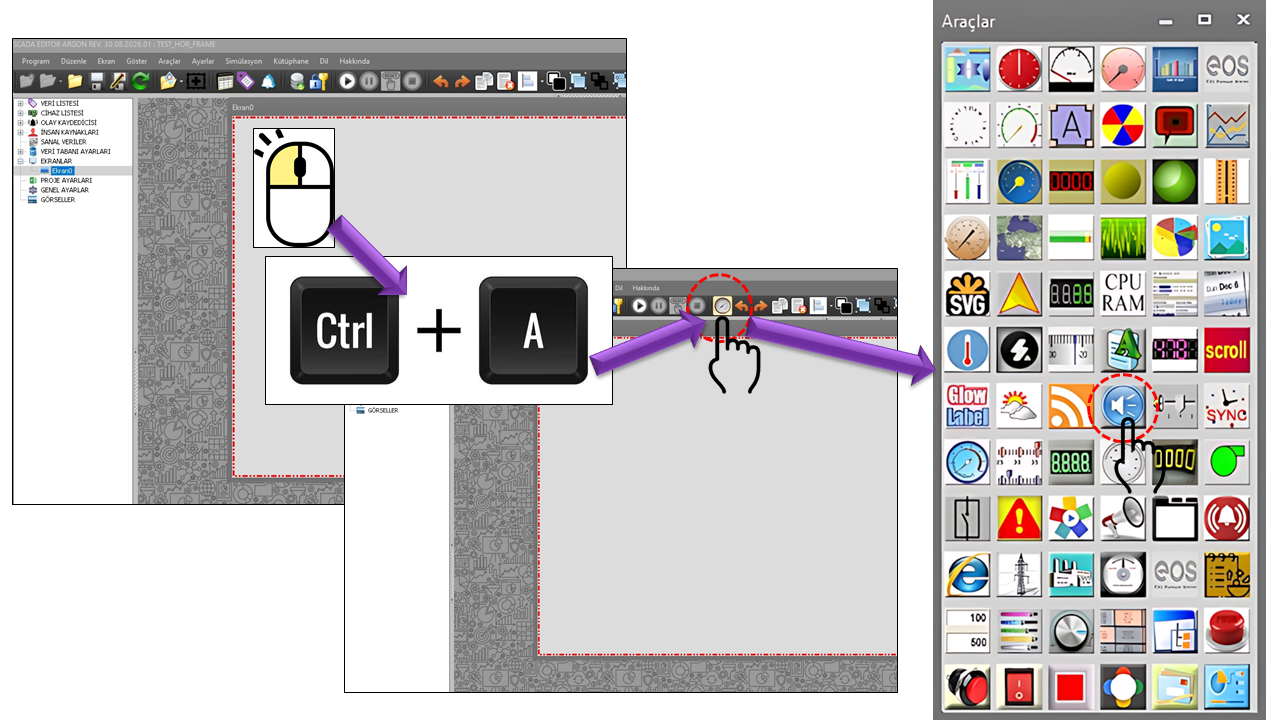
The SOUND user control is a specialized control designed to announce specific events audibly on SCADA screens without requiring the operator to be looking at the screen. In industrial HMI/SCADA systems, audible notifications can complement visual information; modern industrial applications can also deliver alarm notifications through sound, text, and other channels.


What makes SOUND distinctive: This control is not limited to simply playing an alarm sound. The GNSesliAlarmTuru enumeration in the source code defines different triggering modes within a single control, including hourly alerts, multiple scheduled times, data levels, and the call to prayer.
The most important feature of the SOUND control is its support for the following eight alarm types. Each type corresponds to a different operational scenario.
AUDIO OUTPUT · READY
This is the Hourlyalarm option. It is used to create a regular, time-based audible notification scenario. It can provide the operator with an audible time signal at specified hourly intervals.
This is the Calltoprayer option. It supports location-based prayer times through settings such as latitude, longitude, prayer calculation type, prayer calculation convention, and calculation method.
This is the Singlehouralarm option. It creates an audible alarm or announcement for a single hour-and-minute point during the day.
This is the Doublehouralarm option. Two different hour-and-minute points can be defined to create a two-time audible alarm scenario.
This is the Triplehouralarm option. Audible alarms or announcements can be scheduled for three different hour-and-minute points.
This is the Singlelevelwarning option. It evaluates a connected SCADA data point against a specified level and generates an audible warning when the condition is met.
This is the Doublelevelwarning option. It is used to create different or graduated audible warning scenarios based on two separate value levels.
This is the Triplelevelwarning option. Its three-threshold structure, using values such as MinValue, MedValue, and MaxValue, allows audible warnings to be issued at different process-value levels.
One of the strengths of the SOUND control is its ability to convert a SCADA data value into a spoken sentence in the format pre-announcement + data value + post-announcement, rather than merely displaying the value numerically.
Example: Suppose the production value is the SCADA data point connected to the control. When FirstPreAnnouncement = "Production", FirstEndAnnouncement = "MW", and the data value is 100, the spoken output is logically constructed as “Production 100 MW”. The corresponding pre-announcement and post-announcement fields can also be used for the second and third levels.
For time-based alarm types, the SOUND control uses hour and minute fields to generate automatic audible notifications at specified times of day.
| ALARM TYPE | TIME SETTINGS USED | PURPOSE |
|---|---|---|
| Single-Time Alarm | First Alarm Hour + First Alarm Minute | Audible alarm/announcement at one time point |
| Two-Time Alarm | First + Second hour/minute | Audible alarm/announcement at two time points |
| Three-Time Alarm | First + Second + Third hour/minute | Audible alarm/announcement at three time points |
The default times defined in the source code are 00:00, 08:00, and 16:00.
The Call to Prayer mode is one of the most distinctive features that sets the SOUND control apart from a conventional time alarm. The source code defines three separate prayer-time settings alongside latitude and longitude. External sources also calculate prayer times using location coordinates and a selected calculation method.
| SETTING | ENUMERATION OPTIONS | DESCRIPTION |
|---|---|---|
| Prayer Calculation Type | Jafari, Karachi, Isna, Mwl, Makkah, Egypt, Custom, Tehran | Selects the method used to calculate prayer times. |
| Prayer Calculation Convention | Shafii, Hanafi | Two jurisprudential calculation approaches are defined in the source code; similar prayer-time calculation libraries include a school-of-law setting that affects the Asr calculation. |
| Prayer Calculation Method | None, Midnight, One-Seventh, Angle-Based | These are the options defined in the source code. The names on this page follow the source code; the relevant implementation code is required to determine the exact algorithm used within EOS. |
Important: Different prayer-time calculation methods may produce different times for the same location. For example, MWL, ISNA, Egypt, Makkah, Karachi, Tehran, and Jafari methods use different astronomical parameters. Therefore, the selected method, convention, and location settings in the SOUND control must be considered together.
The following tables are based on the properties specified in the source code, their equivalents in the Türkçe_set2(2) dictionary, and their default values.
| PROPERTY | EOS ENGLISH EQUIVALENT | DEFAULT | DESCRIPTION |
|---|---|---|---|
UCType |
Control Type | SES | Defines the type of the user control. |
UpdateInterval |
Update Interval | 1000 | Specifies the control's update interval. |
DecimalPoint |
Decimal Places | 0 | Specifies the number of decimal places used when speaking or displaying numeric values. |
UCBackColor |
Control Background Color | Transparent | Specifies the control's background color. |
UCForeColor |
Control Text Color | Black | Specifies the control's primary text color. |
UCFont |
Control Font | Arial Narrow, 8.25 pt | Specifies the control's font. |
AlarmType |
Alarm Type | Hourlyalarm | Determines which audible alarm or announcement mode the SOUND control uses. |
HideControl |
Hide Control | false | Specifies whether the control is hidden. |
AlarmActive |
Alarm Active | false | Specifies whether the audible alarm behavior is enabled. |
| PROPERTY | EOS ENGLISH EQUIVALENT | DEFAULT | DESCRIPTION |
|---|---|---|---|
MinValue |
Minimum Value | 50 | Provides the lower value or threshold input for a multi-level warning scenario. |
MedValue |
Medium Value | 100 | Provides the intermediate value or threshold input for a multi-level warning scenario. |
MaxValue |
Maximum Value | 150 | Provides the upper value or threshold input for a multi-level warning scenario. |
Three-level operation: Using MinValue, MedValue, and MaxValue together provides a structure for evaluating a process value at three different levels. Since the source code does not specify the exact comparison operators used for these fields, only the threshold structure is described here.
To make audible warnings understandable, separate pre-announcement and post-announcement fields are defined for each alarm level.
| PROPERTY | EOS ENGLISH EQUIVALENT | DEFAULT | ROLE |
|---|---|---|---|
FirstPreAnnouncement |
First Announcement Pre-Announcement | "" | Text spoken before the data value for the first level or first announcement. |
FirstEndAnnouncement |
First Announcement Post-Announcement | "" | Text spoken after the data value. |
SecondPreAnnouncement |
Second Announcement Pre-Announcement | "" | Pre-announcement text for the second level. |
SecondEndAnnouncement |
Second Announcement Post-Announcement | "" | Post-announcement text for the second level. |
ThirdPreAnnouncement |
Third Announcement Pre-Announcement | "" | Pre-announcement text for the third level. |
ThirdEndAnnouncement |
Third Announcement Post-Announcement | "" | Post-announcement text for the third level. |
CustomAnnouncement |
Custom Announcement | "" | Text field defined in the source code for custom announcement content. |
The GNSesliAlarmTuru options in the source code define the following eight operating modes.
| ENUMERATION OPTION | ENGLISH EQUIVALENT | OPERATING MODE |
|---|---|---|
Hourlyalarm |
Hourly Alarm | Regular time-based audible notification. |
Calltoprayer |
Call to Prayer | Audible call-to-prayer scenario based on location and prayer-time settings. |
Singlehouralarm |
Single-Time Alarm | Alarm or announcement at one time point. |
Doublehouralarm |
Two-Time Alarm | Alarm or announcement at two time points. |
Triplehouralarm |
Three-Time Alarm | Alarm or announcement at three time points. |
Singlelevelwarning |
Single-Level Warning | Audible warning associated with one value level. |
Doublelevelwarning |
Two-Level Warning | Audible warning associated with two value levels. |
Triplelevelwarning |
Three-Level Warning | Audible warning associated with three value levels. |
The prayer calculation type options in the source code largely correspond to widely used calculation methods found in external sources. For example, Pray Times and AlAdhan list methods such as MWL, ISNA, Egypt, Makkah, Karachi, Tehran, and Jafari. citeturn0search0turn0search3
| OPTION | DESCRIPTION |
|---|---|
Jafari |
Jafari calculation method. |
Karachi |
Karachi calculation method. |
Isna |
ISNA — Islamic Society of North America method. |
Mwl |
MWL — Muslim World League method. |
Makkah |
Umm al-Qura / Makkah method. |
Egypt |
Egyptian General Authority of Survey method. |
Custom |
Custom method; defined as a custom option in the source code. |
Tehran |
Tehran / Institute of Geophysics method. |
| OPTION | ENGLISH EQUIVALENT | DESCRIPTION |
|---|---|---|
Shafii |
Shafii | The jurisprudential/school-of-law option defined in the source code. |
Hanafi |
Hanafi | The jurisprudential/school-of-law option defined in the source code; this is the default value. |
Prayer-time calculation documentation from external sources indicates that this type of school-of-law or jurisprudence setting can particularly affect the start time of Asr.
| OPTION | ENGLISH EQUIVALENT | DESCRIPTION |
|---|---|---|
None |
None | An option indicating that no additional calculation setting is applied. |
Midnight |
Midnight | A midnight-based approach. |
Oneseventh |
One-Seventh | The one-seventh approach defined in the source code. |
Anglebased |
Angle-Based | The angle-based approach defined in the source code. |
Source fidelity note: The names of these four options are taken from the source code. Although external sources describe similar concepts related to high-latitude and midnight settings, the supplied source code does not show which mathematical formulas the EOS SOUND control uses to implement these options.
| PROPERTY | EOS ENGLISH EQUIVALENT | DEFAULT | DESCRIPTION |
|---|---|---|---|
Latitude |
Latitude | 39.912345 | The latitude used for prayer-time calculations. The dictionary lists the equivalent as “Latitude”. |
Longitude |
Longitude | 32.827058 | The longitude used for prayer-time calculations. |
Location accuracy matters: Prayer-time calculation systems use geographic coordinates as fundamental inputs. Therefore, the Latitude/Longitude values must correspond to the actual installation location.
Connected data point: Production. FirstPreAnnouncement = "Production", FirstEndAnnouncement = "MW". When the data value is 100, the example spoken message is: “Production 100 MW”.
Define MinValue, MedValue, and MaxValue levels for a process variable such as production, pressure, or temperature. Separate pre-announcement and post-announcement texts can be used for each level.
Select Three-Time Alarm to define three time points, such as 00:00, 08:00, and 16:00, and trigger an audible notification scenario at each time.
Select Calltoprayer for AlarmType, then configure the prayer calculation type, prayer calculation convention, and prayer calculation method together with Latitude/Longitude. The control can then be configured for a call-to-prayer scenario based on calculated times for the specified location.

The behavior of the SOUND control on the EOS side is described according to the supplied source code. The following external sources were used for general terminology related to prayer-time calculation methods and industrial audible alarm practices.
Note: External sources do not define the internal algorithm of the EOS SOUND control. EOS-specific behavior is described according to the properties and options in the source code.
SOUND is one of the distinctive user controls in EOS SCADA, bringing audible awareness to SCADA screens. It supports eight operating modes: hourly alarms, single-, two-, and three-time alarms, single-, two-, and three-level warnings, and the call to prayer. In particular, the combination of a pre-announcement, live data value, and post-announcement, as in “Production 100 MW”, is a key feature that distinguishes this control from conventional fixed sound effects.
SOUND = Time + Data + Level + Announcement + Call to Prayer
A single user control combines time-based alarms, audible warnings based on data values, spoken announcements, and a location-based approach to prayer-time calculation.

Free Software Download Center
Software for industrial data collection, monitoring, and analysis.

Technical Support
Software documentation, sample code, and practical technical information.
You can contact us regarding EOS software, technical documentation, or industrial data communication.