Start / Trigger
Transmit a command input to the controller that remains active while the operator presses the button.
EOS SCADA • TACT BUTTON • TACT COMMAND • AUTHORIZATION
TACT BUTTON is a user control used to send commands from a SCADA screen to a controller, directly reflecting the pressed and released states of the button.
The most important feature of this control is that it has only one operating mode: TACT. PUSH mode is not available in this control.

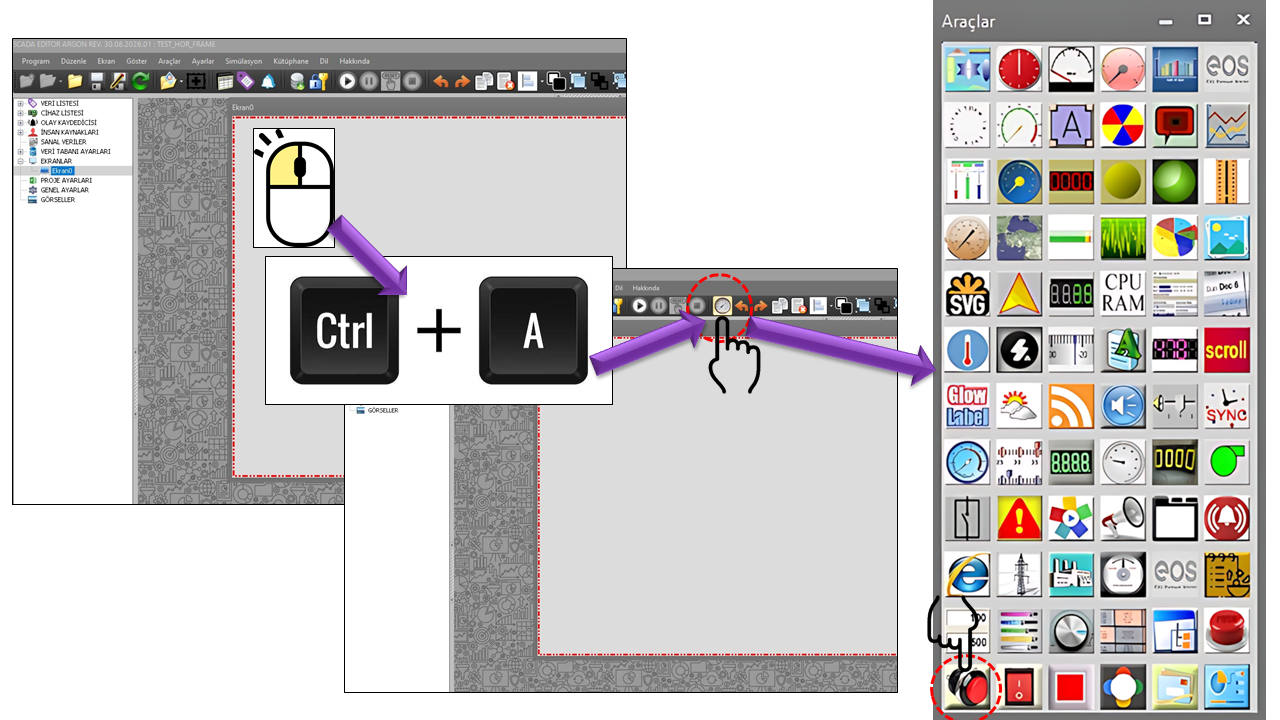
TACT_BUTTON converts press and release events into command states, following the operating principle of physical momentary switches. When pressed, an ON value is sent to the controller; when released, an OFF value is sent.
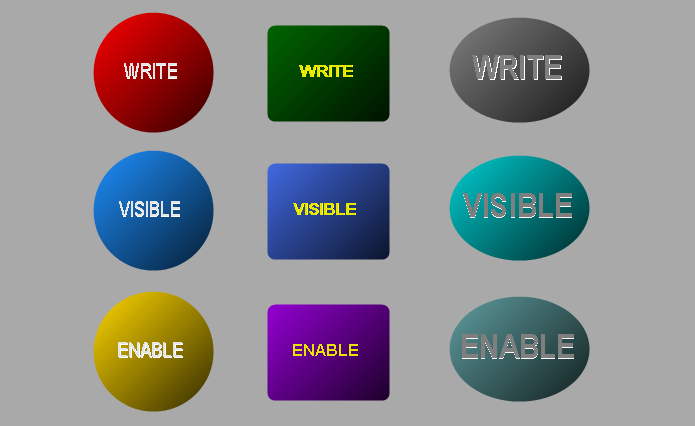
In a real momentary switch, pressing the button closes the circuit, and releasing it opens the circuit again. TACT_BUTTON applies the same basic concept to SCADA/HMI command logic.
Important: TACT_BUTTON should not be treated as a purely visual display control. Since it sends commands to the controller, an incorrect tag, incorrect ON/OFF values, or improper authorization can affect process behavior.
TACT_BUTTON operates only in TACT mode. This user control does not have a PUSH mode. Therefore, no PUSH option is offered on this page, and the control's operating model is not described in terms of a "momentary PUSH" selection.
When the button is pressed, the ON value is sent. When the user releases the button, the OFF value is sent. This is momentary behavior, in which the ON state remains active for as long as the button is held down.
PUSH mode is not an operating mode of TACT_BUTTON. Therefore, no mode selection between PUSH and TACT is available for TACT_BUTTON.
TACT_BUTTON = press → ON → hold → release → OFF.
This behavior is consistent with the momentary-button approach used in industrial HMIs; pressing can be processed as State 1 and releasing as State 0.
The operating logic of TACT_BUTTON can be considered in the following sequence from the perspective of SCADA–controller communication. The ON/OFF values entered by the user do not have to be 1/0; different values may be used depending on the control configuration.
The value sent to the controller when the button is pressed. In the default operating model, this value can be considered 1.
The value sent to the controller when the button is released. In the default operating model, this value can be considered 0.
PRESS → ON VALUEHOLD → ON STATERELEASE → OFF VALUE
Note: The provided TACT_BUTTON source code does not contain a separate PUSH mode or a PUSH-specific timing property. This page is based on the TACT behavior defined by the user.
The AuthorizationLevel property is critical because TACT_BUTTON can send commands directly to the controller. A button being visible on an HMI screen is not the same as being able to execute its command. Restricting user permissions for functions that can send commands is an important practice in industrial HMI security. Siemens also emphasizes restricting access through HMI user management, roles, and function permissions.
The TACT_BUTTON source code defines five authorization levels. The level permitted to send commands should be determined according to the application's process risks and the organization's authorization model.
If an incorrectly authorized user operates the momentary button, it may trigger an unintended action in the connected controller. For commands involving motors, pumps, valves, moving equipment, or process start/stop operations, authorization must be evaluated together with tag connections and the controller's safety logic.
The TACT_BUTTON source code provides separate text and color properties for the normal and pressed states. These properties allow the operator to visually distinguish whether the button is currently being pressed.
| Property | Description | Default | Explanation |
|---|---|---|---|
ButtonShape |
Button Shape | Circular |
Defines the geometric shape of the button. |
ButtonAlpha |
Button Alpha | 20 |
The alpha value used in the button's appearance. |
ButtonLabelEffect |
Button Label Effect | true |
Determines whether a visual effect is applied to the button label. |
DefaultText |
Default Text | TACT |
The text displayed when the button is in its normal state. |
PressedText |
Pressed Text | TACT |
The text displayed when the button is pressed. |
DefaultColor |
Default Color | Red |
The button's color in its normal state. |
PressedColor |
Pressed Color | Lime |
The button's color in its pressed state. |
DefaultTextColor |
Default Text Color | Black |
The text color in the normal state. |
PressedTextColor |
Pressed Text Color | Black |
The text color in the pressed state. |
| Technical Value | Description |
|---|---|
Circular |
Circle |
Rectangular |
Rectangle |
Elliptical |
Ellipse |
| Property | Description | Default | Explanation |
|---|---|---|---|
UCType |
Control Type | TACT_BUTTON |
Defines the type of the user control. |
UCName |
Control Name | — | Specifies the name of the control instance. |
GROUPID |
Group ID | "" |
The identifier of the group to which the control belongs. |
UpdateInterval |
Update Interval | 1000 ms |
The control's default update interval. |
DecimalPoint |
Decimal Places | 0 |
A general numeric display setting. |
UCBackColor |
Control Background Color | Transparent |
Defines the control's background color. |
UCForeColor |
Control Foreground Color | Black |
The control's primary text/foreground color. |
UCFont |
Control Font | Arial Narrow, 42 pt |
Defines the control's primary font. |
LevelThreshold |
Level Threshold | 0.5 |
The level threshold defined in the source code; the provided code does not explain the detailed algorithm. |
AuthorizationLevel defines the user's authorization level for operating TACT_BUTTON. The default value in the source code is Monitor.
| Technical Value | Description | Explanation |
|---|---|---|
None |
No Authorization | No authorization level is granted. |
Monitor |
Monitoring | The default authorization level in the source code. |
Operation |
Operation | Can be used for users at the operation level. |
Engineering |
Engineering | Can be used for users at the engineering level. |
Superuser |
Superuser | The highest authorization level defined in the source code. |
The application of TACT_BUTTON depends on the function performed by the connected tag on the controller side. The TACT approach is particularly useful in scenarios where the operator must keep a command active while pressing and terminate it upon release. The same principle is used in similar momentary HMI buttons through state transitions such as 1 when pressed and 0 when released.
Transmit a command input to the controller that remains active while the operator presses the button.
Associate an equipment's manual control input with the duration of the button press.
Use in applications where pressing and releasing must translate into two separate command states.
Restrict a user control capable of sending commands according to defined authorization levels.
Note: These examples do not mean that TACT_BUTTON is specific to any particular piece of equipment. Actual process behavior is determined by the tag connected to the button and the controller program.
For a user control that sends commands, it is important to verify the connection, ON/OFF values, and authorization logic before working on the visual design.
Before TACT_BUTTON is connected to an actual controller command, it should be verified in a test environment or as part of a controlled commissioning procedure. A correct color change on the screen does not mean that the controller command is correct for the process.
TACT_BUTTON (MOMENTARY BUTTON) is a user control on a SCADA screen that directly converts press and release states into commands sent to the controller, using a single-mode TACT operating model.
PRESS → ONHOLD → ON STATERELEASE → OFF
This control does not have a PUSH mode. The correct tag, appropriate ON/OFF values, and suitable AuthorizationLevel must be considered together.
Free Software Download Center
Software for industrial data collection, monitoring, and analysis.

Technical Support
Software documentation, sample code, and practical technical information.
You can contact us regarding EOS software, technical documentation, or industrial data communication.