1. DATE
Used to display only the date. It provides a simple date field on operator screens where displaying the time is unnecessary.
29.09.2026
EOS SCADA • DATE AND TIME • MULTIPLE DISPLAY FORMATS • SCREEN DESIGN
DATE AND TIME (TARIH_SAAT) is a user control designed to make it easy and convenient to display date and time information on SCADA screens. It provides multiple display formats within a single control, including single-line, two-line, date-only, time-only, panel-style, and LED clock displays.
The six display types defined in the source code by TSBagliDegerTuru form the foundation of this control's visual display logic. Evaluating each type separately is important for determining how information should be presented in a screen design.

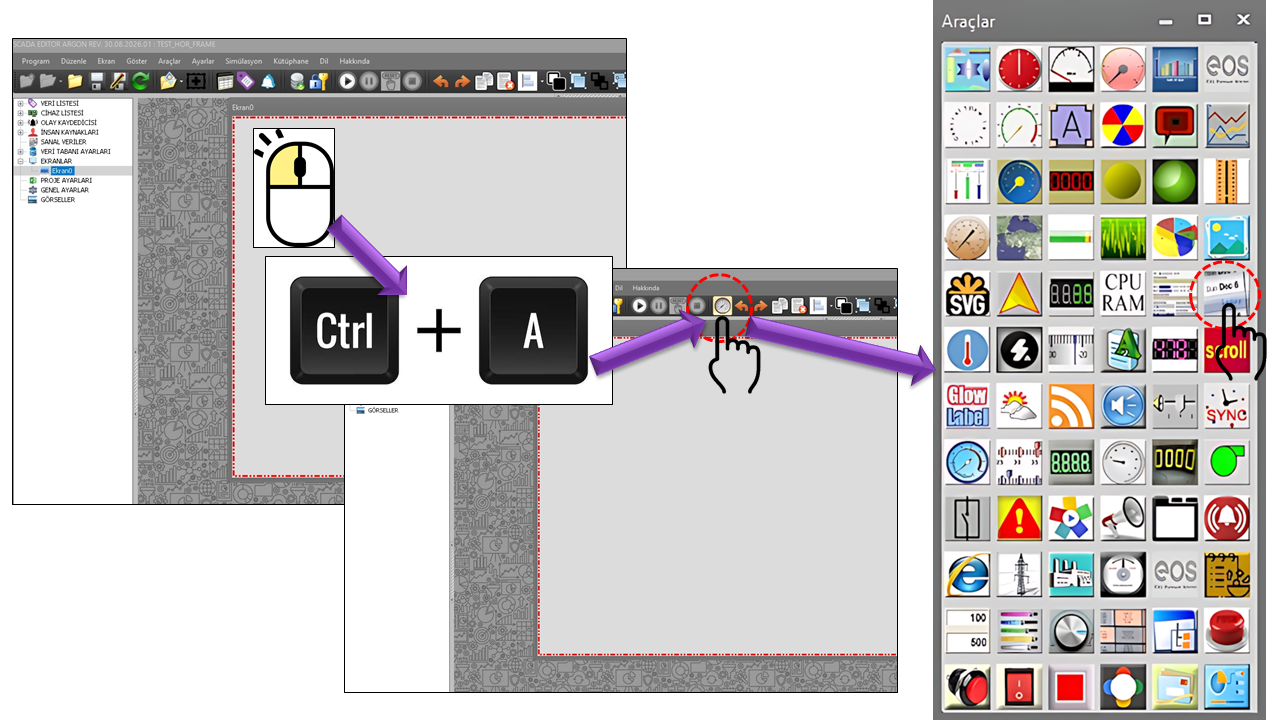
TARIH_SAAT is a user control that keeps time information continuously visible on the operator screen. Although visually simple, it can be adapted to different use cases. Since UpdateInterval=1000 is defined in the source code, the control's basic update interval is 1000 milliseconds.
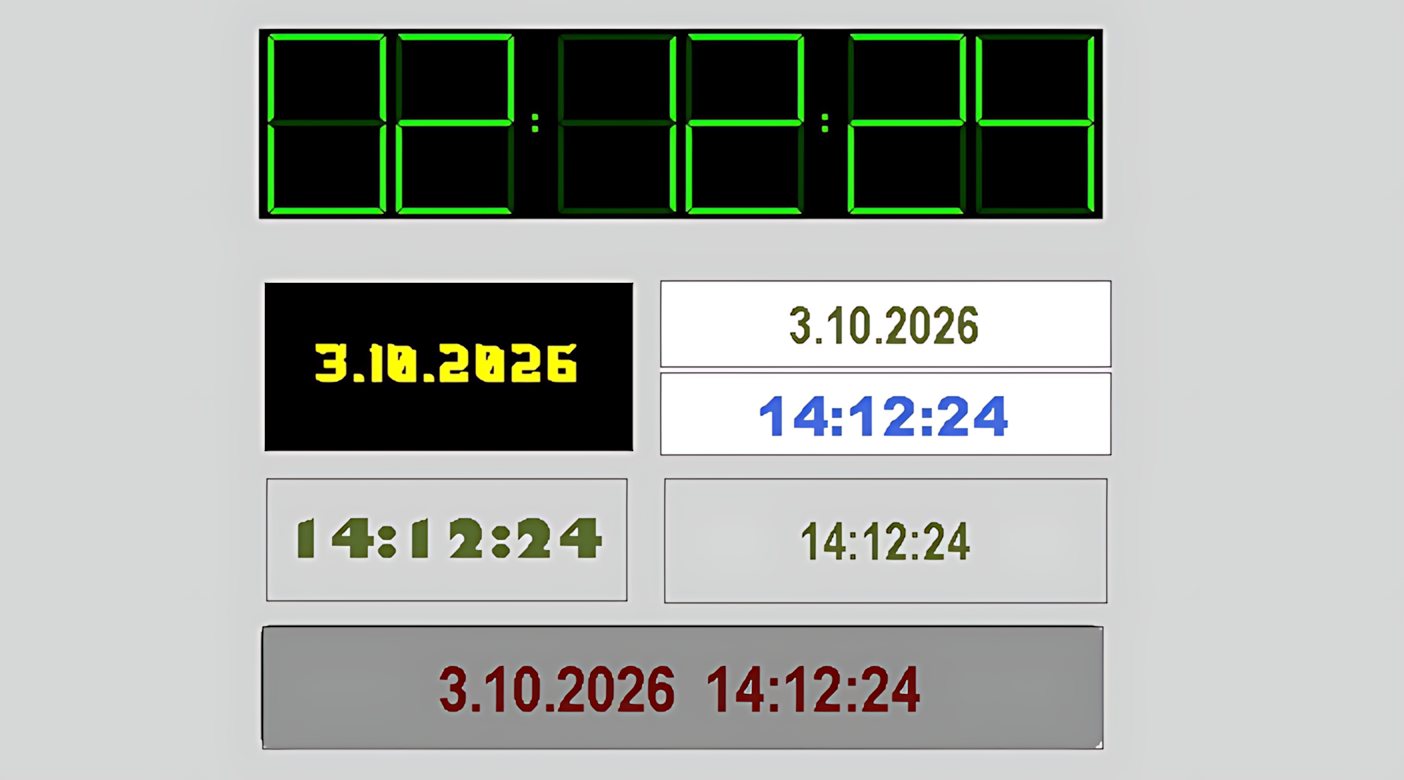
The six options below constitute the complete TSBagliDegerTuru enumeration
in the source code. Each option is therefore explained under a separate heading, with
particular emphasis on the information layout it represents.
TSBagliDegerTuru → Date / Time / Singlelinedatetime / Ledtime / Doublelinedatetime
The DataType property is defined in the source code with
TSBagliDegerTuru.Ledtime as its default value. The six options below determine
how the control presents date and time information.
Used to display only the date. It provides a simple date field on operator screens where displaying the time is unnecessary.
Displays only the time. It is suitable for areas where the current time needs to take precedence over the date.
Combines the date and time on a single line. It provides a compact time display for narrow or single-line information fields.
Presents the time in a format intended for an LED clock display. Since
Ledtime is the default DataType value in the source code,
this is the initial display type.
Displays the date and time on two separate lines. It can be used in screen layouts where the date and time need to be visually distinguished from each other.
The six options do not simply repeat the same information under different names. They provide different presentation formats in terms of screen information density, available width, and visual hierarchy. Therefore, the choices of Date, Time, Singlelinedatetime, Ledtime, and Doublelinedatetime should be considered part of the screen design.
The TARIH_SAAT source code contains independent color, font, and text-alignment properties for two separate lines. This structure makes it possible to visually distinguish the date from the time, especially in the two-line date and time display mode.
TopLineBackColor • Top Line Background Color
TopLineForeColor • Top Line Foreground Color
TopLineFont • Top Line Font
TopLineTextAlignment • Top Line Text Alignment
BottomLineBackColor • Bottom Line Background Color
BottomLineForeColor • Bottom Line Foreground Color
BottomLineFont • Bottom Line Font
BottomLineTextAlignment • Bottom Line Text Alignment
Transparent, the foreground
color is Lime, the font is Arial Narrow 9.75f Bold, and text
alignment is set to Middlecenter.
The TopLineTextAlignment and BottomLineTextAlignment properties
use the GNKonum type. The source code defines a total of nine alignment options.
These are used to determine the position of text on the screen.
| Technical Value | Description | Position |
|---|---|---|
Topleft |
Top Left | Upper left |
Topcenter |
Top Center | Top center |
Topright |
Top Right | Upper right |
Middleleft |
Middle Left | Center left |
Middlecenter |
Middle Center | Center |
Middleright |
Middle Right | Center right |
Bottomleft |
Bottom Left | Lower left |
Bottomcenter |
Bottom Center | Bottom center |
Bottomright |
Bottom Right | Lower right |
The BorderStyle property uses the GNCerceveTuru type to determine
the control's border style. Three options are defined in the source code.
| Technical Value | Description | Explanation |
|---|---|---|
None |
None | No border is used for the control. |
Fixedsingle |
Fixed Single | A fixed single-line border style is used. |
Fixed3d |
Fixed 3D | A fixed three-dimensional border style is used. |
BorderStyle = None,
TARIH_SAAT initially uses a borderless display.
The following table brings together the general and visual properties explicitly defined in the provided TARIH_SAAT source code. The terminology in the Turkish descriptions is based on the Türkçe_set2(3).txt dictionary.
| Technical Property | Description | Default | Explanation |
|---|---|---|---|
UCType |
Control Type | TARIH_SAAT |
Defines the type of the user control. |
UpdateInterval |
Update Interval | 1000 ms |
Defines the control's basic update interval. |
DecimalPoint |
Decimal Places | 0 |
The general numeric display setting defined in the source code. |
UCBackColor |
Control Background Color | Transparent |
Defines the control's general background color. |
UCForeColor |
Control Foreground Color | Lime |
Defines the control's general text/foreground color. |
UCFont |
Control Font | Arial Narrow 9.75f Bold |
Defines the control's primary font and style. |
TopLineBackColor |
Top Line Background Color | Transparent |
Defines the top line's background color. |
TopLineForeColor |
Top Line Foreground Color | Lime |
Defines the foreground color of the top line's text. |
TopLineFont |
Top Line Font | Arial Narrow 9.75f Bold |
Defines the font and style used on the top line. |
TopLineTextAlignment |
Top Line Text Alignment | Middlecenter |
Defines the position of the top line's text. |
BottomLineBackColor |
Bottom Line Background Color | Transparent |
Defines the bottom line's background color. |
BottomLineForeColor |
Bottom Line Foreground Color | Lime |
Defines the foreground color of the bottom line's text. |
BottomLineFont |
Bottom Line Font | Arial Narrow 9.75f Bold |
Defines the font and style used on the bottom line. |
BottomLineTextAlignment |
Bottom Line Text Alignment | Middlecenter |
Defines the position of the bottom line's text. |
BorderStyle |
Border Style | None |
Defines the control's border style. |
TopMargin |
Top Margin | 1 |
The top margin value defined in the source code. |
DataType |
Data Type | Ledtime |
Determines the display format used for date and time information. |
Rather than controlling specific process equipment, TARIH_SAAT is a display control that organizes time information on the screen. Its applications therefore depend on the areas of the screen where operators need access to the date and time.
Can be used to keep the current date continuously visible in the upper section of the screen.
Can be used to let operators monitor the current time without leaving the process screen.
Can be used where the date and time need to be separated into two lines for improved readability.
Can be used in screen designs where an LED clock appearance is preferred.
Note: These use cases are examples for screen design based on the control's definition in the source code. The source code does not require the control to be used with any specific process equipment.
When adding TARIH_SAAT to a screen, the control produces a more organized and readable result if you first decide which time information to display and then determine how it should be laid out.
DataType.GNKonum.BorderStyle.In particular, the screen area's width and line height should be considered when using Singlelinedatetime and Doublelinedatetime. In LED clock or panel-style displays, font, color, and background contrast directly affect readability.
TARIH_SAAT is a user control designed to display date and time information easily and conveniently on SCADA screens. It can be adapted to different screen layouts. Its most distinctive feature is the six different display formats defined in TSBagliDegerTuru.
Date → Time → Single-Line Date and Time → LED Clock → Two-Line Date and Time
In addition, independent color, font, and alignment properties for the top and bottom lines, together with the GNKonum and GNCerceveTuru options, make it easier to adapt the control to SCADA screen designs.

Free Software Download Center
Software for industrial data collection, monitoring, and analysis.

Technical Support
Software documentation, sample code, and practical technical information.
You can contact us regarding EOS software, technical documentation, or industrial data communication.