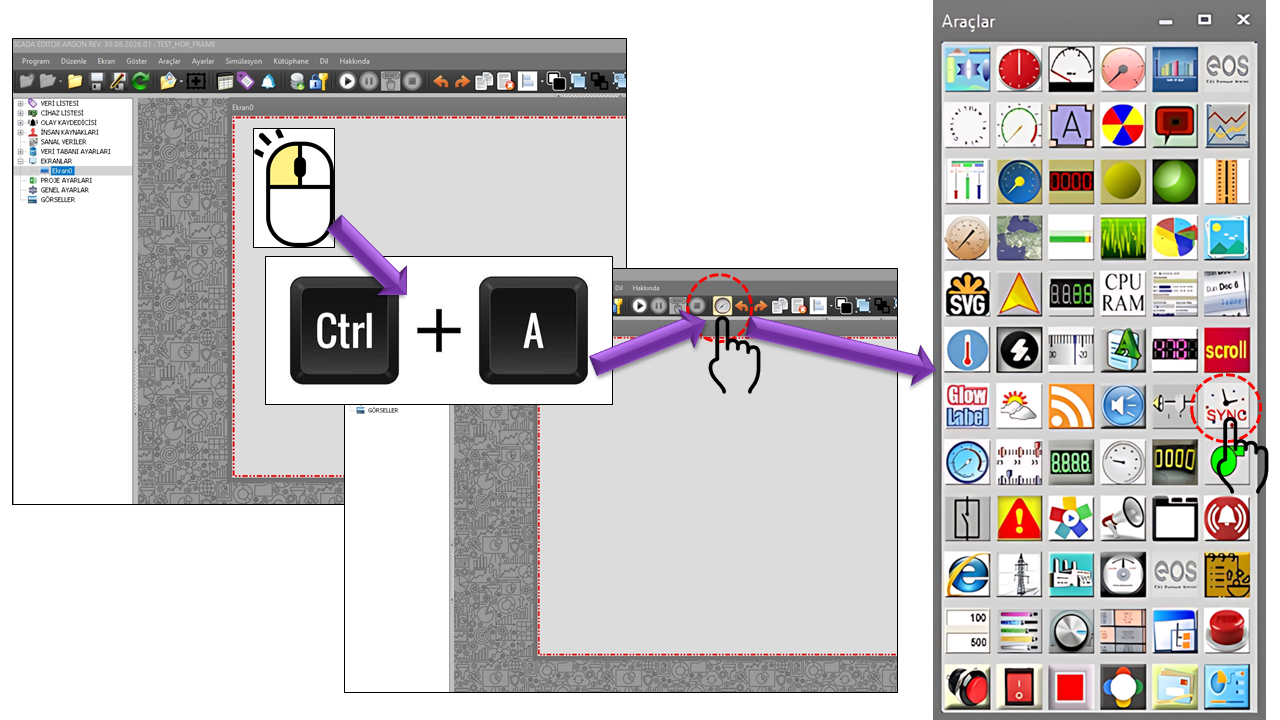
In industrial automation systems, consistent computer clocks are important for comparing
event logs, alarm timestamps, trend data, reports, and records received from different
stations. TIME_SYNC aims to provide this capability on the SCADA screen
by supporting different time sources.
TIME_SYNC
TIME SOURCE SELECTED
12:31:45
NTP / GPS / WEB / RFC 868 / RFC 867
SOURCETime service
COMMUNICATIONNetwork or serial port
RECEPTIONTime data
SYNCHRONIZATIONSystem clock
SCADAConsistent time
Basic approach:
The method used by TIME_SYNC is associated with TimeSyncMode.
Depending on the selected method, server lists or serial communication parameters
are used.
Time Synchronization Methods
The following methods can be associated with fields in the TIME_SYNC source code.
Each method uses a different time source and communication model. The GPS method, in
particular, is based on serial communication and requires a physical GPS receiver and
a suitable antenna to be connected to the computer.
NTP — Network Time
Network Time Protocol (NTP) is a widely used protocol for
synchronizing computer clocks with time servers over a network. NTPv4 defines
a synchronization architecture that takes factors such as the time difference
between client and server and network delay into account. NTP operates over
UDP and uses port 123 for standard client requests.
Field in the source code: NPTServerList
time1.google.com
# Default value in the source code
One detail is important here: the property name is written as
NPTServerList in the source code. This page preserves the
original name exactly; the correct technical name of the protocol is
NTP.
GPS — Satellite Time
GPS-based synchronization requires a GPS/GNSS receiver and a
suitable GPS antenna to be connected to the computer. The
receiver can send NMEA sentences through a serial port. In the TIME_SYNC
source code, GPGLL is specifically provided as the default
NMEA sentence type.
In addition to position information, a GPGLL sentence can contain
UTC time and indicate whether the data is valid. It can
therefore serve as a GPS data source for time synchronization.
$GPGLL,4916.45,N,12311.12,W,225444,A*hh
# 225444 → 22:54:44 UTC
# A      → Valid data
WEB — Web-Based Time
The TIME_SYNC source code contains the WEBServerList field for
a web-based source, with www.time.gov as its default value.
According to NIST's description of time.gov, the website uses a JavaScript-based
mechanism that compares the local clock in the browser with time information
obtained from a NIST server.
www.time.gov
# Default WEB server in the source code
Important: NIST does not describe time.gov as a service for
measuring frequency or time intervals, or for establishing traceability to
NIST. Therefore, the WEB method in TIME_SYNC should be evaluated alongside
the actual implementation behavior of the source code.
RFC 868 — TIME Protocol
The RFC 868 Time Protocol is an older Internet time protocol
that provides machine-readable time information as a number of seconds.
According to RFC 868, the service can operate over TCP or UDP port
37, and the time is sent as the number of seconds elapsed since
January 1, 1900, at 00:00 UTC.
time-a.nist.gov
# Default value of RFC868ServerList in the source code
This server name is taken from the source code. Before using it in a current
system, verify that the relevant server and network firewall actually support
the RFC 868/TIME service.
RFC 867 — Daytime Protocol
The RFC 867 Daytime Protocol is a classic time service that
sends time as an ASCII character string rather than a binary
counter intended for machine interpretation. RFC 867 specifies
port 13 over TCP or UDP.
time-a.nist.gov
# Default value of RFC867ServerList in the source code
RFC 867 does not require a specific text format; the service may return a
one-line date/time string. Therefore, correct interpretation of the received
text depends on the client-side implementation.
About Older Internet Time Protocols
RFC 867 and RFC 868 are classic protocols dating from 1983. Because of firewalls,
network policies, and server-side service availability, these services should not
be assumed to be accessible in every environment. Access to the selected server
and port must also be verified on the site network.
In NTP, the TIME_SYNC client attempts to determine the system clock's offset relative
to UTC by obtaining time samples from one or more time servers. The NTPv4 architecture
uses timestamps between clients and servers; its algorithms evaluate statistics such
as delay, offset, dispersion, and jitter.
1Server
Select an NTP time source.
2Request
Obtain time information over the network.
3Offset
Evaluate clock difference and delay.
4Synchronization
Adjust the system clock as appropriate.
The TIME_SYNC source code specifies time1.google.com as the NTP server.
This should be understood as an example configuration value. Servers used in production
should be selected according to the organization's network architecture and time
infrastructure.
GPS / NMEA Synchronization
The GPS method is particularly noteworthy when a time source independent of an Internet
connection is required. For this purpose, a GPS module/GNSS receiver
must be connected to the computer, together with a GPS antenna
positioned so that the receiver has an adequate view of the sky.
GPS Receiver
The hardware that obtains time information from satellite signals is connected to provide serial data to the computer.
GPS Antenna
A suitable antenna and mounting location are required for the receiver to acquire satellite signals.
NMEA Data
The GPS receiver can send standard NMEA sentences through a serial port; the NMEA sentence type is selected separately in TIME_SYNC.
UTC Time
Sentences such as GPGLL may contain a UTC time field that can be used for synchronization.
GPGLL Example
$GPGLL,3953.8800,N,03252.0000,E,093015.00,A*hh

3953.8800,N  → Latitude
03252.0000,E → Longitude
093015.00    → 09:30:15 UTC
A            → Data valid
NMEA 0183 is an interface standard used to transmit information such as time and
position as ASCII sentences over serial data connections. The official NMEA description
identifies 4800 baud as the basic serial data rate; however, the actual configuration
of a GPS receiver may vary by manufacturer and device. This is why TIME_SYNC includes
the BaudRate, DataBits, Parity, and
StopBits fields.
GPS Serial Communication Settings
When the GPS/NMEA method is selected, the serial communication parameters of the
computer and GPS receiver must match so that time data can be read correctly.
The values below are defined directly in the TIME_SYNC source code.
| Property |
Description |
Default |
Explanation |
ComPort |
COM Port |
Com5 |
The serial port from which GPS/NMEA data is read. |
NmeaType |
NMEA Type |
Gpgll |
The type of NMEA sentence to be read. |
DataType |
Data Type |
Text |
The data type used to process serial data. |
BaudRate |
Baud Rate |
Baud36000 |
Serial communication data rate. It must match the GPS receiver's setting. |
DataBits |
Data Bits |
Eight |
The number of data bits in a serial data character. |
Parity |
Parity |
None |
Determines whether parity checking is used. |
StopBits |
Stop Bits |
One |
The stop-bit setting in the serial data frame. |
Do Not Confuse Source Code Defaults with Field Device Settings
The presence of Baud36000 in the source code does not mean that every
GPS device operates at 36000 baud. The GPS receiver's actual serial communication
settings should be checked in its documentation, and TIME_SYNC parameters should
be configured accordingly.
Comparison of RFC 868 and RFC 867
Both protocols are classic Internet time services, but they return data in different
formats. This difference matters when TIME_SYNC interprets the received time information.
| Property |
RFC 868 |
RFC 867 |
| Protocol name |
Time Protocol |
Daytime Protocol |
| Basic data |
32-bit time value |
ASCII date/time text |
| TCP |
Port 37 |
Port 13 |
| UDP |
Port 37 |
Port 13 |
| Source code field |
RFC868ServerList |
RFC867ServerList |
| Default server |
time-a.nist.gov |
time-a.nist.gov |
RFC 868 defines time as a machine-readable value representing the number of seconds
since January 1, 1900. RFC 867 sends the date and time as a character string and does
not require a specific syntax. RFC 867 itself also refers to RFC 868 for machine-usable
time information.
The following table presents the properties in the provided TIME_SYNC source code and
their descriptions using the terminology in the dictionary. Behaviors not defined in
the source code have not been added to the property descriptions.
| Property |
Description |
Default |
Explanation |
UCType |
Control Type |
TIME_SYNC |
The type of the user control. |
UpdateInterval |
Update Interval |
1000 |
The control's update interval. |
DecimalPoint |
Decimal Places |
0 |
The decimal-place setting for numeric display. |
UCBackColor |
Control Background Color |
Transparent |
The control's background color. |
UCForeColor |
Control Foreground Color |
Black |
The control's text color. |
UCFont |
Control Font |
Arial Narrow, 8.25f |
The control's font and size. |
TimeSyncMode |
Time Synchronization Mode |
Ntp |
The time synchronization method to be used. |
PersistenceMode |
Persistence Mode |
true |
A source code setting that determines persistence behavior. |
RFC868ServerList |
RFC 868 Server List |
time-a.nist.gov |
The server list for the RFC 868 time service. |
RFC867ServerList |
RFC 867 Server List |
time-a.nist.gov |
The server list for the RFC 867 Daytime service. |
WEBServerList |
WEB Server List |
www.time.gov |
The list of web-based time sources. |
NPTServerList |
NPT Server List |
time1.google.com |
The NTP server list defined under this name in the source code. |
ComPort |
COM Port |
Com5 |
The GPS/NMEA serial port. |
NmeaType |
NMEA Type |
Gpgll |
The GPS/NMEA sentence type. |
DataType |
Data Type |
Text |
The serial data processing type. |
BaudRate |
Baud Rate |
Baud36000 |
The serial communication rate. |
DataBits |
Data Bits |
Eight |
The number of serial data bits. |
Parity |
Parity |
None |
Parity checking. |
StopBits |
Stop Bits |
One |
The serial communication stop-bit setting. |
Option Sets and Enums in the Source Code
In the TIME_SYNC source code, some property values are defined using enum types.
The following list shows the default enum values explicitly visible in the supplied
source code. Since not all enum members were provided, no additional options absent
from the source have been assumed.
| Enum Type |
Selected Value |
English Description |
GNTimeSync |
Ntp |
NTP-based time synchronization. |
GNComPort |
Com5 |
COM5 serial port. |
GNNmeaTuru |
Gpgll |
GPGLL NMEA sentence. |
GNVeriModu |
Text |
Text-based data mode. |
GNBaudHizi |
Baud36000 |
The 36000 baud value in the source code. |
GNVeriBiti |
Eight |
8 data bits. |
GNParite |
None |
No parity. |
GNDurmaBiti |
One |
1 stop bit. |
Recommended Configuration Sequence
When commissioning TIME_SYNC, selecting the method first and then configuring the
communication parameters associated with that method provides a clearer workflow.
1Select the method
Choose NTP, GPS, WEB, RFC 868, or RFC 867.
2Define the source
Configure the server list or GPS serial connection.
3Verify communication
Check network access or the data stream from the COM port.
4Check the time
After synchronization, verify that the system clock matches the expected source.
Industrial network note:
Time synchronization should not be treated merely as a screen feature. Changing the
system clock can affect alarms, events, logs, reports, and applications that rely on
timestamps. Therefore, operating system permissions, network security, time-source
reliability, and process requirements should all be considered on the computer where
TIME_SYNC will be used.
Applications in SCADA Screens
TIME_SYNC can be considered particularly useful in SCADA architectures where it is
important to bring the clocks of multiple computers or stations into alignment with
a common time source.
Alarm and Event Logs
Can help associate alarm activation, acknowledgment, and clearing times with a consistent clock source.
Trends and Archives
Can help compare process data recorded at different times along a common time axis.
Distributed SCADA Stations
Can be used in systems where multiple computers need to operate according to a common time source.
GPS Source Without Internet
A GPS-based approach can be considered where network access is unsuitable or an independent time source is preferred.
TIME_SYNC is a user control designed to provide time synchronization
capabilities for SCADA pages by bringing parameters for multiple time sources together
in a single control. The presence of separate configuration fields for
NTP, GPS/NMEA, WEB,
RFC 868, and RFC 867 in the source code allows the
control to be adapted to different field and network conditions.
Key Concept
Time source → communication → time data reception → synchronization → consistent time across the SCADA system.