
Free Software Download Center
Software for industrial data collection, monitoring, and analysis.
OPC XML-DA SERVER • 192 DATA POINTS • 32-BIT DATA VIA MODBUS HOLDING REGISTERS • OPC XML-DA → MODBUS TCP GATEWAY
MAESTROrecsim OPC XML-DA is an industrial OPC XML-DA – MODBUS TCP Gateway application designed to read process data from OPC XML-DA servers and make this data available to higher-level systems through a single MODBUS TCP server. Tag values accessible through the OPC XML-DA interface are consolidated into a data area that can be read by SCADA, HMI, PLC, and data acquisition applications using MODBUS TCP.
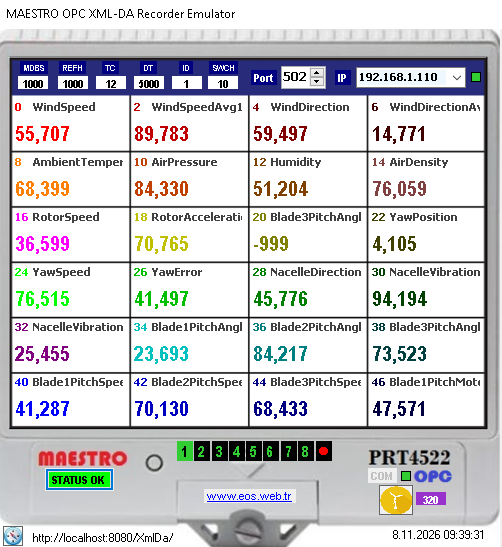
The program supports the configuration of up to 192 data points. These values can be monitored live on the main screen across eight separate pages, with 24 data points displayed on each page. Each data point is published as a 4-byte (32-bit) value using two 16-bit MODBUS Holding Registers.
In industrial automation systems, real-time data generated by PLCs, DCSs, RTUs, and process control software can be transferred to different applications through OPC servers. However, some SCADA, HMI, PLC, and data acquisition systems may not directly support the OPC XML-DA interface. Such systems may need to receive data through MODBUS TCP, a widely used protocol in industrial communications.
MAESTROrecsim OPC XML-DA is an industrial communication gateway application that connects to OPC XML-DA servers, reads the process data defined on the server, and makes selected tag values accessible through a MODBUS TCP Server.
With this architecture, process data accessible through OPC XML-DA can be read by SCADA, HMI, PLC, and data acquisition systems that support the MODBUS TCP Client function. This makes it easier to integrate existing OPC XML-DA data infrastructures with systems using different communication protocols.
Basic architecture: OPC XML-DA Server / Tags → MAESTROrecsim OPC XML-DA → MODBUS TCP Server → SCADA / HMI / PLC / Data Acquisition System
The gateway transfers selected data retrieved from the OPC XML-DA server to the MODBUS TCP Holding Register area. This enables data exchange with systems that do not support OPC XML-DA but do support MODBUS TCP communication.
OPC XML-DA (OPC XML Data Access) is an OPC specification defined by the OPC Foundation. It enables industrial process data to be shared between different applications through XML-based Web Services technologies.
While classic OPC DA uses Microsoft COM/DCOM technology, OPC XML-DA communicates through XML, SOAP, and HTTP technologies. This approach was designed to enable OPC data to be transferred between different applications and systems without being restricted to the Windows COM/DCOM infrastructure.
Core technologies used by OPC XML-DA:
OPC XML-DA was developed to bring the OPC Data Access model into a Web Services architecture. Depending on the services supported by the server, operations such as browsing tag lists, reading data, and subscription-based data monitoring can be performed.
| Feature | OPC DA | OPC XML-DA |
|---|---|---|
| Core technology | COM / DCOM | XML / SOAP / HTTP |
| Communication approach | COM-based client-server interface | Web Services-based client-server interface |
| Platform dependency | Depends on the Windows COM/DCOM infrastructure. | Does not depend on COM/DCOM. |
| Data representation | OPC DA data structures | XML-based data structures |
| Remote access | Requires DCOM network configuration. | Provides access through HTTP-based Web Services. |
OPC XML-DA and OPC UA (Unified Architecture) are not the same technology. OPC XML-DA was developed to provide the OPC Data Access model through XML and Web Services. OPC UA, on the other hand, is an independent architecture that offers broader capabilities, including information modeling, security, alarm and event management, and historical data access.
The OPC XML-DA specification is listed by the OPC Foundation as completed and no longer actively maintained. Although OPC UA is generally a more up-to-date option for new system designs, integration with existing OPC XML-DA servers in operational facilities may still be required.
Important: MAESTROrecsimOPCXML is not an OPC UA client. It is a gateway application designed to communicate with servers that use the OPC XML-DA interface. OPC XML-DA and OPC UA connections are not interchangeable.
A total of 192 data points can be configured in the program. The main monitoring screen displays 24 data points live at a time. By clicking the pages numbered 1–8 at the bottom of the screen, the operator can switch to the corresponding group of 24 data points.
Page and data capacity:
Each page displays the corresponding group of 24 data points. Values read from the OPC XML-DA server are updated live on the main monitoring screen.
The red dot button at the bottom of the screen starts the automatic page-switching function. When activated, the screen cycles sequentially through all eight pages, displaying the live list of 24 data points on each page. This feature allows the operator to monitor all 192 data points in sequence without manually switching between pages.
Clicking the  button in the lower-left corner
of the main screen opens the OPC XML-DA configuration panel on the
right side of the program. The OPC XML-DA server address can be
entered in this panel to establish a connection to the server.
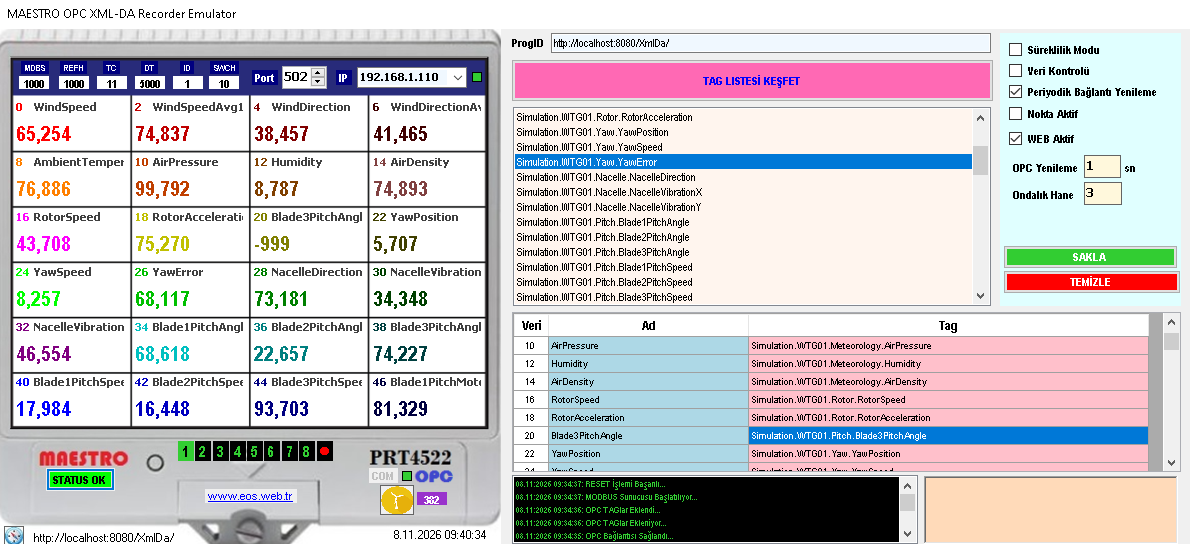
After entering the server address, click the
 (DISCIVER TAG LIST) button. If the connection
is successful, the OPC tags defined on the server are displayed
in a tree structure. The user can select the required tags from
this tree and add them to the program's 192-point MODBUS list.
This allows users to select only the process variables they want to publish through MODBUS TCP from the larger tag namespace available on the OPC XML-DA server.
button to open the OPC configuration panel on the right side of the program. (DISCIVER TAG LIST) to discover the tag list on the server.OPC XML-DA tag structure: OPC XML-DA servers may expose process variables within a hierarchical address space. Browse operations allow the tags and groups made accessible by the server to be discovered. This structure makes it easier for users to locate and select the required process variables.
MAESTROrecsimOPC XML-DA publishes selected data read from the OPC XML-DA server through a MODBUS TCP Server. SCADA, PLC, HMI, or data acquisition systems connecting to the program's MODBUS TCP interface operate as MODBUS TCP Clients.
The IP address and port number used for MODBUS TCP publishing can be configured at the top of the gateway interface. Since the standard TCP port for the MODBUS TCP protocol is 502, this is the default publishing port used by the program.
Data publishing format:
Each 32-bit value is published using two MODBUS Holding Registers. To interpret the data correctly in the upper-level system, both registers must be read together, and the 32-bit data interpretation method and byte/word order used by the device or driver must be compatible.
MODBUS Holding Registers are 16-bit data units. Therefore, a single 32-bit process value is carried across two registers. MODBUS read definitions in the upper-level system must be configured according to the gateway's data mapping and two-register data structure.
Addressing note: The way register addresses are represented as zero-based or one-based in MODBUS clients may vary depending on the software being used. Register starting addresses and the register/word order of 32-bit values should be verified on both the gateway and the upper-level system during commissioning.
The settings panel on the left side of the program provides options
for configuring the OPC XML-DA connection, MODBUS TCP publishing,
data display, and operating behavior. Changes are saved using the
 (SAVE) button. To transfer the settings to the main
application, the
 (APPLY) button on the main screen
on the right must also be clicked.
| Setting | Function |
|---|---|
| Yayın IP'si | Specifies the IP address used by the MODBUS TCP Server. |
| Yayın Port'u | Specifies the TCP port used for MODBUS TCP communication. The default port is 502. |
| Süreklilik | Automatically restarts the application when the program is closed. |
| WEB Aktif | Enables the integrated WEB Server. Published values and MODBUS addresses can be monitored live in a web-based table. |
| Nokta Aktif | Uses a period (.) as the decimal separator. If not selected, a comma (,) is used. |
| OPC DA XML Yenileme Aralığı | Specifies the time interval used for periodically renewing the connection to the OPC XML-DA server. |
| Periyodik Bağlantı Yenileme | When enabled, re-establishes the connection to the OPC XML-DA server at the specified intervals. |
| Ondalık Hane Basamak Sayısı | Specifies the number of decimal places used when displaying data. |
Saving and applying settings:
(SAVE) to save the configuration. (APPLY) on the main screen on the right.
Tags selected from the OPC XML-DA server are transferred to the
program's 192-point MODBUS list. The  (RESET)
button is used when the existing list needs to be cleared completely.
This operation resets the 192-point list. The OPC XML-DA tags must
be selected again to populate the list with new data.
Caution: The (RESET) button resets the existing
192-point configuration list. Before performing this operation,
make sure that any tag selections and configuration settings
that need to be retained have been saved. After changing the
list or settings, click the (APPLY) button
on the main screen on the right.
When the  (WEB Active) option in the settings panel
is selected, the integrated WEB Server can be enabled. This allows
data published by the gateway through MODBUS TCP, together with
their MODBUS addresses, to be displayed live in a table through
a web browser.
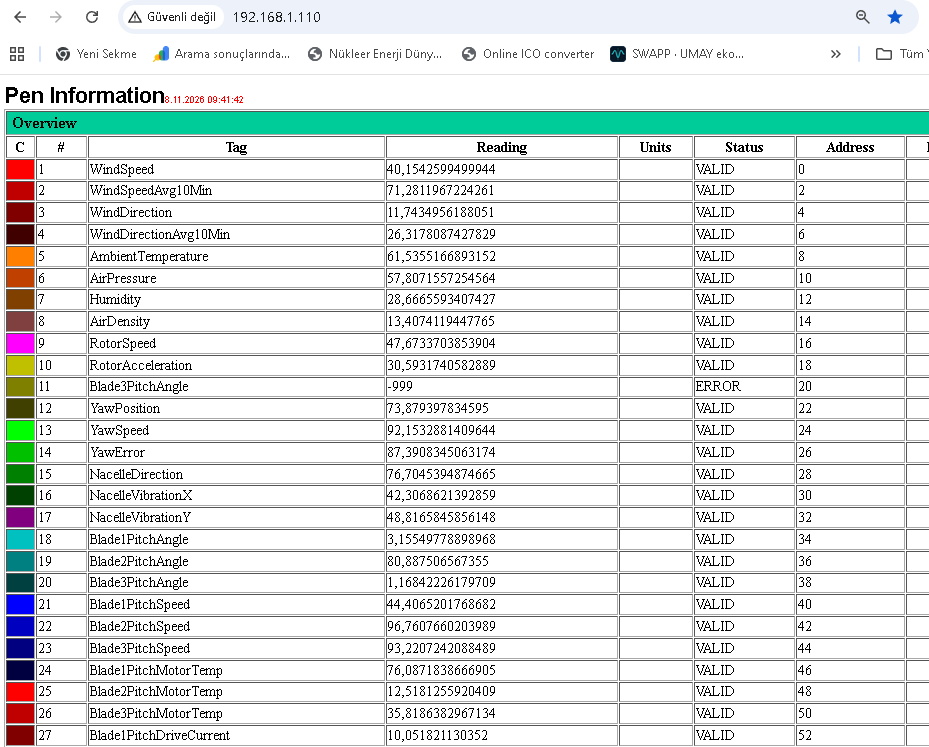
The WEB table helps users check the values read from the OPC XML-DA server and their corresponding MODBUS addresses during commissioning and operation. This screen is intended for monitoring and verification. Viewing data through the WEB Server is not a data transfer protocol that replaces MODBUS TCP communication.
When the  (Auto-Restart Mode) option is enabled, the program
is configured to automatically restart itself when it is closed.
This option can be used in installations where the gateway application
is expected to run continuously on the operating computer.
The (Periodic Connection Renewal) option re-establishes
the connection to the OPC XML-DA server at specified intervals.
The renewal interval is configured in the relevant field in the
settings panel. This feature can be used in scenarios where the
OPC XML-DA connection is intended to be re-established periodically
during long-term operation.
Operational note: Automatic program restart and periodic OPC XML-DA connection renewal do not, by themselves, eliminate issues such as computer shutdown, power failure, network faults, interruptions in MODBUS TCP communication, or the OPC XML-DA server becoming unavailable. In applications requiring continuous operation, the computer, OPC XML-DA server, network connection, and MODBUS TCP communication should be considered together.
OPC XML-DA uses an HTTP- and SOAP-based Web Services architecture. Therefore, communication between the gateway and the OPC XML-DA server takes place through the Web Services address provided by the server.
To establish a connection, the OPC XML-DA server must be running, the server address must be entered correctly, and the gateway computer must have network access to the server. The HTTP service, port configuration, and firewall rules on the server side are also important for connectivity.
Important: Unlike classic OPC DA, OPC XML-DA does not communicate through COM/DCOM. Therefore, DCOM permissions and the OPCEnum discovery mechanism encountered in classic OPC DA connections are not fundamental requirements for OPC XML-DA connectivity. Instead, the Web Services address, HTTP access, server configuration, and any authentication requirements should be checked.
The services provided by OPC XML-DA servers and their connection requirements may vary depending on the vendor and server configuration. Particularly for remote connections, network access, firewall settings, and the server's access policies should be evaluated together.
Making process data from OPC XML-DA servers available through MODBUS TCP allows existing Web Services-based OPC infrastructures to be used with different automation systems that have a MODBUS TCP Client interface. This gateway approach can be particularly useful when integrating systems that support OPC XML-DA but need to exchange data through MODBUS TCP.
| Application | Potential Use |
|---|---|
| Integration of existing OPC XML-DA systems | Transferring process data from OPC XML-DA servers to systems that support a MODBUS TCP Client interface. |
| Data exchange between SCADA systems | Making process variables accessed through OPC XML-DA readable by different SCADA systems supporting MODBUS TCP. |
| Data transfer between PLCs and control systems | Providing selected variables from an OPC XML-DA server to PLCs and control systems that support the MODBUS TCP Client function. |
| HMI and operator panels | Displaying process values from an OPC XML-DA infrastructure on HMI panels that support MODBUS TCP communication. |
| Energy monitoring and management | Enabling energy management systems or data acquisition applications to retrieve power, energy, and status information from OPC XML-DA tags through MODBUS TCP. |
| Industrial recording and data acquisition systems | Allowing recorders and data logging systems with MODBUS TCP Client support to monitor selected process variables obtained through OPC XML-DA. |
| Production and process monitoring | Transferring temperature, pressure, flow, level, and production values exposed through OPC XML-DA by PLC, DCS, or process control software to another system. |
| HVAC and building automation | Making boiler, chiller, air handling unit, and building control data collected by an OPC XML-DA server available to MODBUS TCP-based monitoring systems. |
| Enterprise and higher-level applications | Transferring selected process values obtained from a Web Services-based OPC XML-DA infrastructure to other applications accessible through MODBUS TCP. |
| Preserving existing automation investments | Providing data from an existing OPC XML-DA server to new systems requiring a MODBUS TCP interface, without replacing the original data source. |
| Testing, commissioning, and system interconnection | Mapping OPC XML-DA tags to the MODBUS Holding Register area to verify data mapping and communication. |
Architecture note: MAESTROrecsimOPCXML exposes selected tag values from an OPC XML-DA server through the MODBUS TCP Holding Register area. Therefore, access to the OPC XML-DA server and access to the gateway by MODBUS TCP Client devices are two separate communication paths. Web Services access on the OPC XML-DA side and the IP address, port, and network configuration on the MODBUS TCP side must be verified separately.
button in the lower-left corner to open the OPC XML-DA configuration panel. (DISCIVER TAG LIST) to display the tags defined on the server. (SAVE), then click (APPLY) on the main screen on the right. (WEB Active) and (Auto-Restart Mode) options if required.MAESTROrecsim OPC XML-DA is designed to read selected process data from OPC XML-DA servers and transfer it to upper-level systems through a MODBUS TCP server. By publishing OPC XML-DA tag values in the MODBUS TCP Holding Register area, it enables SCADA, HMI, PLC, and data acquisition systems to access this data through MODBUS TCP. Each 32-bit data value is provided using two 16-bit MODBUS Holding Registers.
Runtime requirement: The program requires access to an OPC XML-DA server to operate correctly. The server's Web Services address must be configured correctly, and the gateway computer must have network access to the relevant HTTP/HTTPS service. Firewall rules on the server side and any authentication requirements must also be configured appropriately. The IP address and port number used for MODBUS TCP publishing can be configured through the program. The default publishing port is 502.
Related files:
Free Software Download Center
Software for industrial data collection, monitoring, and analysis.

Technical Support
Software documentation, sample code, and practical technical information.
You can contact us regarding EOS software, technical documentation, or industrial data communication.