
Free Software Download Center
Software for industrial data collection,
monitoring, and analysis.
ENTERING DEVICE INFORMATION
In EOS SCADA, Devices represent the physical devices and other hardware with which the SCADA system will communicate. During SCADA design, information about the devices from which data will be collected must be entered into the system.
EOS SCADA software communicates with different industrial devices and applications through device drivers. Data reading and writing operations are performed through these drivers. Information about the drivers included with EOS SCADA is provided in the relevant sections of the User Guide.
When device information is configured correctly, EOS SCADA can communicate with the relevant device, read data from it, and, where supported, write data to the device.

To add a new device, right-click the DEVICES menu item in the SCADA tree menu to open the Device Context Menu.
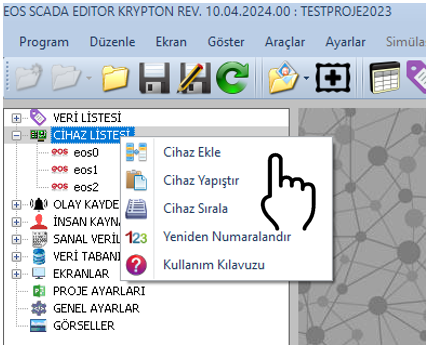
The user can perform various device management operations through the Device Context Menu. This menu can be used to add, copy, cut, paste, delete, and reorder devices.
To add a new device, select the ADD DEVICE option from the Device Context Menu. This operation creates a new device with default properties.
The properties of the newly added device can then be modified using the Settings Table located on the right side of the screen. Depending on the hardware with which the device will communicate and the driver being used, the relevant properties must be configured with appropriate values.
Usage: Right-click the DEVICES menu item and select ADD DEVICE from the Device Context Menu that appears.
After a device has been added, its properties can be modified through the Settings Table located on the right side. The table below shows the main properties available in the device settings, together with their descriptions and default values.
| Property Name | Property Description | Default Value |
|---|---|---|
| DeviceId | Device ID | 0 |
| DeviceName | Device Name | DEVICENAME |
| IPAddress | IP Address | 127.0.0.1 |
| HostName | Host Name | 127.0.0.1 |
| PortNumber | Port Number | 502 |
| DeviceType | Device Type |
EOS
Modbus Iec60870 Dnp3 Iec61850 Livedb (Live Database) S7plc (Siemens S7 PLC) Opc (OPC DA/UA) Txt (Simple Text File) Msmq (Microsoft Message Queuing) |
| DeviceModel | Device Model |
Probigendian
(nmodbus1: Most Significant Byte First)
Prolittleendian (nmodbus2: Most Significant Byte Last) Probigendianbyteswap (nmodbus3: Most Significant Byte First with Byte Swap) Prolittleendianbyteswap (nmodbus4: Most Significant Byte Last with Byte Swap) Probigendianwordswap (nmodbus5: Most Significant Byte First with Word Swap) Prolittleendianwordswap (nmodbus6: Most Significant Byte Last with Word Swap) Probigendianwordbyteswap (nmodbus7: Most Significant Byte First with Word and Byte Swap) Prolittleendianwordbyteswap (nmodbus8: Most Significant Byte Last with Word and Byte Swap) Rawbigendian (mdsotcp1: Most Significant Byte First) Rawlittleendian (mdsotcp2: Most Significant Byte Last) Rawbigendianbyteswap (mdsotcp3: Most Significant Byte First with Byte Swap) Rawlittleendianbyteswap (mdsotcp4: Most Significant Byte Last with Byte Swap) Rawbigendianwordswap (mdrevcp1: Most Significant Byte First with Word Swap) Rawlittleendianwordswap (mdrevcp2: Most Significant Byte Last with Word Swap) Rawbigendianwordbyteswap (mdrevcp3: Most Significant Byte First with Word and Byte Swap) Rawlittleendianwordbyteswap (mdrevcp4: Most Significant Byte Last with Word and Byte Swap) |
| SlaveID | Slave Device ID | 1 |
| TimeoutTime | Timeout Period | 1000 |
| ScanRate | Scan Rate | 1000 |
| TimeLag | Delay Time | 100 |
| UserName | User Name | — |
| Password | Password | — |
| ExtraParameters | Extra Parameters | — |
The DeviceType property determines which communication driver or data source EOS SCADA will use to communicate with the device.
Available device types include different communication and data sources such as EOS, Modbus, IEC 60870, DNP3, IEC 61850, LIVEDB, Siemens S7 PLC, OPC DA/UA, TXT, and MSMQ.
Important: The selected DeviceType value must be compatible with the communication method to be used with the device. After selecting the device type, the relevant communication parameters must be configured.
The DeviceModel property is used, particularly in Modbus and similar communications, to determine how the byte and word ordering of data received from the device will be interpreted.
The options available in the Pro and Raw groups allow data to be interpreted using big-endian, little-endian, byte swap, word swap, or combinations of these formats.
The DeviceModel should be selected according to the data representation format specified in the device manufacturer's documentation.
The address information of the computer or network device with which the device will communicate can be specified using the IPAddress, HostName, and PortNumber properties.
The IPAddress property specifies the IP address of the device, while the HostName property specifies the network name of the device or host computer.
The PortNumber property specifies the TCP/IP port used for communication. The default value is defined as 502.
In some devices and communication protocols, the SlaveID property can be used to specify the address of the slave device with which communication will take place. The default SlaveID value is 1.
The TimeoutTime property specifies the maximum amount of time to wait for a response during communication operations with the device. The default value is defined as 1000.
The TimeLag property is used to specify the delay that may be applied between communication operations. Its default value is defined as 100.
Recommendation: Timeout and delay values should be configured according to the characteristics of the communication environment and the response time of the device.
The ScanRate parameter allows you to determine the data update and reading interval for the device.
The scan rate can be used to adjust the bandwidth requirements of the communication channel according to the needs of the application. A shorter scan interval can be used for applications that require more frequent data updates, while a longer scan interval may be preferred for slowly changing data.
For example, if very slowly changing data needs to be read, there is no need to query the device very frequently. In this case, the ScanRate value can be increased so that the device is queried less frequently. This can reduce unnecessary traffic and communication load on the relevant communication channel.
The default value of the ScanRate parameter is 1000 milliseconds.
A very short scan interval may cause the device and communication channel to be queried more frequently than necessary. Especially in SCADA systems containing a large number of devices and data points, scan rates should be determined according to the actual requirements of the application.
Some devices and data sources may require user authentication before communication can be established. In such cases, the required credentials can be defined using the UserName and Password properties.
For devices that do not require a user name and password, these fields may be left blank.
The ExtraParameters property is used to define additional parameters that may be required depending on the device or communication driver being used.
The usage of this field and the format of the parameters to be entered may vary depending on the features of the device driver. It is recommended to use the parameters specified in the technical documentation of the relevant driver.
Following the sequence below when defining a new device will help ensure that the device configuration is performed in a more controlled manner.
Device definition in EOS SCADA allows devices and data sources with which the SCADA system will communicate to be added to the system. New devices can be added through the DEVICES menu, and device properties can be configured using the Settings Table.
In device configuration, parameters such as DeviceType, DeviceModel, IPAddress, HostName, PortNumber, SlaveID, and ScanRate are particularly important and should be configured according to the device and communication protocol being used.
In particular, determining the ScanRate according to the actual data update requirements of the application can help prevent unnecessary communication load and improve the efficiency of the SCADA system.
Free Software Download Center
Software for industrial data collection,
monitoring, and analysis.

Technical Support
Documentation, sample code, and practical
information for EOS software.
You can contact us regarding software, technical content, or collaboration.