
Free Software Download Center
Software for industrial data
collection, monitoring, and analysis.
MAIN ARCHIVE • ADDITIONAL ARCHIVE • SQL • BIG DATA • IN-MEMORY • REDUNDANT ARCHITECTURE
EOS SCADA Runtime process data must be archived reliably, quickly, and sustainably. Main archives are used for permanent storage and historical analysis, while additional archives can support redundancy, data-source separation, and different retention policies.
EOS SCADA supports SQL, Big Data, and In-Memory database environments. These can be used individually or together for permanent archiving, high-volume data management, and high-speed data access.

The EOS SCADA data archiving structure is not limited to simply writing data to a database. The archiving architecture can be designed by considering permanent SQL archiving, high-volume Big Data storage, high-speed In-Memory access, and, when required, redundant main/additional archives together.
Core roles of the archiving layers:
Therefore, the selection of ArchiveType is not merely a technical database choice. It is a fundamental architectural decision that should be evaluated together with the SCADA system's data storage capacity, access speed, historical analysis requirements, and redundancy strategy.
EOS SCADA can permanently archive process data in SQL and Big Data environments permanently archive; In-Memory veri tabanı ile particularly for liand monitoring, fast data retrieval, and graphing operations.
Database environments:
In addition to this architecture, multiple main and additional databases can be defined according to the redundancy approach used. This helps reduce the risk of data loss, implement different archiving policies, and expand the archiving infrastructure when required.
In-Memory veri tabanı, by keeping data in the computer's main memory, removing disk access from the data query path. This approach can be used for very fast retrieval of recent process data, feeding live trends, and accelerating graphing operations on SCADA screens.
CAUTION: Temporary data held in RAM may be lost in the event of a power failure. Bu nedenle SCADA uygulamalarında bellek içi veri databases that use disk storage is beneficial for data safety.
In the SCADA tree menu, left-click VERİ TABANI. It contains SİSTEM VERİ TABANI, ANA VERİ TABANI and YEREL VERİ TABANI.
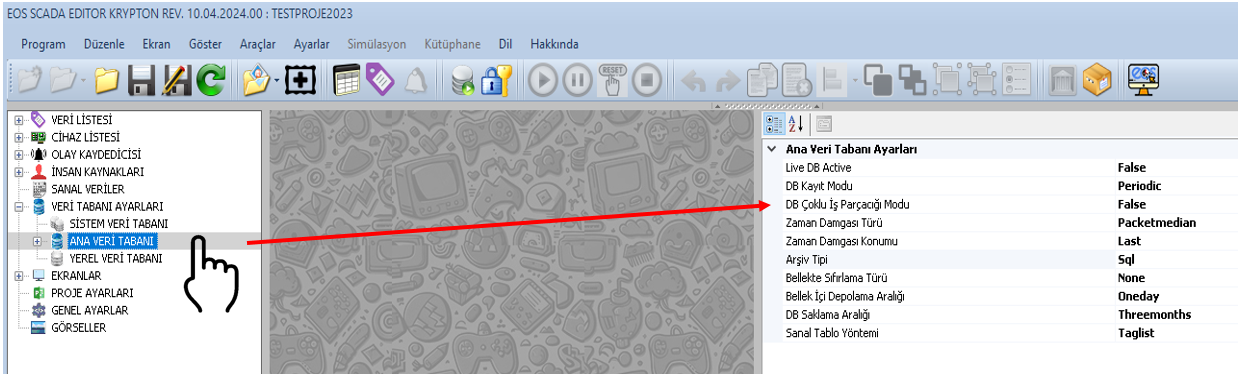
To edit the general settings, select the ANA VERİ TABANI submenu. The settings table on the right opens.
| Property Name | Property Description | Default Value |
|---|---|---|
| LiveDBActive | Live Database Active | false |
| DBMultiThreadMode | Database Multi-Threading Mode | false |
| TimeStampType | Timestamp Type | Packetmedian (Packet Send/Receive Median) |
| TimeStampPosition | Timestamp Position | Last (Last Table Column) |
| ArchiveType | Archive Type | Sql (SQL) |
| InMemortyResetType | In-Memory Reset Type | Day (Day) |
| InMemortyStorageInterval | In-Memory Storage Interval | Oneday (1 Day) |
| DBRecordingMode | Database Recording Mode | Periodic (Periyodik) |
| DBStorageInterval | Retention Period for Data Archived on Disk | Threemonths (3 Months) |
| VirtualTableMethod | Virtual Table Method | Taglist (Tag List) |
ArchiveType, the archiving approach used by the main database. It is a fundamental parameter that determines how the main database operates. When making a selection, data volume, retention period, access speed, and redundancy requirements should be considered together.
CAUTION: The amount of data that can be stored in the In-Memory database is limited by RAM capacity. A disk-based architecture should be preferred for large archives.
Big Data approach provides an important option for managing large volumes of process data accumulated over long periods. It is particularly useful in large SCADA systems with many tags that continuously generate data; using a Big Data infrastructure alongside the conventional archiving structure can increase archiving capacity.
Important: Big Data archives should be considered in scenarios requiring long-term data retention and analysis of large data sets. In-Memory architecture, in contrast, can be used primarily for speed-focused access to recent data. can be used.
| Option | Description |
|---|---|
| Packetsent | Time when the packet was sent |
| Packetreceive | Time when the packet was received |
| Packetmedian | Median of packet send and receive times |
| Databasewritepc | PC time when the data was written to the database |
| Databasewritedb | DB time when the data was written to the database |
TimeStampPosition, determines whether the timestamp is located in the first or last column in SQL archive tables.
CAUTION: If the source device or protocol already provides a timestamp for the data, this parameter may not need to be used.
InMemortyStorageInterval; the period for which data is kept in the In-Memory database. For example, when Oneday is selected, data from the last 1 day is retained.
InMemortyResetType options are None (None), Day (Day) ve Full (Full) olarak can be used.
None is selected, data remaining from the previous session may be preserved after the first connection.
DBRecordingMode can use Periodic or Aschanged (Değiştikçe) yöntemleri can be used.
DBStorageInterval options include None, 1 Month, 3 Months, 6 Months, 1 Year, 2 Years, 5 Years, 10 Years, and Harddiskquota (Hard Disk Quota).
After the general settings, connection information must be entered for each main archive database. Right-clicking ANA VERİ TABANI opens the Main Database Status Menu.
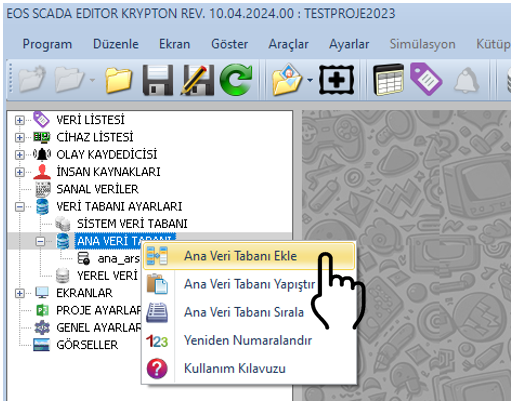
This menu can be used to add, copy, cut, paste, delete, and reorder main databases.
| Property Name | Property Description | Default Value |
|---|---|---|
| MainDBId | Main Database ID | 0 |
| MainDBActive | Main Database Active | false |
| MainDBTitle | Main Database Title | MAINDB |
| MainDBHostName | Main Database Computer Name (IP Address) | localhost |
| MainDBPort | Main Database Connection Port | 3050 |
| MainDBPath | Main Database Path | C:\DataLogger\FDB |
| MainDBName | Main Database Name | eosdb |
| MainDBSID | Main Database Session ID (SID) | DataLogger |
| MainDBTimeOut | Main Database Timeout | 1000 |
| MainDBUserName | Main Database User Name | sysdba |
| MainDBPassword | Main Database Password | masterkey |
| MainDBWriteFrequency | Main Database Write Frequency | 1 |
CAUTION: Connection information such as user names and passwords must be stored securely in the actual system. The default values shown here are example values from the source documentation.
EOS SCADA Editor settings for MAIN DATABASE allow you to define the archive type, timestamp method, In-Memory retention period, data recording behavior, and disk-based retention period.
Firebird based SQL archiving, MongoDB-based Big Data archiving, and REDIS-based In-Memory access can be used together to support SCADA archiving architectures suited to different capacity, performance, and data access requirements.
With proper planning of main and additional data archives, permanent data retention, fast live access, management of high-volume historical data, and redundancy requirements can be addressed within a single integrated data archiving approach.
Free Software Download Center
Software for industrial data
collection, monitoring, and analysis.

Technical Support
Software documentation and practical
technical information.
You can contact us regarding EOS software, technical documentation, or industrial data communication.