
Free Software Download Center
Software for industrial data collection, monitoring, and analysis.
MULTIPLE ARCHIVES • DIFFERENT DATABASES • CSV • PARALLEL ARCHIVING
EOS SCADA Runtime allows collected process data to be stored without being limited to a single archive system, in multiple data archives for different purposes. This allows different data groups selected from the same SCADA data source to be transferred to different database technologies according to requirements.
The additional archive structure helps meet requirements such as high-speed operational access, long-term data retention, providing data to different applications, internal reporting, and independent backup within the same SCADA system.

While the main archive database forms the core data storage structure of the SCADA system, additional archives allow specific data groups to be directed to a separate archiving layer according to different technologies and usage purposes.
With this approach, for example, data that must be accessed quickly during operation can be stored in a high-performance system, large datasets intended for long-term analysis can be kept in another database, and records that need to be transferred to external applications can be stored in CSV format.
Key idea: Additional archives help distribute data collected by SCADA to multiple target systems simultaneously for different use cases.
EOS SCADA's additional archive structure supports many database options for different data models, performance requirements, and integration needs. Data can also be stored in plain-text CSV format.
The main advantage of additional archives is that the same process data can be stored in different target systems according to different requirements. Thus, the archiving architecture can be designed not only for storage but also according to the intended use of the data.
Example use cases:
To edit the Additional Archive Database settings, click the DATABASE menu item in the SCADA tree menu with the left mouse button.
The following three submenu items are available under this menu:
To define a new Additional Archive Database, right-click the LOCAL DATABASE submenu item to open the Local Database Context Menu.
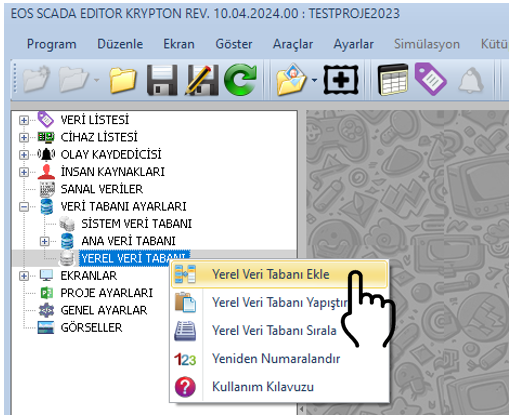
The Context Menu can be used to add, copy, cut, paste, delete, and reorder additional databases.
The connection, activation, database type, and write settings of the newly added additional data archive can be configured through the Settings Table on the right.
| Property Name | Property Description | Default Value |
|---|---|---|
| LocalDBId | Local Database ID | 0 |
| LocalDBTitle | Local Database Title | LOCALDB |
| LocalDBLogActive | Local Database Logging Active | false |
| LocalDBArchiveActive | Local Database Archive Active | false |
| LocalDBType | Local Database Type | Firebird |
| LocalDBHostName | Local Database Host Name | localhost |
| LocalDBPort | Local Database Port | 3050 |
| LocalDBPath | Local Database Path | C:\DataLogger\FDB |
| LocalDBName | Local Database Name | eosdb |
| LocalDBTableName | Local Database Table Name | eosdb |
| LocalDBSID | Local Database Session ID (SID) | DataLogger |
| LocalDBTimeOut | Local Database Timeout Period | 1000 |
| LocalDBUserName | Local Database User Name | sysdba |
| LocalDBPassword | Local Database Password | masterkey |
| LocalDBWriteFrequency | Local Database Write Frequency | 1 |
The LocalDBType parameter determines which database or file-based target will be used to store the additional archive.
| Type | Purpose |
|---|---|
| Firebird | Relational SQL-based archiving |
| Sqlserver | Archiving to SQL Server infrastructure |
| Postgres | PostgreSQL-based archiving |
| Mysql | MySQL-based archiving |
| Mariadb | MariaDB-based archiving |
| Mongodb | Document-oriented and high-volume data archiving |
| Cubrid | Relational database archiving |
| Couchdb | Document-oriented data archiving |
| Redis | Fast in-memory data access |
| Csv | File-based text archiving and data exchange |
A key strength of additional archives is that SCADA data can be distributed to different targets without being tied to a single database technology. This structure allows a layered archiving architecture to be created according to the facility’s data management and integration requirements.
Example architecture:
With this approach, the same facility data can be maintained in separate archives for different purposes such as operation, analysis, integration, and data sharing.
Because additional archives can be used with multiple target systems, the archive architecture should be designed by considering data continuity, performance, capacity, redundancy, and ease of maintenance together. These factors should be evaluated together.
CAUTION: Database connection information such as user names and passwords must be stored securely in real systems. The default values provided in the source document are example configuration values.
Especially for high-volume data archives, the selected database technology’s capacity, indexing, querying, and backup capabilities should be evaluated together with SCADA’s data write frequency. These factors should be evaluated together.
Creating additional data archives in EOS SCADA Runtime allows collected process data to be stored using different technologies and for different purposes without depending on a single database.
In addition to databases such as Firebird, SQL Server, PostgreSQL, MySQL, MariaDB, MongoDB, CUBRID, CouchDB, and Redis, archiving can also be performed in CSV format, making it easier for EOS SCADA to integrate with different enterprise and technical data infrastructures.
A properly designed additional archive architecture provides a flexible infrastructure for storing operational data, analyzing high-volume historical data, providing fast access, transferring data to external systems, and applying different archiving policies within the same SCADA project.
Free Software Download Center
Software for industrial data collection, monitoring, and analysis.

Technical Support
Documentation, sample code, and practical information for EOS software.
You can contact us regarding EOS software, technical documentation, or industrial data communication.