
Free Software Download Center
Software for industrial data collection, monitoring, and analysis.
ADVANCED GRAPHICS • INDUSTRIAL SHAPES • PARAMETRIC DESIGN
EOS SCADA software, etkileyici görsel ve işitsel tasarımlar oluşturmak amacıyla çok sayıda user control nesne motoruna, vektör formatında binlerce endüstriyel şekle ve control nesnelerine yönelik parametrik hale getirilmiş ayarlara sahiptir.
Aşağıda EOS SCADA'nın sahip bulunduğu user control motorlarına yönelik liste ve bu motorların kısa açıklamaları yer almaktadır.

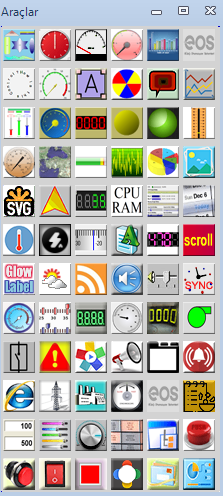
EOS SCADA Editor içerisinde kullanılan user control motorları, operatör ekranlarının yalnızca temel grafiklerden oluşmasını değil, aynı zamanda data ile ilişkilendirilebilen gelişmiş görsel ve işitsel nesnelerle tasarlanabilmesini sağlar.
Bu motorlar kullanılarak indicators, butonlar, alarm nesneleri, grafikler, metinler, animasyonlar, navigasyon bileşenleri, endüstriyel şekiller ve özel amaçlı control panelleri oluşturulabilir. Hazırlanan user kontrolleri daha sonra şablon olarak saklanarak farklı SCADA ekranlarında tekrar kullanılabilir.
Total number of engines: 71 • Liste EOS SCADA tasarım altyapısındaki user control motorlarını kapsamaktadır.
| Engine Name | Engine Symbol | Engine Description |
|---|---|---|
|
UC_ADVANCED_PB (RULERINDICATOR) |
An engine for creating linear indicator templates with rulers, different shapes such as rectangles, triangles, circles, ellipses, and sections, and different fill properties. The ruler can be configured independently of the linear indicator. The fill direction can be set vertically or horizontally. | |
|
UC_ALARM_INDICATOR (ALARMINDICATOR) |
An engine developed for creating alarm indicator templates in different shapes such as triangles, squares, circles, and hexagons. The active alarm count can be positioned at any desired location on the warning graphic. | |
|
UC_SYNCHROSCOPE (SYNCHROSCOPE) |
An engine that provides a synchroscope graphic according to the data to which it is connected. It also includes an animation feature for use when no data is connected. | |
|
UC_ALARMLISTESI (ALARMLIST) |
A user control designed to add an alarm list to SCADA pages. It can operate in different modes such as continuous display, active alarms only, and acknowledge. The alarm information displayed in the table and its visual properties can be customized by the user to suit the screen design. | |
|
UC_ANALOG_CLOCK (ANALOGCLOCK) |
A clock engine designed to add three different realistic analog clock designs to SCADA pages. The clock designs can be customized in detail by the end user. | |
|
UC_ANALOG_METER (ANALOGMETER) |
An engine created to add traditional analog meters with classic features to SCADA pages. Details such as scale, scale ranges, labels, and the meter needle can be configured by the end user. | |
|
UC_ANNUNCIATOR (ANNUNCIATOR) |
A user control engine developed for creating signal panels in different shapes and visual styles, including squares, triangles, and circles. It supports four rows of signal messages. It can change color according to connected signals and can send a command to the controller when clicked. | |
|
UC_AQUA_GOSTERGE (AQUAMETER) |
A user control engine added to the design for creating circular meters with a glass-like appearance. Many properties, such as color, needle thickness and color, and scale ranges, can be customized. | |
|
UC_BAR_CHART (BARCHART) |
A user control engine developed for adding live bar charts to SCADA pages, with many configurable properties. | |
|
UC_BULLET_GRAPH (BULLETGRAPH) |
An engine developed for creating user control templates that can display multiple data values simultaneously and comparatively on a linear scale. | |
|
UC_CIRCULAR_FRAME (CIRCULARFRAME) |
This engine makes it possible to create professional-looking circular meters in many different styles. Almost every detail of the circular meter can be configured according to user preferences. Although the design stage requires some effort, once a user control is designed it can be added to the template library and used on different SCADA pages. | |
|
UC_CUSTOMTEXT (CUSTOMSHAPETEXT) |
This engine makes it possible to create visually distinctive text that can take forms such as circles and rings and can be connected to SCADA data. The user can also apply different angles to plain text. | |
|
UC_DAIResel_GOSTERGE (CIRCULARINDICATOR) |
This engine can be used to create quarter-circle, half-circle, and full-circle meters. Scale zones can be defined in the meter, and all of its properties can be customized by the user. | |
|
UC_DATA_BOX (DATABOX) |
The Databox engine allows text areas to be created for sending data to SCADA. It enables user controls in which data to be sent to SCADA can be entered from the keyboard into a text box and sent to the automation system as a command by clicking the Apply button. | |
|
UC_DUYURUPANELI (ANNOUNCEMENTPANEL) |
The announcement panel provides an environment for publishing announcements such as occupational health and safety notices, weddings, births, and special days on SCADA pages. The user can configure many properties of the announcement panel. Announcements are stored in a separate Firebird database. A separate announcement management application is available for changing announcements. | |
|
UC_ETIKET (LABEL) |
This advanced label engine allows user control templates to be created using a three-part combination of 1) data title, 2) value, and 3) unit. All components can be customized individually, allowing visually effective label components to be created for presenting data on SCADA screens. | |
|
UC_MASTER_NAV (MASTERNAVIGATOR) |
This engine is a tool specific to EOS SCADA software that combines prepared SCADA screens under a single menu. SCADA pages can be grouped under a tree structure, toolbar, or automatic transition option, including title, menu, and alarm sections. To access SCADA screens, the user only needs to open the page containing Master Navigator and use its navigation functions. | |
|
UC_EXTRA_SHAPES (EXTRASHAPES) |
An extra-shape engine for creating different graphic shapes such as rectangles, squares, ellipses, and triangles. Many properties, including fill color, fill pattern, and border line, can be configured by the end user. Data can also be connected to this user control. | |
|
UC_PIPES_MOTORS (PIPESANDMOTORS) |
Using this engine, the user can create user controls containing animated pipe and engine elements. Flow and movement directions, pipe styles and angles, flow styles, and all colors can be configured. Pipe flow and engine rotation speeds can be set to change according to the SCADA value being read. | |
|
UC_GLABEL (GLABEL) |
This engine allows visually distinctive text user controls to be created that can receive three-level text and color values according to the variable read by SCADA and whose properties can be extensively configured. Text can include effects such as glow, feathering, color gradients, border boxes, shadows, and heartbeat effects, some fixed and some animated. | |
|
UC_GRAFIK (LIVEGRAPH) |
This engine is designed for creating user controls containing live bar charts on SCADA pages. The user can change many properties of the chart object and configure it according to the desired design. | |
|
UC_GTRACKBAR (LINEARINDICATOR) |
An engine designed for creating linear indicators. The resulting indicators can be horizontal or vertical, and many properties can be configured by the user. | |
|
UC_GUPDATA (DAMDATA) |
This user control was developed for the needs of EÜAŞ facilities. It can display the facility's Day-Ahead Market (DAM) obligation and actual values comparatively on a SCADA page. If the obligation is met, a green indicator is shown for that hour; if it is not met, a red warning light is shown. This makes it easier for operators to track their DAM obligations. | |
|
UC_HAVA_DURUMU (WEATHER) |
This user control engine allows weather conditions for different cities in Türkiye to be displayed on SCADA pages either statically or cyclically. The control reads temperature values from the General Directorate of Meteorology websites at specified intervals. It can display the temperature of a selected city continuously or cycle through the temperature values of all cities read from the source. Weather conditions can be presented using an image element such as sunny, rainy, or snowy, together with the expected high and low temperatures. | |
|
UC_HORIZONTAL_FRAME (HORIZONTALFRAME) |
This engine makes it possible to create professional-looking horizontal meters in many different styles. Almost every detail of the horizontal meter can be configured according to user preferences. Although the design stage requires some effort, once a user control is designed it can be added to the template library and easily used on different SCADA pages. | |
|
UC_INDUSTRIAL_LED (INDUSTRIALLED) |
This engine enables thousands of industrial shapes in vector format to be used as industrial LEDs and allows thousands of different user controls to be created. For example, a vector pump shape can be added to a page and linked to SCADA data. Depending on the SCADA value, the pump can change color or shape, or switch to a different visual. The engine also allows graphic objects to be added externally. Many properties can be changed according to end-user requirements. | |
|
UC_INTERNET_TARAYICISI (INTERNETBROWSER) |
This engine makes it possible to place an internet page on SCADA pages. The internet page supports two-stage page loading. | |
|
UC_KAYAR_GOSTERGE (SLIDINGINDICATOR) |
An engine that can be used to add traditional horizontal and vertical sliding analog indicators. The color of the sliding component, scale ranges, and indicator needle properties can be configured by the user. | |
|
UC_KESICI (BREAKERSWITCH) |
This engine allows the user to design circuit breaker and disconnector graphics that can also send command data to SCADA. The colors, line thickness, and shape angle of the breaker and disconnector can be configured. Commands such as opening or closing the breaker can also be sent to the controller through the status menu opened by right-clicking. | |
| UC_KNOB (KNOB) |
This engine helps create professional-looking rotary buttons. The resulting buttons can send commands to the controller through SCADA. The user can customize many properties of the button. | |
|
UC_LABEL_GRADIENT (SIMPLEINDICATOR) |
This engine is designed to create different types of text boxes, including shadowed, gradient, and simple text boxes. SCADA data can be connected to the text boxes and used to visualize SCADA data. | |
|
UC_LB_GOSTERGE (LBINDICATOR) |
An engine designed for creating circular meters that support many customizable features, including dial and needle colors, scale lines and ranges, and color zones. | |
|
UC_LB_LED (LBLED) |
Designed to create text-based LED lights with user-configurable dimensions. The user can connect the LED light to any desired SCADA data and create multi-level variable states. It can be configured as a flashing warning alarm when a specified alarm value is exceeded. The LED color and status can change according to SCADA data, and the text corresponding to each status can also be changed. | |
|
UC_LBBASIT_GOSTERGE (LBSIMPLEINDICATOR) |
This numerical indicator engine supports flashing when a specified threshold is exceeded and can be used to create LED numerical indicators in many different designs. | |
|
UC_LED_CONTROL (LEDCONTROL) |
This LED numerical indicator engine includes a Fast Graph feature and can be used to create LED numerical indicators in many different designs. When Fast Graph is enabled, clicking the mini button that appears in the corner of the indicator quickly visualizes the historical data for the configured period as a graph and opens a window displaying the line chart of the SCADA data for that interval. | |
|
UC_LEDBULB (LEDBULB) |
An engine that can be used to create four different types of LED lights: ellipse, square, diamond, and 3D. It supports alarmed user controls with two-state or three-state operation and flashing. It also provides an audible warning feature. | |
|
UC_MACTRACKBAR (MACTRACKBAR) |
An engine that can be used to design horizontal and vertical linear indicators. The needle can be circular or rectangular. A scale ruler can be added to one or both sides of the indicator. The color of scale points and labels can be configured. | |
|
UC_MANOMETER (MANOMETER) |
An engine created for designing professional-looking circular meters. The meter can operate clockwise or counterclockwise. Explanatory text can be placed on the dial. The scale lines and the shape and color of the indicator needle can be configured. The meter can retain the highest value it has received. | |
| UC_MAP (MAP) |
A user control engine designed to place a map on a SCADA screen using coordinates entered by the user. Because map data is downloaded over the internet, the SCADA computer must have an internet connection for this user control to operate correctly. | |
|
UC_NEROBAR (NEROBAR) |
This engine is designed to present SCADA data comparatively on a horizontal, ruler-based indicator. It allows horizontal data zones to be created and displays the current value on the indicator dial. The engine also allows visual effects such as glow to be added to the horizontal indicator. | |
|
UC_NUMERICAL_FRAME (NUMERICALFRAME) |
This engine makes it possible to create professional-looking numerical indicators in many different styles. Almost every detail of the numerical indicator can be configured according to user preferences. Although the design stage requires some effort, once a user control is designed it can be added to the template library and easily used on different SCADA pages. | |
|
UC_OSG_NUMERIC (OSGNUMERIC) |
An engine designed for creating numerical indicators. The user can customize many properties of the indicator, including the number of decimal places. | |
|
UC_OSG_ROUND (OSGROUND) |
This engine helps users create circular indicator templates. Many properties of the indicator can be changed by the end user. | |
|
UC_PERF_MONITOR (PERFMONITOR) |
This engine helps users create performance monitoring panels that can be connected to SCADA data. Many properties, such as the background color, grid, and graph lines, can be customized. It can be configured to use relative and absolute graphs. | |
|
UC_PFKANALYSIS (AUXILIARYSERVICESANALYSIS) |
This user control was developed to evaluate the auxiliary services performance of a facility in real time using auxiliary services data collected at EÜAŞ facilities. The auxiliary services performance can be displayed instantaneously using the collected data. | |
|
UC_PIE_CHART (PIECHART) |
A user control engine developed for adding live pie charts to SCADA pages, with many configurable properties. | |
|
UC_PUSH_BUTTON (PUSHBUTTON) |
This engine is designed to create push-button templates with different visual properties. The buttons can be circular, elliptical, or rectangular. Text with 3D effects can be added, and the colors for normal and pressed states can be configured. The push button is primarily designed to send command data to the controller. | |
|
UC_TACT_BUTTON (TACTBUTTON) |
This engine is designed to create tact button templates with different visual properties. The buttons can be circular, elliptical, or rectangular. Text with 3D effects can be added, and the colors for normal and pressed states can be configured. The tact button is primarily designed to send command data to the controller. | |
|
UC_SWITCH_BUTTON (SWITCHBUTTON) |
An engine developed to create user control templates with different visual characteristics, such as rocker, toggle, LED, lever, rotary, and panel buttons. Many button properties can be configured according to the design, and the buttons can also be rotated by a specified angle. The On/Off state texts can be changed. This button type is primarily designed to send command data to the controller. | |
|
UC_STND_BUTTON (STANDARDBUTTON) |
An engine added to the design so that the standard button user control provided by the Windows Framework can be used on SCADA screens. It can be configured as either a Push or Tact button. Background images, colors, and text values can be assigned for both normal and pressed states. This button type is primarily designed to send command data to the controller. | |
|
UC_NAV_BUTTON (NAVBUTTON) |
The navigation button engine is designed to provide navigation functionality on SCADA screens. It can perform operations such as opening a new screen and closing the current screen. Different button options are available, including label, image box, circular image box, circular button, and virtual data selection button. Normal and pressed-state colors can also be assigned. | |
|
UC_PICT_BUTTON (PICTUREBUTTON) |
The picture button engine is designed to create image-based normal and circular buttons. It can be configured as either a Push or Tact button. Background images, colors, and text values can be assigned for both normal and pressed states. This button type is primarily designed to send command data to the controller. | |
| UC_RESIM (IMAGE) |
The image engine is designed to add static and animated visual elements to SCADA screens. All visual frames forming an animation can be added to the user control through this engine. When the connected SCADA data exceeds a specified threshold, the animation starts; when it falls below the threshold, the animation stops. This user control type allows animation speed to be adjusted and dynamic animations based on data values to be created. It can also be used simply to add a visual element to a SCADA screen. | |
|
UC_RSS_HABER (RSSNEWS) |
The RSS control engine allows RSS sources such as current news, company news, and weather information to be placed on SCADA screens. Up to three different RSS sources can be combined under a single control. RSS data is displayed as scrolling text. News feed and refresh intervals can be configured by the user. | |
|
UC_SCROLLING_TEXT (SCROLLINGTEXT) |
This engine makes it possible to create text that scrolls from left to right or right to left and integrate it with SCADA data. All SCADA data can also be displayed sequentially as scrolling text. Many properties of the scrolling text can be configured by the end user. | |
|
UC_SES (AUDIBLEWARNING) |
With the audio warning feature, hourly alarms, call-to-prayer announcements, single and double time alarms, single and double level alarms, and customized audible alarms can be added to SCADA pages. Before and after text audio files can be added for each announcement. SCADA data can also be announced audibly. | |
|
UC_SESKONTROL (AUDIOCONTROL) |
This engine allows volume-up, volume-down, and mute controls to be added to a SCADA screen. | |
| UC_SHAPE (SHAPE) |
This engine allows many different shapes to be added to a SCADA screen with a wide range of properties. Shapes include squares, rectangles, triangles, circles, ellipses, diamonds, rounded rectangles, balloons, and polygons. These shapes can be added with configurable outlines, interior colors and fills, and gradient color zones. | |
|
UC_SLIDER (SLIDER) |
This engine is designed to create horizontal and vertical linear indicators that can send commands to the controller. The slider can be configured as a slider, three-state switch, or switch slider. The scale levels of sliders and switches can be configured by the end user. This button type is primarily designed to send command data to the controller. | |
|
UC_SLIDESHOW (SLIDESHOW) |
This engine allows the user to add slideshows with animated transition effects using different images on a SCADA screen. Because the images used in the slideshow are stored in a folder under the SCADA folder, the user can edit these images and add new ones whenever needed. | |
|
UC_SSD_GOSTERGE (SSDINDICATOR) |
This numerical indicator component allows the user to create two different visual types of numerical indicators. Many properties of the numerical indicator can be configured by the end user. When Fast Graph is enabled, clicking the mini button that appears in the corner of the indicator quickly visualizes the historical data for the configured period as a graph and opens a window displaying the line chart of the SCADA data for that interval. | |
|
UC_SYSTEM_INFO (SYSTEMINFO) |
This engine was developed to add system information to SCADA screens. CPU and memory usage, as well as the storage utilization of hard disks, can be displayed on SCADA screens using this indicator. | |
|
UC_SYSTEM_MONITOR (SYSTEMMONITOR) |
Information such as computer model, processor type, CPU usage, CPU usage history, active user, memory usage, disk read and write history, and internet usage can be displayed on SCADA screens using this engine. | |
|
UC_TABCONTROL (TABCONTROL) |
This engine was added to the design to organize user controls placed on the screen under a TAB structure. The TAB control can be customized by the end user in terms of appearance. Because the TAB structure operates at only one level, other TAB controls should not be placed inside a tab. | |
|
UC_TARIH_SAAT (DATETIME) |
This engine was developed to create user control templates that can display time and date information on SCADA screens in different formats. The user can separately design single-line, double-line, numerical, and other date/time formats, as well as combined date/time user controls. | |
|
UC_NEW_INDUSTRIAL (NEWINDUSTRIAL) |
An engine that can be used to design linear indicators with different visual characteristics, such as thermometers, linear indicators, tank sections, indicator tubes, and LED indicators. The user can create different scale zones and assign colors to them, configure the scale ruler as desired, and apply an angle to the resulting indicator. | |
|
UC_TIME_SYNC (TIMESYNC) |
This engine is designed to add time synchronization functionality to a SCADA screen. It can synchronize time from GPS, NTP, RECF867, RCF868, and WEB time servers. The end user can configure synchronization intervals. It can perform precise time synchronization using the NMEA protocol from a GPS antenna connected through a serial port and also supports GPS-NTP combo operation. | |
|
UC_RECIPE_MANAGER (RECIPEMANAGER) |
Recipes consist of tables used to summarize relevant data such as machine configurations or production data. The data can then be rapidly transferred from the operator panel to the controller in a single step, for example to switch production to another product type. With this engine, the user can create recipe tables and transfer a group of SCADA parameters that need to be changed to the controller with a single button. This control type is primarily designed to send group command data to the controller. | |
|
UC_SVG_MACHINE (SVGMACHINE) |
This engine allows user controls containing vector SVG shapes to be created. For example, a vector pump shape can be added to a page and linked to SCADA data. Depending on the SCADA value, the pump can change color and shape. The engine also allows graphic objects to be added externally in SVG format. Many properties can be changed according to end-user requirements. | |
|
UC_FORCE_MACHINE (FORCEMACHINE) |
This engine is designed to automatically send commands to the controller according to the value of the data being read or a specified time schedule. | |
|
UC_PANELPC_NAV (PANELPCNAVIGATOR) |
This engine is a tool specific to EOS SCADA software that combines SCADA screens under a single menu, particularly on Panel PCs prepared for local controllers. SCADA pages can be grouped under a tree structure or toolbar option, including menu sections that hide themselves when not in use. To access the SCADA screens, the user only needs to open the page containing Panel PC Navigator and use its navigation functions. |
EOS SCADA Editor'de bir user control motoru seçildikten sonra, motorun sunduğu parametrik özellikler kullanılarak screen tasarımına uygun bir user kontrolü hazırlanabilir. Hazırlanan control, gerekli SCADA verilerine bağlanarak gerçek zamanlı değerleri, durumları veya komutları görselleştirebilir.
user kontrolünün tasarımı tamamlandıktan sonra kontrolün bir şablon olarak user kütüphanesine eklenmesi mümkündür. Böylece aynı tasarım farklı ekranlarda tekrar tekrar kullanılabilir ve büyük SCADA projelerinde görsel standartların korunması kolaylaşır.
Free Software Download Center
Software for industrial data collection, monitoring, and analysis.

Technical Support
Software documentation and practical technical information.
You can contact us regarding EOS software, technical documentation, or industrial data communication.