
Free Software Download Center
Software for industrial data collection, monitoring, and analysis.
ADDING USER CONTROL OBJECTS TO THE SCREEN
After the basic design of a screen has been created in EOS SCADA Editor and the containing the static graphic elements that will remain fixed on the screen has been defined, variable elements must be added to the design area so that the screen can display real-time SCADA data.
In EOS SCADA software, these elements, whose appearance, value, color, status, or behavior can change according to data collected from devices, are placed on the screen as .
Through user control objects, a SCADA screen goes beyond being a drawing consisting only of static graphics and becomes a dynamic operational screen that visually presents real-time information received from field devices and processes.
EOS SCADA Editor provides a flexible user control infrastructure that allows numerous user controls to be created for different requirements and reused on different screens.

EOS SCADA software provides approximately for creating user control objects to meet different visual and functional requirements.
These design engines form the foundation for numerous user controls with different features. Users can take advantage of the capabilities provided by these basic engines to create control objects with different appearances and different operating behaviors.
This makes it possible to derive and use thousands of different user control templates on SCADA screens from approximately 70 main design engines.
Basic approach:
To add a variable element to a SCADA screen, the user control to be used must first be determined. The selected user control is then placed in the screen's design area.
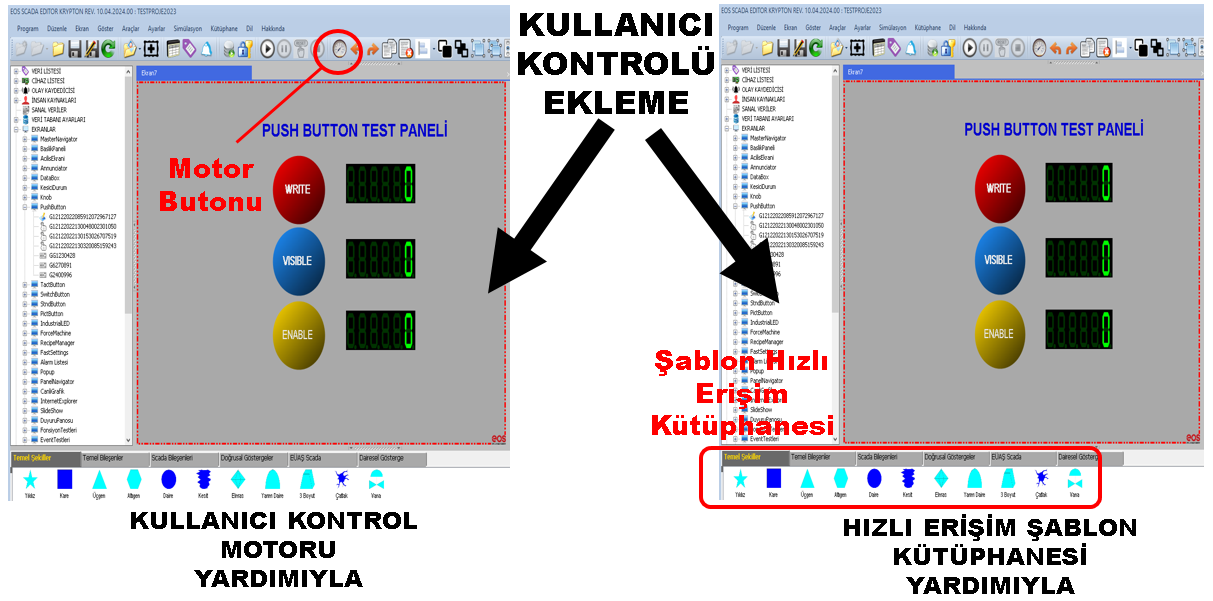
In EOS SCADA Editor, user control objects can be added to the screen using two basic methods:
The choice of method depends on whether the design requires an existing user control to be reused or a new control to be created.
When a new user control needs to be created, the User Control Engine can be used directly.
The User Control Engine allows a new user control object to be created using the basic properties of the selected control type. Through this structure, the user can define the control's visual properties, size, operating behavior, and other required properties.
After the created user control has been placed on the screen, it can be associated with the relevant SCADA data points and its required properties can be configured.
When should it be used?
To facilitate the reuse of previously prepared user controls, EOS SCADA Editor includes the .
This library consists of user control templates previously prepared using User Control Engines and configured for a specific design or usage purpose.
Instead of recreating the required control each time, the user can select the appropriate template from the library and quickly add it to the screen.
This approach is particularly useful in large SCADA projects containing many screens, as it helps reduce design time and maintain visual and functional consistency between screens.
Advantage:
The User Template Library is a quick-access structure that contains design templates prepared using the User Control Engine.
A template should not be considered merely a visual object. A template may also contain the design properties and required operating settings of a user control. This allows a previously prepared control to be reused on different screens while preserving its similar characteristics.
This allows users to standardize frequently used control structures and repeatedly use the same control structures when designing different screens.
Design standardization:
In addition to the ready-made user control templates provided with EOS SCADA Editor, users can also create custom templates for their own requirements.
Especially in screen designs specific to a particular facility, process, or group of devices, converting project-specific user controls into templates provides a significant advantage.
The prepared custom templates can be added to the quick-access library and later reused on different screens within the same project.
This eliminates the need to recreate a user control that has already been prepared for the same or similar designs.
Recommendation:
Users are not limited to templates they have created themselves. User control templates prepared in another SCADA project or by a different SCADA designer can also be transferred to the project using appropriate methods.
This feature allows user control designs that were previously prepared and used in different projects to be reused in new projects.
This allows reusable control templates developed by different SCADA designers to be transferred to a project and used in screen designs.
Developing and sharing commonly used user control templates can help different designers create faster and more standardized screens within the same project.
One of the most important advantages of user control templates is that a prepared design can be reused on multiple screens.
For example, the same user control template can be used to display numerous similar pumps, motors, valves, or measurement points in a facility.
This eliminates the need to recreate the same graphic and control structure from scratch for each screen. The designer can select the appropriate template from the library, add it to the relevant screen, and configure the required data connections.
This method both reduces development time and contributes to a more consistent user experience across screens.
Following the workflow below when placing user control objects on the screen can make it easier to create organized and reusable screen designs.
One of the most important advantages of user control templates is that a prepared design can be reused on multiple screens.
After the static graphic elements of the screen have been defined as the background image in EOS SCADA Editor, the elements that need to change in real time are added to the screen using .
EOS SCADA software provides approximately , enabling numerous different user controls to be created. Using this infrastructure, thousands of different user control templates can be derived.
User controls can be created directly using the or added from ready-made templates in the .
In addition to the templates provided with the software, users can create templates for their own requirements, add these templates to the quick-access library, and reuse templates prepared in different projects by importing them.
This approach enables SCADA screens to be prepared more quickly, design standards to be maintained, and previously developed user control designs to be reused in different projects.
Free Software Download Center
Software for industrial data collection, monitoring, and analysis.

Technical Support
Software documentation, sample code, and practical technical information.
You can contact us regarding EOS software, technical documentation, or industrial data communication.