
Free Software Download Center
Software for industrial data collection, monitoring, and analysis.
EVENT RECORDER • GROUP DEFINITION • SOURCE-BASED CLASSIFICATION
Every event and alarm defined in the EOS SCADA Editor must belong to a group class. Group classes are defined during SCADA design and entered into the system using the EOS SCADA Editor.
Alarm groups can be used to identify the source of an event or alarm. This allows faults, warnings, and events originating from different sources to be managed within a common classification structure.

Every event and alarm defined in EOS SCADA software must belong to a group class. These group classes should be determined during SCADA design and added to the system using the EOS SCADA Editor.
An alarm group can be considered classification information indicating the source of an alarm or event. An alarm may originate from a plant component, process data, EOS hardware, or a communication line.
Important: Defining group classes consistently during the design phase makes event and alarm records easier to monitor, filter, and analyze.
Different groups can be created according to the plant structure and SCADA project requirements to distinguish between event and alarm sources.
Example group definitions:
Depending on project requirements, additional source groups such as process, field, power, communication, security, or other project-specific groups can also be defined.
To perform operations related to event groups, click the EVENT RECORDER menu item in the SCADA tree menu with the left mouse button.
The EVENT RECORDER menu contains the following five submenu items:
Operations related to event groups are performed through the EVENT GROUPS submenu.
Note: The EVENT GROUPS menu provides centralized management of event and alarm sources within the project.
The Event Groups Context Menu can be opened by right-clicking the EVENT GROUPS submenu item.
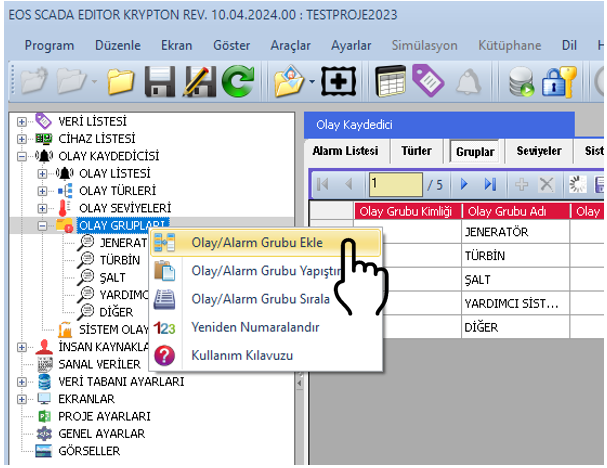
The following operations can be performed on event groups using the opened context menu:
These operations allow required event groups to be created within the project, existing groups to be edited, and unnecessary groups to be removed.
When a new event group is added by the user, its information can be modified through the settings table located on the right side of the screen.
Correctly defining event group properties is important for associating event and alarm records with meaningful source information.
| Property Name | Property Description | Default Value |
|---|---|---|
| EventGroupId | Group Type ID Number | 0 |
| EventGroupName | Group Type Name | EVENTGROUP |
| EventGroupDefinition | Group Type Definition | — |
CAUTION: It is recommended that EventGroupName and EventGroupDefinition be defined meaningfully and clearly express their intended purpose within the project.
Event group properties define the group's identity and description within the system.
EventGroupId: Specifies the identification number of the event group within the system.
EventGroupName: Specifies the name of the event group displayed to the user. Names such as HARDWARE, SOFTWARE, or NETWORK can be used.
EventGroupDefinition: Defines the purpose of the event group and the type of source covered by the group.
A new event group can be defined in the EOS SCADA Editor according to the following sequence of operations.
Event and alarm groups provide classification of information generated in the SCADA system according to its source. This structure helps manage records more clearly, particularly in large plants with a high number of events and alarms.
Using groups such as hardware, software, and network helps maintenance teams, operations personnel, and SCADA users assess the source of events more quickly.
Establishing group classes in a planned structure at the beginning of the project makes it easier to filter, report, and analyze event and alarm records during subsequent project phases.
Defining event and alarm groups in the EOS SCADA Editor enables events and alarms to be classified according to their sources.
Using the EVENT GROUPS section under the EVENT RECORDER menu, users can create, copy, cut, paste, delete, and sort groups.
For each created event group, the EventGroupId, EventGroupName, and EventGroupDefinition properties can be edited through the settings table.
A properly planned group structure contributes to easier monitoring, management, and analysis of event and alarm information in the EOS SCADA system.
Free Software Download Center
Software for industrial data collection, monitoring, and analysis.

Technical Support
Software documentation, sample code, and practical technical information.
You can contact us regarding EOS software, technical documentation, or industrial data communication.