
Free Software Download Center
Software for industrial data collection, monitoring, and analysis.
EVENT TYPES • CLASSIFICATION • DEFINING PROPERTIES
Every event and alarm defined in the EOS SCADA Editor must belong to a type class. This classification enables event and alarm information to be managed in a more organized manner and evaluated more easily during operation.
Event types are determined during SCADA design and defined in the EOS SCADA Editor using the EVENT TYPES section under the EVENT RECORDER menu.

Every event and alarm defined in EOS SCADA software must belong to an event type class. These type classes must be determined during SCADA design and defined in the system using EOS SCADA Editor.
Type classes help group events and alarms with different characteristics according to their common properties. This makes event records easier for operating personnel to understand and evaluate.
Important: An appropriate event type must be defined for every event or alarm to be added to the system. The type classes used when creating event and alarm definitions constitute one of the fundamental classification elements for the management and evaluation of events in subsequent stages.
Different event types can be defined during SCADA design according to the operational requirements of the facility. When determining type names, the operational significance of the event and the response it requires from personnel should be taken into consideration.
Example type classes:
These examples do not constitute a mandatory naming standard. Type names can be determined by the project designer in accordance with the plant's operating philosophy and SCADA design standards.
To perform event type operations, first click the EVENT RECORDER menu item located under the SCADA tree menu bar with the left mouse button.
The EVENT RECORDER menu contains the following five submenu items:
The operations described on this page are performed through the EVENT TYPES submenu. Event groups, levels, system alarms, and event definitions can also be configured separately using the other submenus.
The Event Type Context Menu can be opened by right-clicking the EVENT TYPES submenu.
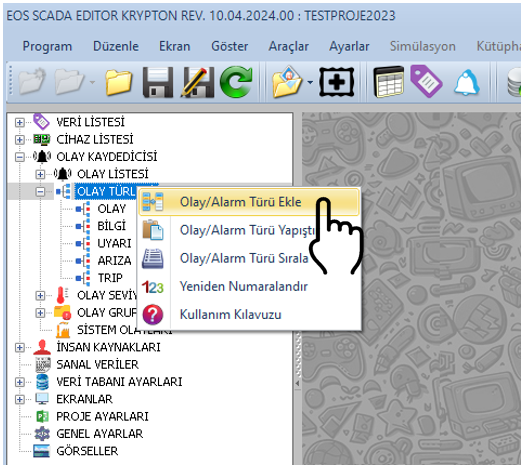
Basic editing operations can be performed on event types using this context menu. New event types can be created and existing types can be managed through the menu.
Available operations:
Information related to a newly added event type can be modified using the settings table located on the right side of the screen.
Event Type settings can be edited through the settings table located on the right. The properties listed in the table below provide the basic identity and definition information for the event type.
| Property Name | Property Description | Default Value |
|---|---|---|
| EventTypeId | Event Type ID Number | 0 |
| EventTypeName | Event Type Name | EVENTTYPE |
| EventTypeDefinition | Event Type Definition | — |
CAUTION: When defining the event type name and definition, using clear and consistent naming throughout the project will make the management of event and alarm records created later easier.
Creating a new event type in EOS SCADA Editor can generally be performed by following the procedure below.
After this configuration, the created event type can be used to classify event and alarm records defined in subsequent stages.
When defining event types, it is important not only to create short names, but also to clearly determine the purpose for which these types will be used in plant operation.
Avoiding the use of different type names with the same meaning within a project helps make event records easier to interpret. It is recommended that type names be consistent with the plant's existing operating procedures and alarm management approach.
Recommendation:
If types such as EVENT, FAULT, and TRIP are used, the criteria distinguishing these classes from one another should be clearly defined in the project documentation.
Ensuring that every event and alarm defined in EOS SCADA Editor belongs to an appropriate event type class enables the event recorder structure to be used in an organized and understandable manner.
Event types can be managed through the EVENT RECORDER → EVENT TYPES menu; new types can be added, existing types can be copied, cut, pasted, deleted, and sorted.
The EventTypeId, EventTypeName, and EventTypeDefinition properties of a newly added event type can be configured through the settings table on the right.
This allows events and alarms created in the SCADA project to be managed within a structured classification system aligned with the operational requirements of the facility.
Free Software Download Center
Software for industrial data collection, monitoring, and analysis.

Technical Support
Software documentation, sample code, and practical technical information.
You can contact us regarding EOS software, technical documentation, or industrial data communication.