
Free Software Download Center
Software for industrial data
collection, monitoring, and analysis.
PROJECT SETTINGS • RUNTIME • SERVERS • SCREENS • ALARMS • ARCHIVE • REDUNDANCY
EOS SCADA project Runtime, communication, screen, alarm, archive, and redundancy behavior can be configured through PROJECT SETTINGS.
This page describes the EOS SCADA 2026 project settings with their property names, descriptions, data types, and default values.

SCADA tasarımının bir sonraki aşamasında, açılan proje ile ilgili özel ayarların girilmesi gerekmektedir. Project ayarlarını değiştirmek için SCADA ağaç menüsü altındaki PROJE AYARLARI menü öğesine tıklanarak, sağ tarafta görüntülenen ayarlar tablosundan ilgili özellikler yapılandırılabilir.
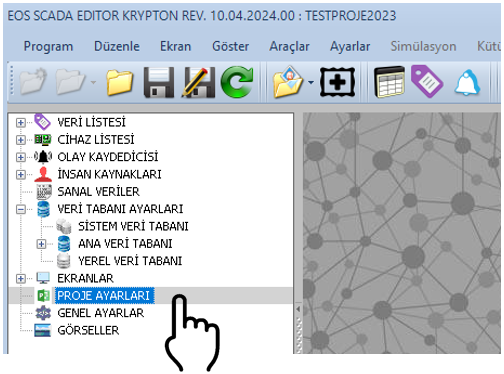
Bu sayfa, EOS SCADA 2026 sürümü için verilen kaynak kodundaki proje ayarlarını esas almaktadır. İngilizce property adları, English açıklamalar, veri tipleri ve varsayılan değerler birlikte verilmiştir.
2026 version: Aşağıdaki değerler doğrudan verilen 2026 kaynak kodundaki başlangıç değerleridir. Project uygulamasına göre farklı değerler kullanılabilir.
Accessing project settings:
| Property Name | Description | Type | Default Value |
|---|---|---|---|
|
ModbusServerActive Modbus Server Active |
Enable Modbus Server | bool | false |
| ModbusPort Modbus Port |
Modbus Connection Port | int | 502 |
|
ModbusServerTimeout Modbus Server Timeout |
Modbus Server Timeout | int | 1000 ms |
| ModbusServerId Modbus Server ID |
Modbus Server ID | int | 1 |
|
ModbusDataRefreshInterval Modbus Data Refresh Interval |
Modbus Data Refresh Interval | int | 500 ms |
|
ModbusServedDataType Modbus Served Data Type |
Data type served by Modbus | ADModbusType | Selected — Selected |
|
IEC60870ServerActive IEC 60870 Server Active |
Enable IEC 60870 Server | bool | false |
|
IEC60870DataRefreshInterval IEC 60870 Data Refresh Interval |
IEC 60870 Data Refresh Interval | int | 500 ms |
|
IEC60870ServedDataType IEC 60870 Served Data Type |
Data type served by IEC 60870 | ADModbusType | Selected — Selected |
|
SetCommandWriteAutoDelay Set Command Write Auto Delay |
Automatically set command data write delay | bool | false |
|
CommandWriteSensitivity Command Write Sensitivity |
Command data write sensitivity | int | 50 |
| ContinuityMode Continuity Mode |
Continuity Mode | bool | false |
| UseAudibleAlert Use Audible Alert |
Use Audible Alert | bool | false |
|
ExecutionPriority Execution Priority |
SCADA software execution priority | GNUygulamaOnceligi | Normal |
| StatusReset Status Reset |
Status reset method | GNStatusReset | Neveruse — Never Use |
| DBNumbering DB Numbering |
Database TAG numbering method | DBNumberingMethod | Simple — Simple |
|
UseQuickDataDisplay Use Quick Data Display |
Use status bar data display | bool | false |
|
QuickDataDisplayTime Quick Data Display Time |
Status bar data display time | int | 10000 ms |
|
DisplayVerticalRuler Display Vertical Ruler |
Display vertical ruler | bool | false |
|
DisplayHorizontalRuler Display Horizontal Ruler |
Display horizontal ruler | bool | false |
|
HTTPServerActive HTTP Server Active |
Enable HTTP Server | bool | false |
| HTTPAccessPort HTTP Access Port |
HTTP access port | int | 80 |
|
OPCUAServerActive OPC UA Server Active |
Enable OPC UA Server | bool | false |
| OPCUAAccessPort OPC UA Access Port |
OPC UA access port | int | 7718 |
|
OPCUARefreshInterval OPC UA Refresh Interval |
OPC UA data refresh interval | int | 1000 ms |
|
OPCUAServedDataType OPC UA Served Data Type |
Data type served by OPC UA | ADModbusType | Selected — Selected |
|
MQTTServerActive MQTT Server Active |
Enable MQTT Server | bool | false |
| MQTTAccessPort MQTT Access Port |
MQTT access port | int | 7718 |
|
MQTTRefreshInterval MQTT Refresh Interval |
MQTT data refresh interval | int | 1000 ms |
|
MQTTServedDataType MQTT Served Data Type |
Data type served by MQTT | ADModbusType | Selected — Selected |
| ServerIP Server IP |
Server IP address | string | 127.0.0.1 |
| Property Name | Description | Type | Default Value |
|---|---|---|---|
| DecimalPoint Decimal Point |
Number of decimal places | int | 3 |
|
UseDotAsDecimalPoint Use Dot As Decimal Point |
Use dot as decimal point | bool | false |
|
DefaultDesignResolution Default Design Resolution |
Default design resolution | SLEkranCozunurlugu | R1920x1080 — 1920×1080 |
| DefaultScreenId Default Screen ID |
Default screen ID | string | (empty) |
| AutoStart Auto Start |
Auto Start | bool | false |
| OpenScreenLimit Open Screen Limit |
Open screen limit | int | 2 |
| PanelPCMode Panel PC Mode |
Panel PC mode | bool | false |
|
RuntimeSystemDBActive Runtime System DB Active |
Enable Runtime system database | bool | false |
| SimulationMode Simulation Mode |
Simulation mode | bool | false |
| UseBackground Use Background |
Use the EOS pattern as the Runtime background | bool | true |
| BackColor Back Color |
Runtime empty-area background color | Color | Silver — Silver |
|
ForceDesignResolution Force Design Resolution |
Force design resolution | bool | true |
|
EventLoggerScanTime Event Logger Scan Time |
Event logger scan time | int | 1000 ms |
|
ArchiveForceEvents Archive Force Events |
Archive command events | bool | false |
|
ArchiveFormEvents Archive Form Events |
Archive screen events | bool | false |
|
KeepEventStatusTable Keep Event Status Table |
Keep event status table | bool | false |
|
VirtualDataScanTime Virtual Data Scan Time |
Virtual data scan time | int | 1000 ms |
| LogActive Log Active |
Enable logging | bool | false |
| CommandLog Command Log |
Log sent commands | bool | false |
| LogReset Log Reset |
Log reset | int | 1000 |
|
ProjectctEditPassword Projectct Edit Password |
Projectct edit password | string | " " |
|
TagChangeControl Tag Change Control |
Data definition change control | bool | false |
| RedundancyType Redundancy Type |
Main database redundancy type | YedeklilikTuru | Independent — Independent |
| Property Name | Description | Type | Default Value |
|---|---|---|---|
| DataFillActive Data Fill Active |
Enable data filling | bool | false |
| FillWaitTime Fill Wait Time |
Data fill wait time | int | 5000 ms |
|
FillDataGrainSize Fill Data Grain Size |
Data fill grain size | int | 5000 |
| ScreenLoadStyle Screen Load Style |
Screen loading method | GNEkranYuklemeTuru | Development — Development Mode |
|
ScreenLoadBufferSize Screen Load Buffer Size |
Screen load buffer size | int | 10 |
|
ChangePasswordVisible Change Password Visible |
Show password change option on the Runtime login screen | bool | true |
|
IgnoreTemplatesInRuntime Ignore Templates In Runtime |
Runtime'da şablonları yoksay | bool | false |
|
FollowBackupScada Follow Backup SCADA |
Yedek SCADA'yı takip et | bool | false |
|
ArchiveAccessActive Archive Access Active |
Enable archive access | bool | true |
| Property Name | Description | Type | Default Value |
|---|---|---|---|
|
AlarmSoundFile1 … AlarmSoundFile10 Alarm Sound File 1 … 10 |
Alarm sound files | string | (empty) |
| Diagnostics Diagnostics |
Enable diagnostics | bool | false |
|
CheckDiagData Check Diagnostic Data |
Check diagnostic data freshness | bool | false |
|
EventsCyberLogging Events Cyber Logging |
Log events to Windows Event Log | bool | false |
|
AlarmsCyberLogging Alarms Cyber Logging |
Log alarms to Windows Event Log | bool | false |
|
DisableTaskManager Disable Task Manager |
Disable Task Manager | bool | false |
|
PopupAlarmActive Popup Alarm Active |
Enable popup alarm | bool | false |
| PopupSoundAlarm Popup Sound Alarm |
Use audible alarm in popup | bool | false |
| PopupAlarmType Popup Alarm Type |
Popup alarm type | string | (empty) |
| PopupAlarmGroup Popup Alarm Group |
Popup alarm group | string | (empty) |
| PopupAlarmLevel Popup Alarm Level |
Popup alarm level | string | (empty) |
| ConnectionAlarm Connection Alarm |
Use connection alarm | bool | true |
| Property Name | Description | Type | Default Value |
|---|---|---|---|
|
AlarmTimeCorrection Alarm Time Correction |
Correct alarm time | bool | false |
| HdFullAlarm HD Full Alarm |
Use disk-full alarm | bool | false |
|
ConnSoundAlarm Connection Sound Alarm |
Use sound for connection alarm | bool | false |
| HdSoundAlarm HD Sound Alarm |
Use sound for disk alarm | bool | false |
| AlarmCheck Alarm Check |
Enable alarm checking | bool | false |
|
CheckUpdateInterval Check Update Interval |
Check software update interval | bool | false |
|
UpdateIntervalLimit Update Interval Limit |
Minimum update interval | int | 1000 ms |
|
ActiveScreenSync Active Screen Sync |
Synchronize active screens | bool | true |
|
PassiveScreenSync Passive Screen Sync |
Synchronize passive screens | bool | false |
|
PassiveUpdateInterval Passive Update Interval |
Passive screen update interval | int | 10000 ms |
|
ActiveUpdateInterval Active Update Interval |
Active screen update interval | int | 500 ms |
| PeriodicRenewal Periodic Renewal |
Enable periodic refresh | bool | false |
| RenewalInterval Renewal Interval |
Refresh interval | int | 2 |
| UseBanner Use Banner |
Use banner | bool | false |
|
IgnoreUnusedTags Ignore Unused Tags |
Kullanılmayan TAG'leri Runtime'da yoksay | bool | true |
| UseSuffixStamp Use Suffix Stamp |
Use suffix stamp | bool | false |
| StampTextColor Stamp Text Color |
Stamp text color | Color | White — White |
| StampOpaqueness Stamp Opaqueness |
Stamp opacity | int | 200 |
| StampLocX Stamp Location X |
Stamp X position | int | 0 |
| Property Name | Description | Type | Default Value |
|---|---|---|---|
| StampLocY Stamp Location Y |
Stamp Y position | int | 0 |
| StampFont Stamp Font |
Stamp font | Font | Algerian, 108, Italic |
| UIUpdateRelax UI Update Relax |
Relax user interface updates | bool | false |
| UIRelaxMult UI Relax Multiplier |
UI relaxation multiplier | int | 1 |
|
UIRelaxRefrTime UI Relax Refresh Time |
UI relaxation refresh time | int | 5000 ms |
Bazı proje ayarlarında sabit seçenekler sağlayan enum tipleri kullanılır. 2026 sürümünde kullanılan enum tanımları aşağıda verilmiştir.
| Enum | English Meaning |
|---|---|
| All | All |
| Analog | Analog |
| Digital | Digital |
| Selected | Selected |
| Enum | English Meaning |
|---|---|
| Realtime | Real-time |
| Abovenormal | Above Normal |
| Belownormal | Below Normal |
| High | High |
| Idle | Idle |
| Normal | Normal |
| Enum | English Meaning |
|---|---|
| Neveruse | Never Use |
| Resetatstartup | Reset at Startup |
| Manualreset | Manual Reset |
| Enum | English Meaning |
|---|---|
| Simple | Simple |
| Projectct | Project |
| General | General |
| Enum | Resolution |
|---|---|
| R2048x1536 | 2048×1536 |
| R1920x1080 | 1920×1080 |
| R1600x1200 | 1600×1200 |
| R1280x1024 | 1280×1024 |
| R1280x960 | 1280×960 |
| R1280x800 | 1280×800 |
| R1280x768 | 1280×768 |
| R1280x720 | 1280×720 |
| R1280x600 | 1280×600 |
| R1152x864 | 1152×864 |
| R1024x768 | 1024×768 |
| R800x600 | 800×600 |
| R800x480 | 800×480 |
| R768x576 | 768×576 |
| R640x480 | 640×480 |
| R480x320 | 480×320 |
| R384x288 | 384×288 |
| R352x288 | 352×288 |
| R320x240 | 320×240 |
| R320x200 | 320×200 |
| Enum | English Meaning |
|---|---|
| Eosredundant | EOS Redundancy |
| Autobackup | Automatic Redundancy |
| Independent | Independent |
| Enum | English Meaning |
|---|---|
| Development | Development Mode |
| Production | End User Mode |
| LimitedProduction | Sınırlı End User Mode |
| Usebuffer | Use Buffer |
CAUTION: Modbus, IEC 60870, OPC UA, MQTT ve HTTP sunucuları etkinleştirildiğinde ilgili portların ve ağ güvenlik kurallarının uygun şekilde yapılandırılması gerekir. Varsayılan değerler, 2026 kaynak kodundaki başlangıç değerleridir.
RedundancyType, main database redundancy behavior; ScreenLoadStyle ise ekranların Runtime sırasında yüklenme yöntemini belirleyen önemli ayarlardır.
Projectct Settings, EOS SCADA projesinin Runtime, haberleşme, ekran, alarm, arşiv, yedeklilik, teşhis, günlükleme ve kullanıcı arayüzü davranışlarının merkezi olarak yapılandırılmasını sağlar.
Bu sayfadaki 2026 sürümü property ve enum listeleri, verilen kaynak kodundaki tanımlar esas alınarak hazırlanmıştır.
Free Software Download Center
Software for industrial data
collection, monitoring, and analysis.

Technical Support
Software documentation, sample code, and
practical technical information.
You can contact us regarding EOS software, technical documentation, or industrial data communication.