
Free Software Download Center
Software for industrial data collection, monitoring, and analysis.
GENERAL CHART SETTINGS • DATA-SPECIFIC CHART SETTINGS • DATA REDUCTION
General chart settings can be configured in the EOS SCADA Chart Panel, while individual display settings can also be configured for each SCADA data series displayed on the chart. In addition, data reduction options can be used to maintain performance when plotting high-volume datasets.
General chart settings for the EOS Chart Panel can be configured through the Settings tab. In addition, individual chart display settings can be configured separately for each SCADA data series displayed on the chart.
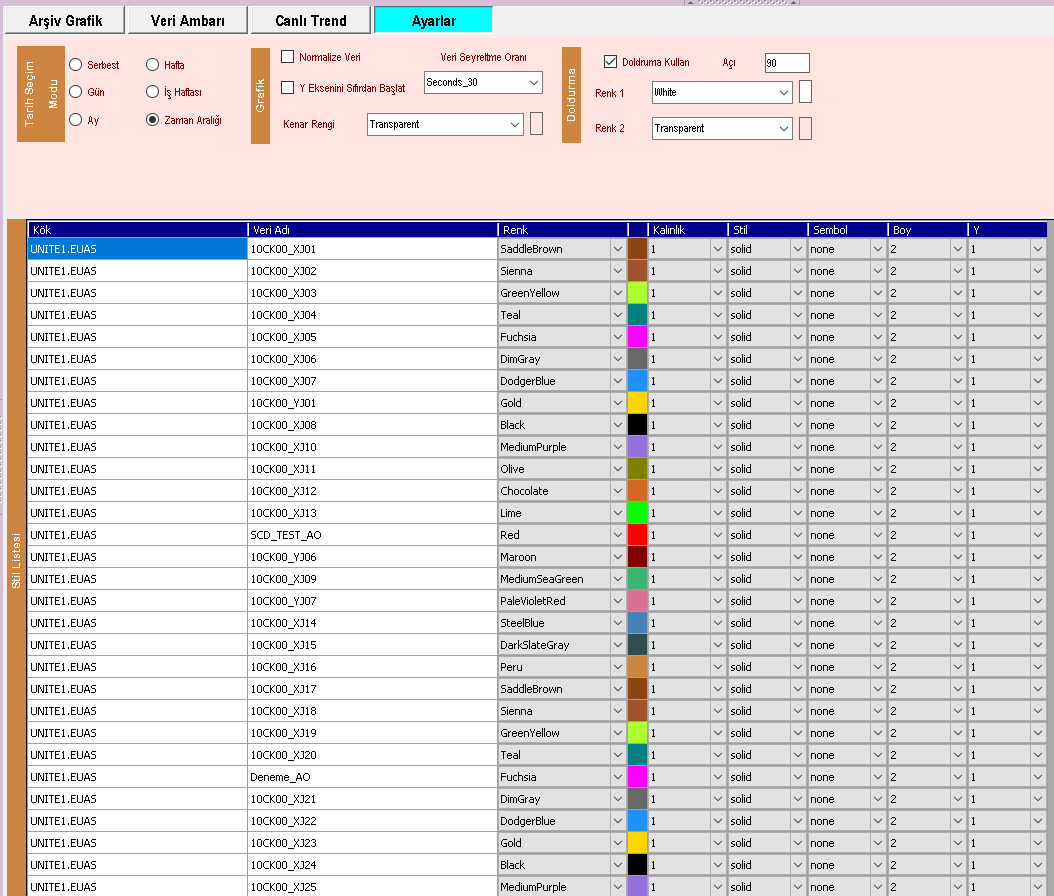
This structure makes it possible to configure different data series displayed on the same chart so that they can be easily distinguished from one another. Data-specific chart settings improve readability, particularly when a large number of SCADA data series are monitored on the same chart.
The appearance of each SCADA data series on the chart can be configured independently. This allows different process variables displayed on the same chart to be visually distinguished from one another.
| Setting | Description |
|---|---|
| Color | Determines the line color of the relevant SCADA data series on the chart. |
| Line Style | Determines how the data series line is displayed on the chart. |
| Line Width | Determines the thickness of the relevant data series line on the chart. |
SCADA systems may contain a very large number of data records, particularly over long time periods. Attempting to plot all of these data points on the chart simultaneously can significantly increase chart generation time and result in excessive use of system resources.
Particularly when plotting historical data, the shortest practical time ranges should be preferred. Creating charts using preferably 1-hour time ranges helps preserve the required level of detail. When longer periods need to be analyzed together, data reduction options can be used.
Data reduction reduces the number of data points used for chart rendering according to a specified time interval. Instead of processing all raw data points, only data points corresponding to the selected reduction interval are included in the charting process.
The data reduction interval in the EOS Chart Panel can be determined by selecting one of the following options:
| Option | Description |
|---|---|
| None | No data reduction is applied. |
| 1 per 500 Milliseconds | One data point is used for each 500-millisecond interval. |
| 1 per Second | One data point is used for each 1-second interval. |
| 1 per 2 Seconds | One data point is used for each 2-second interval. |
| 1 per 5 Seconds | One data point is used for each 5-second interval. |
| 1 per 10 Seconds | One data point is used for each 10-second interval. |
| 1 per 20 Seconds | One data point is used for each 20-second interval. |
| 1 per 30 Seconds | One data point is used for each 30-second interval. |
| 1 per Minute | One data point is used for each 1-minute interval. |
| 1 per 15 Minutes | One data point is used for each 15-minute interval. |
| 1 per 30 Minutes | One data point is used for each 30-minute interval. |
| 1 per Hour | One data point is used for each 1-hour interval. |
| 1 per Day | One data point is used for each 1-day interval. |
When selecting the reduction interval, the amount of data to be plotted, the selected time range, and the required level of chart detail should be considered together. For detailed monitoring over a short time range, lower reduction intervals may be preferred; for analyzing long-term trends, higher reduction intervals may be appropriate.
| Requirement | Approach |
|---|---|
| Short-term and detailed analysis | Use the shortest practical time range and a low reduction interval. |
| Long-term trend analysis | Use a higher reduction interval. |
| Very high data volume | First reduce the time range or use an appropriate data reduction interval. |
| Approximately 1-hour operational analysis | Prefer plotting using a 1-hour time range. |
The objective when generating charts is to avoid processing an unnecessary number of data points while preserving the operational information required. Therefore, before starting the charting process, it is recommended to keep the time range as short as practical and apply data reduction when necessary.
Particularly for long-term historical data, selecting a reduction interval appropriate to the purpose of the analysis instead of plotting all raw records simultaneously helps reduce chart generation time and use system resources more efficiently.
| Feature | Primary Function |
|---|---|
| General chart settings | Managing the general appearance and operating settings of the Chart Panel |
| Data color | Setting the line color separately for each SCADA data series |
| Line style | Defining the line display style for each SCADA data series |
| Line width | Defining the line width for each SCADA data series |
| Data reduction | Reducing the number of data points before chart rendering |
| Time range | Limiting the period of data to be plotted |
Free Software Download Center
Software for industrial data collection, monitoring, and analysis.

Technical Support
Software documentation, sample code, and practical technical information.
You can contact us regarding EOS software, technical documentation, or industrial data communication.