
Free Software Download Center
Software for industrial data collection, monitoring, and analysis.
EOS SCADA • ALARMLISTESI • ALARM LIST • USER CONTROL
ALARM LIST (ALARMLISTESI) is one of the essential user controls for alarm management and operator monitoring in EOS SCADA. It allows alarms to be listed on SCADA screens in different display formats.
The control supports the configuration of numerous features, including alarm display type, alarm color coding, alarm archive, KKS usage, column widths, filtering, retrieving data from the archive, update method, and sorting.

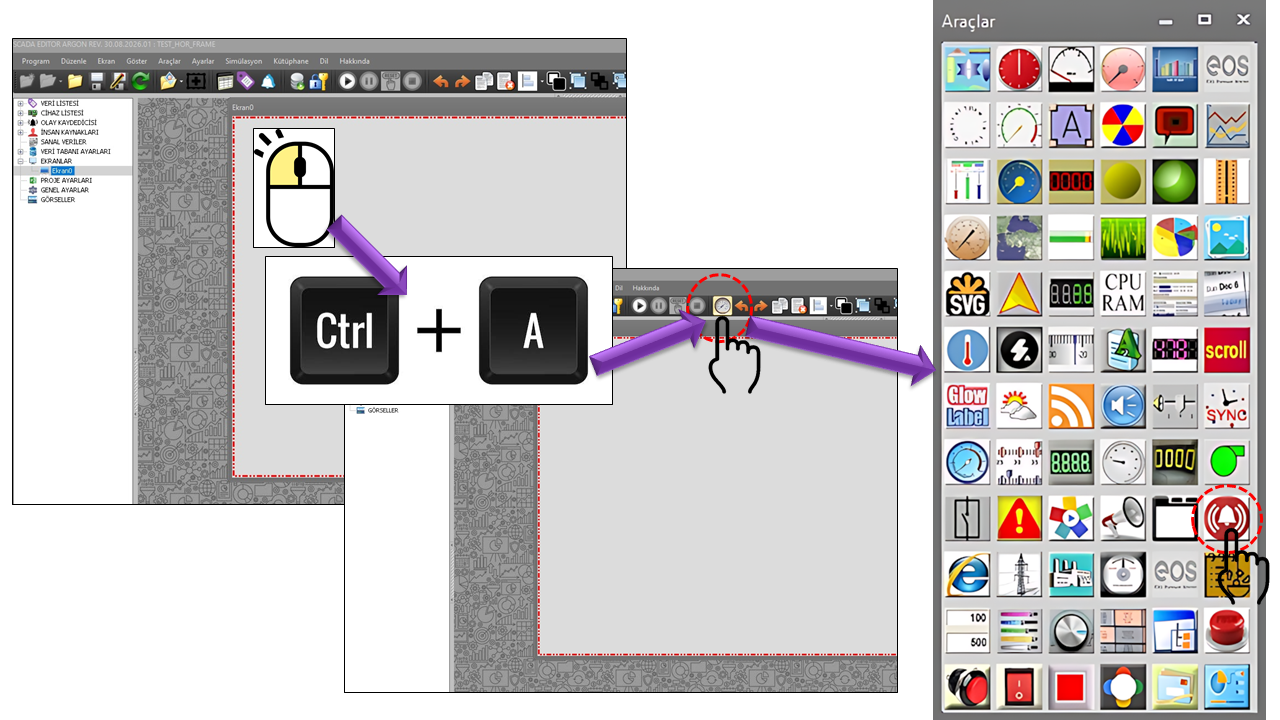
ALARM LIST is the ALARMLISTESI User Control type used in EOS SCADA to present alarm information to the operator in tabular form. Its extensive configuration options allow it to be adapted to different alarm monitoring requirements across various SCADA screens.
The alarm list is not limited to displaying active alarms. Different alarm display modes can be selected through the ListType property. In addition, information such as archived data, filters, KKS details, alarm activation and recovery times, data values, and occurrence counts can be configured in the table.
ALARMLISTESI is a central interface component that enables SCADA operators to monitor and filter alarm conditions through a single user control and review them using different alarm display models.
When configuring the ALARM LIST, first define the alarm list's basic identity and update method. Then configure the alarm display type, table appearance, filters, and archive settings.
The basic identity, update interval, and general appearance of the ALARMLISTESI control are defined by the following properties.
| Property | EOS Turkish Equivalent | Default | Purpose | Where It Is Used |
|---|---|---|---|---|
UCType |
Control Type | ALARMLISTESI |
Defines the User Control type within EOS SCADA. | Defines the basic user control type for the alarm list. |
UpdateInterval |
Update Interval | 1000 ms |
Specifies the control's update interval. | SCADA screens where alarm information is refreshed periodically. |
UCBackColor |
Control Background Color | White |
Specifies the background color of the user control. | Defines the overall background appearance of the alarm table. |
UCForeColor |
Control Text Color | Black |
Specifies the default text color of the control. | Defines the overall appearance of text in the alarm table. |
UCFont |
Control Font | Arial Narrow, 8.25 pt |
Specifies the font used by the user control. | Adjusts the readability of alarm information. |
This group defines the basic alarm display model and table behavior of
the ALARM LIST. In particular, the ListType property is
one of the key properties that determines how the alarm list is displayed.
| Property | EOS Turkish Equivalent | Default | Purpose | Where It Is Used |
|---|---|---|---|---|
ListType |
List Type | Snitch |
Specifies the display type to be used for the alarm list. | Presents alarm information using different display models. |
ColorAlarms |
Color Alarms | false |
Specifies whether alarm coloring is enabled. | Alarm tables where colors are used to distinguish alarm conditions. |
KeepAlarmArchive |
Keep Alarm Archive | false |
Defines the setting for retaining the alarm archive. | Applications where alarm history must be retained. |
UseKKS |
Use KKS | false |
Specifies whether KKS is used. | Alarm lists for energy and industrial plant equipment identified by KKS. |
AlarmResetInterval |
Alarm Reset Interval | 0 |
Specifies the value used for the alarm reset interval. | Applications where alarm reset behavior is configured. |
ListType         = Snitch
ColorAlarms      = false
KeepAlarmArchive = false
UseKKS = falseThis user control operates independently of the main alarm-processing thread of the SCADA program. The control processes alarms itself according to its own processing interval. Therefore, it may not be as reliable as the main alarm-processing thread. It may fail to capture every alarm event, particularly alarms that appear and disappear very quickly. This must be taken into account especially when using modes such as Display All (Dispalyall), which track alarm conditions through the control's own processing cycle.
In addition, the Alarm List Type can be changed while the control is running, and filters can be added to the alarm list. Therefore, adding an unnecessarily large number of ALARMLISTESI user controls to the same SCADA project is not recommended. Each control runs its own alarm-processing cycle, so using too many alarm list controls can increase the processing load of the SCADA software and reduce overall performance.
Recommendation: When the same alarm source must be displayed
for different purposes, use the ListType (List Type) selection
and filtering features of an existing alarm list control whenever possible.
Avoid creating redundant alarm list controls.
ListType is an important enumeration property that determines
how the ALARM LIST presents alarm information. These options define more
than the table's appearance: they establish basic operating modes that
determine when an alarm remains in the list, how activation and recovery
events are displayed, and, in some cases, which data source supplies the
alarm information.
Selecting the ListType according to the intended use of
the alarm list directly affects the alarm view presented to the operator.
The English descriptions below are based on the terminology dictionary
and the Description values in the supplied source code.
| Enum Value | English Description |
|---|---|
Snitch |
Snitch |
Cumulative |
Cumulative |
Database |
Database |
Dispayactive |
Display Active |
Dispalyall |
Display All |
The Snitch mode is primarily used on alarm screens where the operator is expected to see and acknowledge alarms. Its main principle is to track both whether an alarm is active and whether the operator has acknowledged it.
In Snitch mode, the alarm is reported to the operator and acknowledged by the operator. If an alarm is configured to require acknowledgment and becomes active, it appears in the list. When the operator acknowledges the alarm, an indicator appears on the alarm row to show that it has been acknowledged.
When the alarm condition clears, the alarm is removed from the list if it has already been acknowledged. If the alarm clears before it has been acknowledged, it remains in the list and its color changes to indicate that it is no longer active. This allows the operator to distinguish alarms that have cleared but have not yet been acknowledged.
ListType = SnitchThe main purpose of the Cumulative mode is to display not only the current alarm conditions but also the alarm's activation and recovery events in chronological order. This allows the alarm's lifecycle to be tracked through the list.
In Cumulative mode, both alarm activation and recovery events are tracked. An arrow indicating the activation direction is used when an alarm occurs, while an arrow indicating the recovery direction is used when the alarm clears. Alarm events are listed in chronological order. This allows the operator to track when an alarm occurred and when it cleared within the same alarm history.
ListType = CumulativeThe Database mode is intended to display alarm events using records that have been persistently processed and stored. Although its appearance resembles the Cumulative mode, its data source and operating logic are different.
The Database display resembles the Cumulative display. Alarm activation and recovery events are shown with arrows indicating the corresponding direction and are ordered by time. The key difference is that alarm information is read directly from the database.
In this display mode, the user control does not operate as an independent alarm-processing mechanism that makes decisions about the alarms itself. Instead, it uses the alarm list written to the database by the alarm-processing thread running in the parent thread. The control therefore displays the records produced by the alarm-processing thread.
ListType = DatabaseThe Display Active mode helps the operator focus on alarms that are currently active rather than historical alarm events. It is therefore useful on screens where the current number of active alarms needs to be seen quickly.
In Display Active mode, only alarms that are currently active are displayed. When an alarm is no longer active, it is no longer part of the active alarm list and is removed from this view. This mode is therefore suitable for screens where the operator needs to focus specifically on ongoing active alarms.
ListType = DispayactiveThe Display All mode does not limit the alarm list to active alarms. Alarms remain in the list regardless of their current state, allowing the operator to view active and inactive states together.
When Display All is selected, all alarms are displayed along with their current active or inactive states. An active alarm is shown as active, while an alarm that has cleared remains in the list as inactive. This approach allows the operator to see the current states of alarm records processed by the control, rather than only the current active alarm conditions.
ListType = DispalyallThe widths of the information columns in the alarm list can be configured individually. These properties are used to control the layout of the alarm list on the screen and determine how much space each type of information occupies.
| Property | EOS Turkish Equivalent | Default | Purpose | Where It Is Used |
|---|---|---|---|---|
HeaderBackColor |
Header Background Color | White |
Specifies the background color of the alarm table header. | Controls the visual appearance of the table header. |
HeaderForeColor |
Header Text Color | Black |
Specifies the foreground color of the alarm table header. | Controls the appearance of header text. |
HeaderFont |
Header Font | Arial Narrow, 8.25 pt |
Specifies the font used for the alarm table header. | Improves the readability of table column headings. |
AlarmStatusColWidth |
Alarm Status Column Width | 40 |
Specifies the width of the alarm status column. | Controls the column that displays the alarm status. |
AlarmDataNameColWidth |
Alarm Data Name Column Width | 0 |
Specifies the width of the alarm data name column. | Controls the column that displays the data name associated with the alarm. |
AlarmDefinitionColWidth |
Alarm Definition Column Width | 250 |
Specifies the width of the alarm definition column. | Controls the column that displays the alarm description or definition. |
TimeOfOccurrenceColWidth |
Occurrence Time Column Width | 100 |
Specifies the width of the occurrence time column. | Controls the display of the time when the alarm occurred. |
TimeOfRecoveryColWidth |
Recovery Time Column Width | 100 |
Specifies the width of the recovery time column. | Controls the display of the time when the alarm recovered. |
DataValueColWidth |
Data Value Column Width | 80 |
Specifies the width of the data value column. | Controls the display of the data value that triggered the alarm. |
NumberOfOccurrenceColWidth |
Occurrence Count Column Width | 80 |
Specifies the width of the occurrence count column. | Controls the column that shows how many times the alarm has occurred. |
AlarmStatusColWidth        = 40
AlarmDefinitionColWidth    = 250
TimeOfOccurrenceColWidth   = 100
TimeOfRecoveryColWidth     = 100
DataValueColWidth          = 80
NumberOfOccurrenceColWidth = 80Text and global filter properties can be used to filter the alarm information displayed in the alarm list.
| Property | EOS Turkish Equivalent | Default | Purpose | Where It Is Used |
|---|---|---|---|---|
FilterText |
Filter Text | "" |
Specifies the text filter to be used for the alarm list. | Filters alarm records containing specific text. |
UseGlobalFilter |
Use Global Filter | false |
Specifies whether the global filter is used. | Applies the SCADA-wide filtering mechanism to the alarm list. |
_ExtraFilterText |
Additional Filter Text | — | Represents the additional filter text collection. | Applications that use the additional filter structure defined in the source code. |
EXTRA_FILTERTEXT_COLLECTION:
This structure is used in the source code as the
EXTRA_FILTERTEXT_COLLECTION[] array and defines the
_FilterText field. The supplied source definition does
not provide further information about how additional filters are processed.
| Property | EOS Turkish Equivalent | Default | Purpose | Where It Is Used |
|---|---|---|---|---|
DataFromArchive |
Data from Archive | false |
Specifies the setting for using alarm data from the archive. | Applications where the alarm list uses historical or archived data. |
NumberOfArchiveDays |
Number of Archive Days | 3 |
Specifies the number of days of archived data to use. | Defines the time range of alarm data retrieved from the archive. |
DataFromArchive     = true
NumberOfArchiveDays = 3
This example shows how to enable archived data for the alarm list and set the archive period to 3 days.
UpdateMode specifies the method used by the alarm list's
update mechanism.
| Enum Value | English Description |
|---|---|
Localtimer |
Local Timer |
Maintimer |
Main Timer |
Thread |
Thread |
UpdateMode = Localtimer
The default value defined in the source code is
Localtimer, which means Local Timer.
| Property | EOS Turkish Equivalent | Default | Purpose | Where It Is Used |
|---|---|---|---|---|
UseSorting |
Use Sorting | false |
Specifies whether sorting is used in the alarm list. | Screens where alarm records need to be displayed according to a defined sorting method. |
An example configuration for displaying active alarms:
UCType         = ALARMLISTESI
ListType       = Dispayactive
ColorAlarms    = true
UseSorting     = true
UpdateMode     = Localtimer
UpdateInterval = 1000An example configured to use the Cumulative display mode:
ListType                 = Cumulative
ColorAlarms              = true
KeepAlarmArchive         = true
AlarmDefinitionColWidth  = 250
TimeOfOccurrenceColWidth = 100
TimeOfRecoveryColWidth = 100An example using archived data:
DataFromArchive      = true
NumberOfArchiveDays  = 3
ListType = DatabaseAn alarm list configuration that uses KKS information:
UseKKS       = true
ColorAlarms  = true
UseSorting = trueAn example using a text filter:
FilterText      = "POMPA"
UseGlobalFilter = false| Group | Key Properties |
|---|---|
| General |
UCType, UCName,
UpdateInterval, UCBackColor,
UCForeColor, UCFont
|
| Alarm Table |
ListType, ColorAlarms,
KeepAlarmArchive, UseKKS,
AlarmResetInterval
|
| Header |
HeaderBackColor, HeaderForeColor,
HeaderFont
|
| Columns |
AlarmStatusColWidth,
AlarmDataNameColWidth,
AlarmDefinitionColWidth,
TimeOfOccurrenceColWidth,
TimeOfRecoveryColWidth,
DataValueColWidth,
NumberOfOccurrenceColWidth
|
| Filters |
FilterText, UseGlobalFilter,
_ExtraFilterText
|
| Alarm Data |
DataFromArchive,
NumberOfArchiveDays
|
| Update |
UpdateMode, UpdateInterval
|
| Sorting | UseSorting |
ALARM LIST (ALARMLISTESI) is one of the core User Controls in EOS SCADA alarm management and operator monitoring screens, offering a wide range of configuration options.
Different alarm monitoring screens can be created by combining the display
modes defined by ListType with filtering, archived data, KKS,
colored alarm display, column widths, update mode, and sorting features.
Documentation Standard: The property names on this page are the technical names used in the EOS SCADA source code. ENUM values are retained in their English technical form, and their Turkish equivalents are presented based on the Description values in the source code and the EOS terminology dictionary. No additional behavioral assumptions have been made for fields whose functionality is not separately explained in the source code.
Free Software Download Center
Software for industrial data collection, monitoring, and analysis.

Technical Support
Software documentation, sample code, and practical technical information.
You can contact us regarding EOS software, technical documentation, or industrial data communication.