Pressure Monitoring
Analog gauges can be used to monitor pressure values on a scale in pipelines, process equipment, and pressurized systems.
EOS SCADA • ANALOG INDICATOR • DIAL • PROCESS VALUE
AQUA_GOSTERGE is an analog gauge-type EOS SCADA User Control designed to monitor a process value at a glance using a circular dial, scale markings, and a moving pointer.
The control structure includes properties such as minimum and maximum limits, the number of major and minor divisions, dial color, indicator background color, recommended value, and threshold percentage. The same value can also be displayed digitally if desired.
Visually, the control features a circular analog gauge with a range of 0–100, a pointer, and a colored operating region. This layout helps operators assess not only the numerical value but also its position on the scale at a glance.

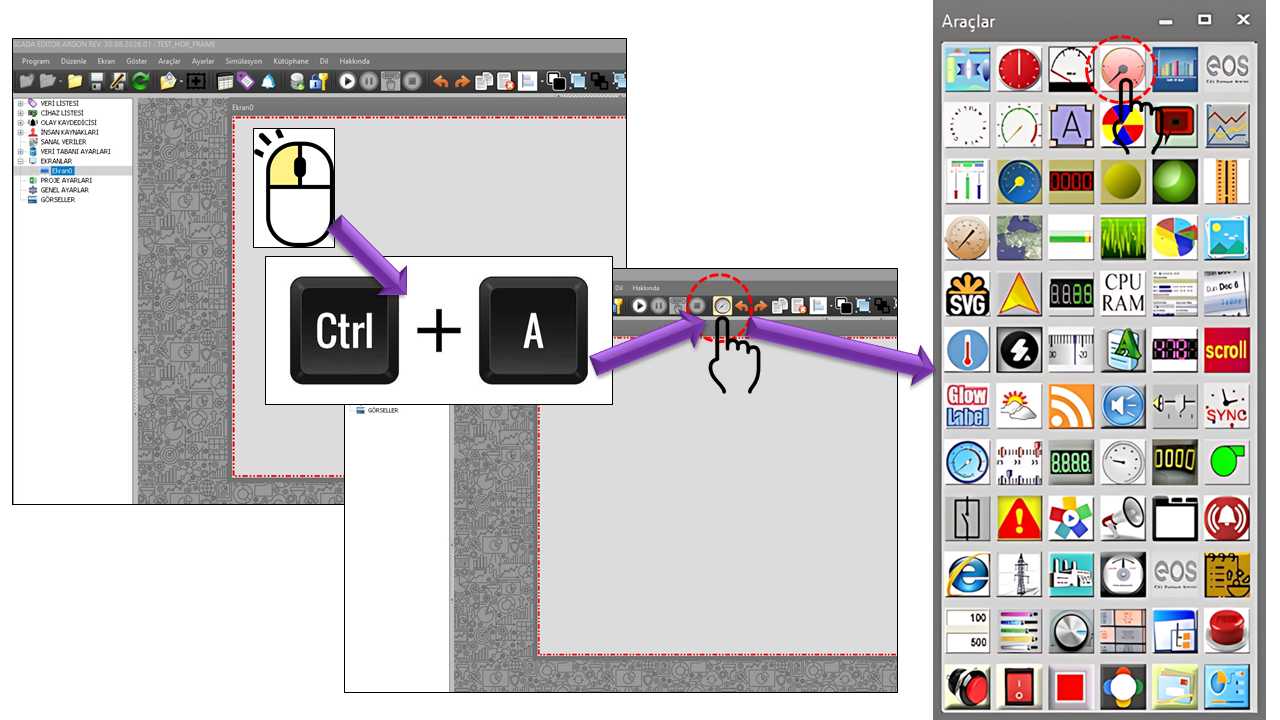
The basic visual design of AQUA_GOSTERGE resembles a conventional analog dial gauge. A process value is indicated by a pointer within a defined measurement range. The major and minor divisions on the dial make it easier and faster to read the value's position on the scale.
Analog gauges allow operators to assess the current value of a process variable not only numerically, but also visually by observing its position on the scale. This makes it easier to recognize where the value lies between its minimum and maximum limits, how close it is to the normal operating range, and the direction in which it is changing.
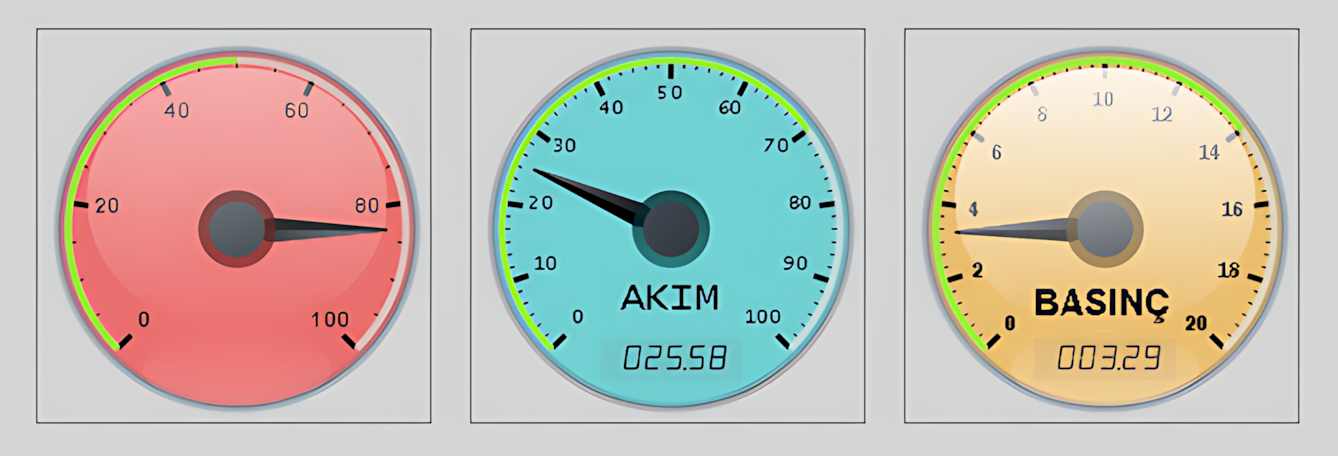
AQUA_GOSTERGE can be used to visually monitor numerical process variables such as flow, level, pressure, temperature, power, voltage, current, and similar quantities. The measurement range is defined by the MinValue and MaxValue properties, while the number of major and minor divisions allows the value to be displayed on a more detailed scale.
The gauge includes properties such as dial color, background color, pointer display, and optional digital value display. These features allow the same gauge design to be adapted to different process variables and screen layouts.
Primary purpose of AQUA_GOSTERGE: To present the current value of a process variable quickly and clearly as an analog gauge within a defined measurement range. A digital value can also be displayed on the gauge when required, and its visual appearance can be configured for different process variables.
Analog gauges can be used in a wide range of industrial measurement and automation applications where process values need to be monitored. Manufacturer documentation describes gauges and process measurement instruments for various variables, particularly pressure, flow, temperature, and level.
Analog gauges can be used to monitor pressure values on a scale in pipelines, process equipment, and pressurized systems.
The position of a temperature value within its normal operating range can be quickly identified in furnaces, boilers, process lines, cooling systems, and similar equipment.
The gauge can be used to visually monitor the position of a tank, reservoir, or process vessel level between its minimum and maximum limits.
Displaying pipeline flow rates on an analog dial provides a quick visual assessment, particularly for process variables with a fixed measurement scale.
Gauge-type indicators are used to monitor process measurements in fields such as automation, chemical processing, energy, oil and gas, metals and mining, food and beverage, and water and wastewater treatment.
In energy and utility applications, analog process variables such as pressure, temperature, flow, and level can be monitored on operator screens.
An analog gauge provides visual context that a number alone cannot convey: the pointer's position on the dial immediately shows where the value lies relative to the minimum and maximum limits. SCADA/HMI documentation describes moving analog indicators and gauge components as a way to present analog values in context.
This group contains the basic operating and appearance properties of AQUA_GOSTERGE. Settings such as the update interval, decimal places, background color, and font determine the control's general behavior.
| Property | EOS Turkish Equivalent | Default | Purpose | Where It Is Used |
|---|---|---|---|---|
UCType |
Control Type | AQUA_GOSTERGE |
Defines the User Control type within EOS SCADA. | When defining the basic type of an AQUA_GOSTERGE control. |
UpdateInterval |
Update Interval | 1000 ms |
Specifies the control's update interval. | On screens where live process values are refreshed periodically. |
DecimalPoint |
Decimal Places | 0 |
Specifies the number of decimal places used when displaying numerical values. | To adjust the displayed precision of measurement values. |
UCBackColor |
Control Background Color | Transparent |
Specifies the control's primary background color. | To maintain visual consistency between the gauge and the SCADA screen. |
UCForeColor |
Control Foreground Color | Black |
Specifies the control's primary text and foreground color. | To configure the general appearance of text on the dial. |
UCFont |
Control Font | Lucida Console, 8.25 pt |
Specifies the control's primary font. | To adjust the readability of dial markings and numerical values. |
The limits determine the range over which the analog value is scaled on the gauge. The default configuration uses a range of 0–100.
| Property | EOS Turkish Equivalent | Default | Purpose | Where It Is Used |
|---|---|---|---|---|
MinValue |
Minimum Value | 0 |
Defines the minimum value of the gauge scale. | When defining the lower limit of the measurement range. |
MaxValue |
Maximum Value | 100 |
Defines the maximum value of the gauge scale. | When defining the upper limit of the measurement range. |
| Application | MinValue | MaxValue | Example Unit |
|---|---|---|---|
| Tank Level | 0 | 100 | % |
| Pressure | 0 | 10 | bar |
| Temperature | 0 | 200 | °C |
| Flow Rate | 0 | 500 | m³/h |
These values are illustrative examples only. The actual engineering range must be determined according to the monitored process and the technical specifications of the measurement instrument.
The scale settings determine the number of major dial divisions and the number of minor divisions between each pair of major divisions. These values directly affect the readability of the gauge.
| Property | EOS Turkish Equivalent | Default | Purpose | Where It Is Used |
|---|---|---|---|---|
NoOfSubDivisions |
Number of Minor Divisions | 3 |
Defines the number of minor divisions between major divisions. | When creating the smaller tick marks on the scale. |
NoOfDivisions |
Number of Major Divisions | 5 |
Defines the number of major divisions on the dial. | When creating the main scale markings. |
Default configuration:
Using 5 major divisions and 3
minor divisions per major interval across a 0–100 range
helps operators read changes in value in greater detail.
The gauge settings include the main properties that determine the dial's appearance and how its value information is presented.
| Property | EOS Turkish Equivalent | Default | Purpose | Where It Is Used |
|---|---|---|---|---|
DialColor |
Dial Color | Red |
Defines the primary color of the dial. | When establishing the gauge's visual identity and value display area. |
GaugeBackColor |
Gauge Background Color | White |
Defines the gauge background color. | To visually distinguish the dial background from the measurement area. |
DialText |
Dial Text | "" |
Specifies the text displayed on the gauge. | To display information such as a title, unit, or short description on the dial. |
ShowDigitalValue |
Show Digital Value | false |
Determines whether a numerical value is displayed alongside the analog pointer. | When an exact numerical value is required in addition to the analog display. |
RecommendedValue |
Recommended Value | 0 |
Defines a recommended reference value for the gauge. | When operators need to compare the current value with a target or recommended value. |
ThresholdPercent |
Threshold Percentage | 50 |
Defines the percentage value used for the threshold. | When configuring a threshold region or threshold behavior on the scale. |
Glossiness |
Glossiness | 70 |
Defines the intensity of the glossy effect on the gauge surface. | When creating a gauge design with a glass-like or glossy appearance. |
Based on the supplied image, the control's main visual structure consists of the following components:
| Component | Function in the Image | Related Property |
|---|---|---|
| Dial | Forms the circular measurement area. | DialColor, GaugeBackColor |
| Scale | Displays the major and intermediate values across the 0–100 range. | MinValue, MaxValue, NoOfDivisions, NoOfSubDivisions |
| Pointer | Indicates the current analog value's position on the dial. | The control's analog value display mechanism |
| Colored Region | Visually highlights a specific operating or threshold region on the scale. | RecommendedValue, ThresholdPercent |
| Glossy Surface | Gives the gauge a glass-like visual appearance. | Glossiness |
| Digital Value | Can display the value indicated by the pointer numerically. | ShowDigitalValue |
The presence of the RecommendedValue and
ThresholdPercent properties in AQUA_GOSTERGE
indicates that the gauge is designed to support a reference
value or threshold concept in addition to displaying the
raw process value.
MinValue          = 0
MaxValue          = 100

RecommendedValue  = 70
ThresholdPercent  = 50

ShowDigitalValue  = true
In this example, the value is displayed on an analog dial covering the 0–100 range, the value 70 is defined as a reference, and the digital value can also be displayed. The exact visual implementation of the threshold behavior depends on the processing logic in the EOS SCADA control's source code.
Important:
The meanings of RecommendedValue and
ThresholdPercent have been explained based on
their definitions in the supplied source. Since the source
code describing exactly how these properties are drawn on
the dial has not been provided here, no assumptions have
been made about the control's precise internal algorithm.
The Glossiness property is used to adjust the
intensity of the glossy effect in the control's visual design.
Its default value is 70.
Visual effect: The supplied AQUA_GOSTERGE image shows a glossy, layered dial surface. This creates a more distinctive measuring instrument appearance than a conventional flat numerical display.
| Property | EOS Turkish Equivalent | Default | Purpose | Where It Is Used |
|---|---|---|---|---|
Glossiness |
Glossiness | 70 |
Defines the glossiness level of the dial. | In analog gauge designs that use a glass-like appearance. |
While the analog dial provides quick visual recognition,
enabling ShowDigitalValue also displays the
numerical equivalent of the same process value. When these
two approaches are combined, operators can see both the
value's position on the scale and its exact numerical value.
ShowDigitalValue = true
DecimalPoint     = 1
For example, if the gauge operates over a 0–100 range and the pointer indicates approximately 63.4, the digital value display can be configured to show the value to one decimal place.
In industrial HMI systems, displaying a process value with a pointer while also presenting its numerical value is a common gauge design approach. Siemens HMI Gauge documentation describes displaying analog measurement values and visually marking measurement ranges. citeturn1search36turn1search2
Displaying the flow rate in a turbine or water conveyance system on an analog dial with a range of 0–500 m³/h.
MinValue          = 0
MaxValue          = 500
NoOfDivisions     = 5
NoOfSubDivisions  = 3
ShowDigitalValue = trueDisplaying the reservoir level as a percentage over a range of 0–100.
MinValue          = 0
MaxValue          = 100
RecommendedValue  = 70
ThresholdPercent  = 50
DialText = "%"Monitoring boiler temperature using an analog gauge with a range of 0–200 °C.
MinValue          = 0
MaxValue          = 200
NoOfDivisions     = 5
NoOfSubDivisions  = 3
DialText          = "°C"
ShowDigitalValue = trueMonitoring pump discharge pressure over a range of 0–10 bar.
MinValue          = 0
MaxValue          = 10
RecommendedValue  = 7
DialText          = "bar"
ShowDigitalValue  = true
The engineering ranges used in these examples are provided solely to illustrate the configuration approach. Actual limits must be determined based on the field instrument's measurement range, process design, and operating limits.
Analog gauges such as AQUA_GOSTERGE can make important analog values easier to scan quickly, particularly on process screens. However, using too many gauges can make the screen visually crowded.
Practical approach: Use dial gauges for analog variables that operators need to assess quickly when making decisions. For less critical variables or large numbers of measurements, alternatives such as tables, digital values, or trends can help create more organized screens.
Modern HMI design approaches note that presenting analog values together with their normal operating ranges and alarm context, rather than as isolated numbers, can help operators understand process conditions more quickly. citeturn1search0turn1search4
| Group | Key Properties |
|---|---|
| General |
UCType,
UpdateInterval,
DecimalPoint,
UCBackColor,
UCForeColor,
UCFont
|
| Limit Settings |
MinValue,
MaxValue
|
| Scale |
NoOfSubDivisions,
NoOfDivisions
|
| Gauge |
DialColor,
GaugeBackColor,
DialText,
ShowDigitalValue,
RecommendedValue,
ThresholdPercent,
Glossiness
|
AQUA_GOSTERGE provides a User Control in EOS SCADA for quickly monitoring analog process values using a dial and pointer. Properties such as minimum and maximum limits, major and minor division counts, dial colors, digital value display, recommended value, threshold percentage, and glossiness allow the control to be configured for both functional and visual requirements.
Documentation standard: The property names on this page are the technical names from the EOS SCADA source code supplied by the user. The EOS terminology dictionary was used for the Turkish property equivalents. External references support the industrial applications of similar analog and gauge indicators; they are not presented as documentation of AQUA_GOSTERGE's source code.

Free Software Download Center
Software for industrial data collection, monitoring, and analysis.

Technical Support
Software documentation, sample code, and practical technical information.
You can contact us regarding EOS software, technical documentation, or industrial data communication.