Staff Communication
Publishing shift, meeting, training, maintenance, and internal announcements on shared SCADA screens.
EOS SCADA • DUYURUPANELI • ANNOUNCEMENT PANEL • USER CONTROL
ANNOUNCEMENT PANEL is a specialized user control that extends EOS SCADA screens beyond process monitoring and control, enabling their use for staff communication, internal announcements, and information display.
Announcements can be added, edited, or deleted using a separate application named EOSScadaDuyuru.exe. Announcement records are stored in a separate Firebird database and displayed on the SCADA screen through the ANNOUNCEMENT PANEL.

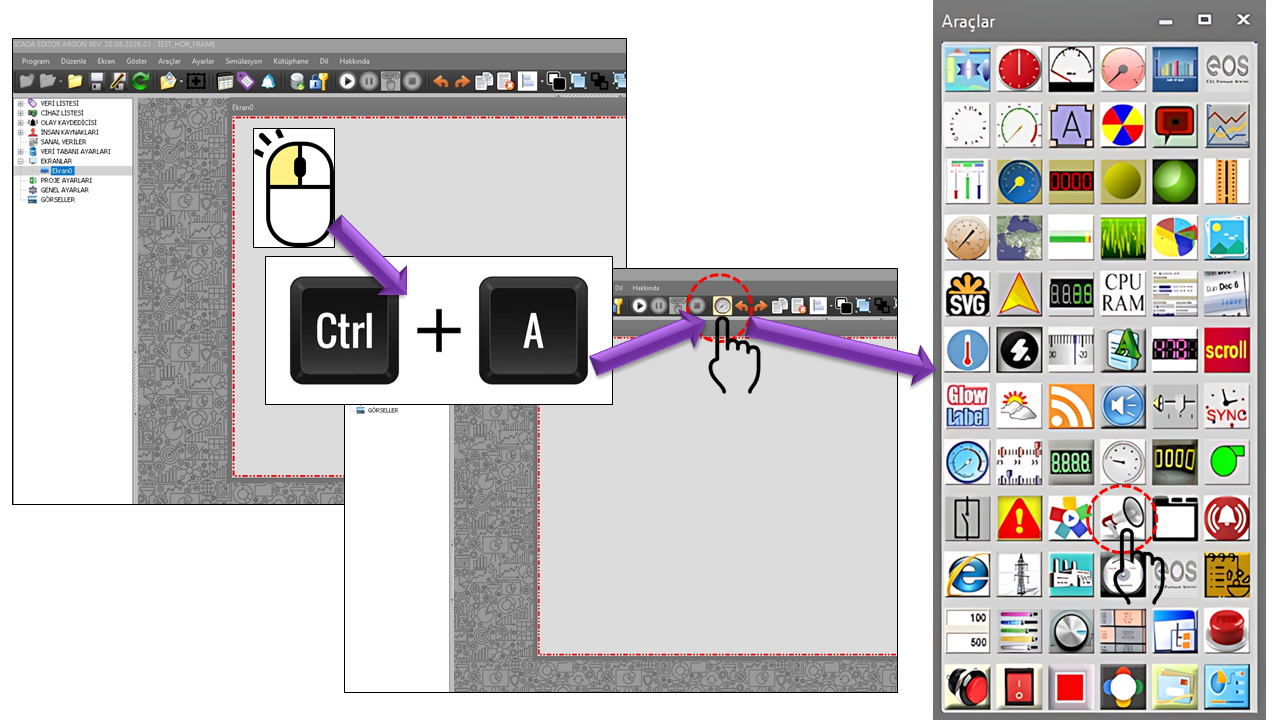
The primary purpose of traditional SCADA screens is to display process data, present alarms, and assist operators with control operations. The ANNOUNCEMENT PANEL also uses the same screen infrastructure for communication between people.
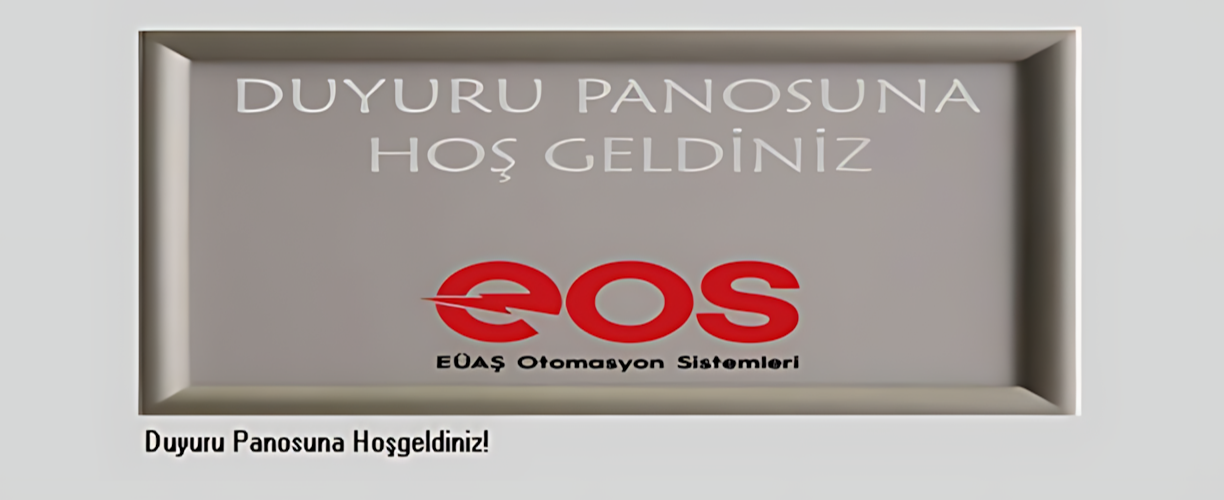
For this reason, this control is more than a simple text display object. When used together with a separate announcement management application and a Firebird database, it can provide a corporate communication and information display system running on SCADA.
Publishing shift, meeting, training, maintenance, and internal announcements on shared SCADA screens.
Work schedules, events, general messages, and operational updates.
Supporting communication with visitors or general users as part of a suitable information display project.
Displaying information in a rotating sequence in control rooms, entrances, waiting areas, or shared spaces.
An image can accompany announcement text; its position and allocated display area can be configured.
The panel can reread announcement data according to the configured update interval.
The system consists of two main layers: announcement management and displaying announcements on SCADA screens.
EOSScadaDuyuru.exe is launched.
A new record is added or an existing record is edited.
Announcement information is stored in a separate database.
The ANNOUNCEMENT PANEL displays the records.
Staff or the intended audience sees the message.
Key distinction: Announcements are created and edited using EOSScadaDuyuru.exe, while they are displayed by the ANNOUNCEMENT PANEL.
Managing announcement content through a separate program separates content management from the display layer in the Runtime screen.
This architecture can support a centralized facility in which authorized personnel prepare announcements and publish them on multiple SCADA screens.
The basic configuration properties of the DUYURUPANELI user control are listed in the table below. These properties define the update interval, general color and font settings, and the alignment of announcement text within the panel.
| Property | EOS English Equivalent | Default | Description |
|---|---|---|---|
UCType |
Control Type | DUYURUPANELI |
Defines the type of the Announcement Panel user control. |
UpdateInterval |
Update Interval | 3600000 ms |
Specifies the update interval; the value corresponds to one hour. |
UCBackColor |
Control Background Color | Transparent |
Defines the control's background color. |
UCForeColor |
Control Foreground Color | Black |
Defines the general text/foreground color. |
UCFont |
Control Font | Arial Narrow, 8.25 pt, Bold |
Defines the default font. |
TextAlignment |
Text Alignment | Topleft |
Defines the position of announcement text within the panel. |
Announcements are stored in a separate Firebird database. The source code contains settings for the connection host, port, database name, SID, timeout, credentials, file path, and timestamp format.
| Property | EOS English Equivalent | Default / Status | Description |
|---|---|---|---|
DBHostName |
DB Host Name | localhost |
Defines the host computer for the Firebird server. |
DBPort |
DB Port | 3050 |
The TCP port used for the Firebird connection. |
DBName |
DB Name | duyurudb |
The name of the announcement database. |
DBSID |
DB SID | DataLogger |
The database identifier defined in the source code. |
DBTimeOut |
DB Timeout | 1000 |
The timeout value defined for the database connection. |
DBUserName |
DB User Name | ••••• | The username in the source code is not disclosed for security reasons. |
DBPassword |
DB Password | ••••• | The password in the source code is not disclosed for security reasons. |
DBLogBase |
DB Log Base / Database File Path | C:\DataLogger\FDB |
The base path for the database files specified in the source code. |
DBPort = 3050: The official Firebird configuration documentation specifies 3050 as the default value for RemoteServicePort.
The TextAlignment property defines the position of announcement text within the ANNOUNCEMENT PANEL. The available positions are listed in the Enumeration below.
| Enumeration | English |
|---|---|
Topleft |
Top Left |
Topcenter |
Top Center |
Topright |
Top Right |
Middleleft |
Middle Left |
Middlecenter |
Middle Center |
Middleright |
Middle Right |
Bottomleft |
Bottom Left |
Bottomcenter |
Bottom Center |
Bottomright |
Bottom Right |
The display behavior of the ANNOUNCEMENT PANEL can be configured through properties such as whether animation is enabled, animation speed, whether the panel border is displayed, and the transition interval between announcements or images. These properties, their EOS English equivalents, default values, and functions are listed in the table below.
| Property | EOS English Equivalent | Default | Description |
|---|---|---|---|
UseAnimation |
Animation | false |
Determines whether display animation is used. |
AnimationSpeed |
Animation Speed | 0 |
Defines the animation speed. |
DisplayBorder |
Display Border | false |
Determines whether the panel border is displayed. |
TransitionInterval |
Transition Interval | 5000 ms |
Defines the time interval between announcement or image transitions. |
The default value TransitionInterval = 5000 represents a transition interval of 5 seconds. The UseAnimation property determines whether animation is enabled.
Depending on the announcement type, the ANNOUNCEMENT PANEL can display announcements with visual support by using predefined images embedded in the software. An appropriate image defined for each announcement type can be displayed alongside the announcement. The properties below determine whether an image is displayed, its position within the panel, and the proportion of space allocated to it.
| Property | EOS English Equivalent | Default | Description |
|---|---|---|---|
DisplayImage |
Display Image | false |
Determines whether the predefined image embedded in the software for the relevant announcement type is displayed alongside the announcement. |
ImageLocation |
Image Location | Top |
Defines the position of the image displayed alongside the announcement within the panel. |
ImagePercent |
Image Percentage | 20 |
Defines the percentage of the panel area allocated to the image. |
The ImageLocation property defines the placement of the predefined image embedded in the software within the announcement panel. The available positions are defined in the Enumeration below.
| Enumeration | English |
|---|---|
Top |
Top |
Bottom |
Bottom |
Left |
Left |
Right |
Right |
Note: Images used by DUYURUPANELI are treated as predefined visuals embedded in the software for specific announcement types, rather than as external image files uploaded separately by the user.
The ANNOUNCEMENT PANEL can be used on SCADA screens to go beyond displaying process information and alarm states, supporting staff communication and general information needs within a facility. Announcements can cover a range of purposes, including operational activities, maintenance work, occupational health and safety, shift organization, training, corporate communication, and shared information displays. This arrangement makes it possible to present up-to-date information centrally, particularly in control rooms and shared areas regularly used by personnel.
Publishing shift changes, meetings, training schedules, work plans, and general announcements for personnel.
Informing personnel about scheduled maintenance, field activities, temporary operating procedures, equipment work, and operational changes.
Announcing maintenance schedules, equipment interventions, testing activities, shutdowns, and issues requiring the attention of technical teams.
Displaying occupational health and safety messages, safety reminders, site rules, awareness initiatives, and periodic OHS campaigns.
Publishing important safety messages, assembly-point information, temporary procedures, and instructions for personnel during emergencies.
Sharing general internal announcements, events, achievements, organizational information, and messages for employees.
Communicating training programs, technical information, awareness initiatives, periodic information campaigns, and reminders to personnel.
Displaying informative content about the facility, operations, working environment, and corporate activities for visitors or general users where the architecture is suitable.
Creating centralized announcement and information displays in control rooms, entrance areas, waiting rooms, cafeterias, and other shared spaces.
Providing advance notice of scheduled maintenance, power outages, system work, site modifications, or temporary service changes.
Announcing meetings, seminars, ceremonies, internal events, visits, and organizational information to personnel or visitors.
Supporting consistent information flow throughout a facility by publishing centrally prepared announcements with identical content on multiple SCADA screens.
The most distinctive aspect of the ANNOUNCEMENT PANEL is its ability to transform a SCADA screen into an interface that communicates not only with machines but also with people.
In the control room of a power plant, factory, or other facility, staff meetings, maintenance activities, training sessions, or general corporate announcements can be displayed alongside process information.
In a more advanced project, EOS SCADA's visualization infrastructure could form part of a staff communication display, an internal corporate information display, or, where appropriate, a visitor/public relations information display project.
The ANNOUNCEMENT PANEL is used on a large screen at the entrance. An authorized person manages the content using EOSScadaDuyuru.exe; the record is written to Firebird; and the panel presents the content to visitors or staff using the configured update and transition settings.
| Topic | Approach | Purpose |
|---|---|---|
| Text | Short, readable, and direct messages | Quick comprehension. |
| Alignment | Position appropriate to the content | Effective use of the panel area. |
| Image | Use DisplayImage when needed | Provide visual support for the message. |
| Transition | Set TransitionInterval according to reading time | Ensure the content can be read. |
| Animation | Enable UseAnimation when necessary | Maintain readability. |
| Database | Separate the management and display layers | Centralized content management. |
The ANNOUNCEMENT PANEL occupies a special place among EOS SCADA user controls because its primary purpose is not to display process values, but to use SCADA infrastructure for communication between people.
When the separate EOSScadaDuyuru.exe management application, separate Firebird database, text alignment, animation and transition settings, and optional image display are considered together, they provide a configurable SCADA information and communication panel.
The EOS SCADA approach: Screens that monitor processes can also become screens that communicate information to the people within an organization. The ANNOUNCEMENT PANEL represents this additional communication layer.

Free Software Download Center
Software for industrial data collection, monitoring, and analysis.

Technical Support
Software documentation, sample code, and practical technical information.
You can contact us regarding EOS software, technical documentation, or industrial data communication.