WRITE DATA
Forcedata
Used to write commands or values to SCADA data points.
EOS SCADA • AUTOMATED COMMANDS • SCRIPTS • EXTERNAL APPLICATIONS • USER CONTROL
AUTOMATED ACTION EXECUTOR (FORCE MACHINE) is a specialized user control designed to perform automated operations in EOS SCADA based on schedules or operating conditions. In addition to data writing and scheduled data writing, the control can execute scripts and external applications.
The most important feature of this control is its ability to execute predefined operations without requiring the operator to approve each one manually. Therefore, the AUTOMATED ACTION EXECUTOR (FORCE MACHINE) should be regarded not merely as a screen object, but as an automation component capable of initiating operations in the control system.

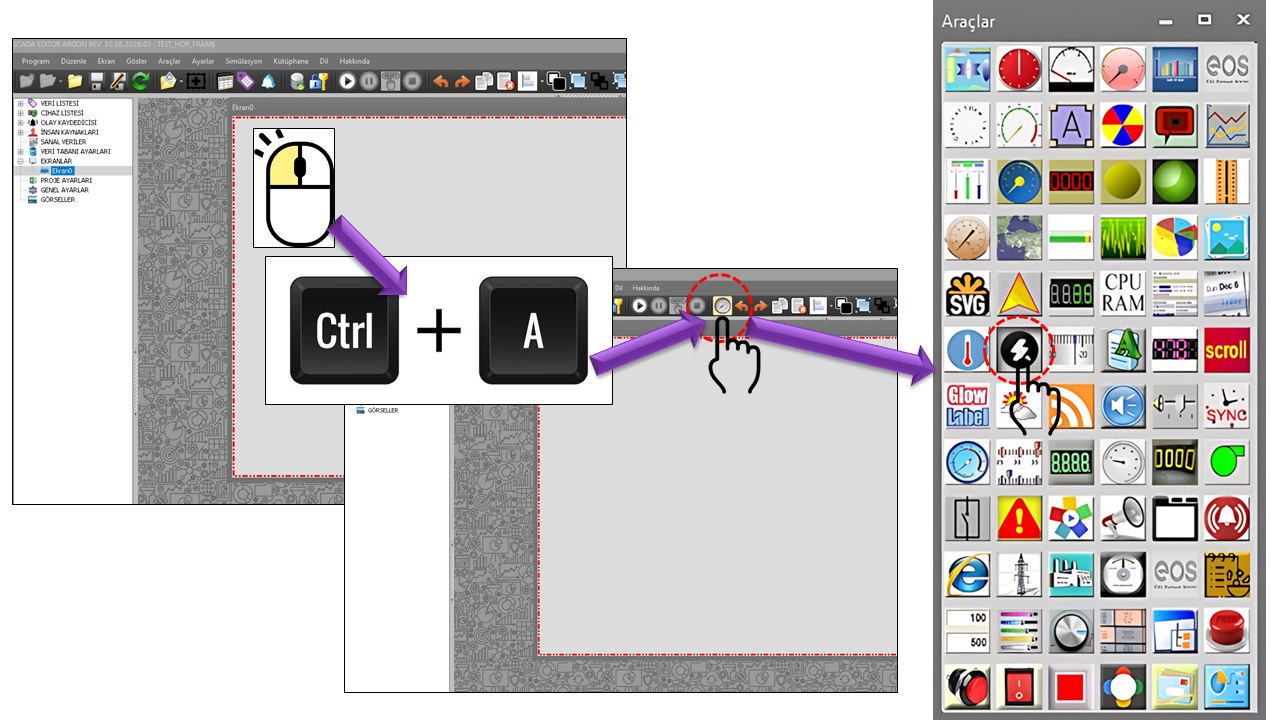
AUTOMATIC OPERATION EXECUTOR (FORCE MACHINE) is a specialized user control designed to perform operations, unlike conventional display controls in EOS SCADA. Depending on its configuration, it can initiate operations at specified intervals, run at a specific time, write data, or execute scripts and programs.
One of the key strengths of the AUTOMATIC OPERATION EXECUTOR (FORCE MACHINE) is its ability to establish a bidirectional workflow between data in SCADA and external computation or application environments. Data selected by EOS SCADA can be passed to a script or external program as input parameters; the resulting output parameters can then be associated with SCADA data again.
Such an architecture can provide an integration point for periodic calculations, data transformation, custom algorithms, external analysis software, and user-developed decision-support applications. Within the design approach specified by the user, it also enables external computational components, such as artificial intelligence software, to be used in scenarios that interact with SCADA data.
CRITICAL WARNING: Because the AUTOMATIC OPERATION EXECUTOR (FORCE MACHINE) can issue commands or initiate operations, it must be configured carefully due to its ability to execute automatically without approval. An incorrectly defined operation, inappropriate scheduling, an incorrect target data point, or unsuitable use of an external program may lead to unintended process consequences. Therefore, authorization, testing, commissioning, and change management must be addressed together.
The basic configuration properties of the AUTOMATIC OPERATION EXECUTOR (FORCE MACHINE) user control are listed in the table below. These properties cover the main parameters that determine the control's operating cycle, operation behavior, threshold value, command type, and authorization level.
| Property | EOS Turkish Equivalent | Default | Description |
|---|---|---|---|
UCType |
Control Type | OTOMATİK İŞLEM YÜRÜTÜCÜ (FORCE MACHINE) |
Specifies the user control type within EOS SCADA. |
UpdateInterval |
Update Interval | 1000 ms |
The basic time interval used for the control's operating/update cycle. |
PulseDelayTime |
Pulse Delay Time | 500 ms |
The delay period used for pulse-based operations. |
LevelThreshold |
Level Threshold | 0.5 |
The threshold value defined in the source code; it can be used when designing conditional control behavior. |
HideControl |
Hide Control | false |
Determines whether the control is visible in the user interface. |
ContinuousCommand |
Continuous Command | false |
Determines whether continuous command execution is enabled. |
ForceType |
Operation Type | Forcedata |
Selects the main type of operation to be performed by the AUTOMATIC OPERATION EXECUTOR (FORCE MACHINE). |
ForceInterval |
Operation Interval | Everyhour |
Specifies the period or schedule at which the operation is executed. |
ScriptName |
Script File Name | "" |
Specifies the name of the script file to be used when executing a script. |
InputParams |
Input Parameters | "" |
Defines the input data to be passed to a script or external program. These definitions make it possible to export SCADA data to the script/program for processing. |
OutputParams |
Output Parameters | "" |
Defines the output data to be used after the operation. These definitions make it possible to import script/program results into SCADA data. |
OperationHour |
Operation Hour | 0 |
The hour value used when execution at a specific time is selected. |
OperationMinute |
Operation Minute | 0 |
The minute value used when execution at a specific time is selected. |
AuthorizationLevel |
Authorization Level | Monitor |
Specifies the EOS SCADA authorization level required to use the control. |
FMForceType is the primary enumeration that determines what the AUTOMATIC OPERATION EXECUTOR (FORCE MACHINE) does.
Its functionality is not limited to issuing commands. In particular, the Runscript and
Runprogram options provide a powerful operating model that integrates EOS SCADA with
external computational and application components.
Forcedata
Used to write commands or values to SCADA data points.
Writehour
Writes time information as part of the defined operation.
Plannedforcedata
Performs data-writing operations according to a scheduled execution model.
Runscript
Can transfer SCADA data to external computational logic by executing the specified script file.
Runprogram
Can establish an operational workflow between EOS SCADA and another software application by executing an external program.
Important distinction: It would be incomplete to think of the AUTOMATIC OPERATION EXECUTOR (FORCE MACHINE) merely as a "control that writes data automatically." The Run Script and Run Program options allow the control to act as an integration point that transfers SCADA data to external processing logic and brings the resulting outputs back into the SCADA environment.
| Enumeration | EOS Turkish Equivalent | Functional Approach |
|---|---|---|
Forcedata |
Write Data | Writing the specified data or command within the SCADA operation workflow. |
Writehour |
Write Time | Writing time information for use during the operation. |
Plannedforcedata |
Write Scheduled Data | Executing data-writing operations according to a scheduled timing model. |
Runscript |
Run Script | Executing a script and exchanging data through input/output parameters. |
Runprogram |
Run Program | Executing an external program and incorporating its results into a SCADA scenario. |
ForceInterval determines how frequently the AUTOMATIC OPERATION EXECUTOR (FORCE MACHINE) performs an operation.
The same control can therefore run on a scan-cycle basis, every few minutes, hourly, daily, or
at a specified hour and minute.
EveryminuteEvery5minutesEvery10minutesEvery15minutesEvery20minutesEveryhalfhourEveryscanintervalEveryhourEvery6hoursEvery12hoursEverydayAtspecifictime
When At a Specific Time is selected, the OperationHour and
OperationMinute fields are used. The default values in the source code are
0 hours and 0 minutes.
Example operating model:
The combination Runscript + Everyhour can define a scenario in which
the specified script runs hourly. The combination Runprogram + Atspecifictime
can define an operating model in which an external program starts at a specified hour and minute.
One of the most notable features of the AUTOMATIC OPERATION EXECUTOR (FORCE MACHINE) is its ability to establish data exchange through input and output parameters between EOS SCADA and a script or external program. This allows the external software to do more than simply run as a standalone program: it can receive and process SCADA data, then feed its results back into the SCADA workflow.
| Field | EOS Turkish Equivalent | Role |
|---|---|---|
InputParams |
Input Parameters | Used to define the data to be transferred from EOS SCADA to a script or external program. |
ScriptName |
Script File Name | Specifies the script to be executed for the Runscript operation type. |
OutputParams |
Output Parameters | Supports the use of operation results in the SCADA workflow. |
Integration concept: Measurements obtained from SCADA can be analyzed by a script or external program. The calculated results can then be used in SCADA as new data, a decision, a status, or an input for the next operation step. As specified by the user, this model can support scenarios in which artificial intelligence or specialized analysis software interacts with EOS SCADA.
The purpose of the AUTOMATIC OPERATION EXECUTOR (FORCE MACHINE) is not limited to initiating operations at fixed
time intervals. Automatic command or operation scenarios can also be created according to
operating logic defined by the user. The LevelThreshold field in the source code
indicates that the control has a level value that may be used for threshold-based behavior.
However, the supplied source code does not show all conditional expressions or the details of the condition-evaluation algorithm. Therefore, no implementation details absent from the source have been assumed regarding the exact logic by which a particular process condition is converted into a command.
Scenario approach: Initiating an operation when a process value reaches a defined operating condition, evaluating the result through an external script/program, and transferring the resulting output back to SCADA data represents an architecture in which the AUTOMATIC OPERATION EXECUTOR (FORCE MACHINE)'s scheduling, data-transfer, and external-processing capabilities can be used together.
Runscript and Runprogram are the two operation types that most clearly distinguish the AUTOMATIC OPERATION EXECUTOR (FORCE MACHINE) from an ordinary command control. These options allow automation logic within EOS SCADA to work together with software components outside SCADA.
Runscript executes the script specified by ScriptName.
SCADA data can be passed to the script through InputParams, and the resulting
outputs can be used in the SCADA workflow through the OutputParams mechanism.
Runprogram provides a bridge for initiating operations between EOS SCADA and an
external application. This model can be used to integrate specialized computational software,
data-transformation tools, analysis applications, or other programs developed by the organization.
SCADA data
                                ↓
                                InputParams
                                ↓
                                Script / External Program
                                ↓
                                Calculation / Analysis / Decision
                                ↓
                                OutputParams
                                ↓
                                EOS SCADA data
                                ↓
                                Next automation operation
Execution security: The ability to run external programs must be evaluated not only in terms of SCADA commands, but also in terms of the effects of the executed application on the operating system and project environment. The source, version, access permissions, execution account, and change management of scripts/programs must be controlled.
AuthorizationLevel is a critical configuration field for the AUTOMATIC OPERATION EXECUTOR (FORCE MACHINE).
Its default value in the source code is Monitor; however, because the control can
generate commands and initiate operations, the authorization model must be defined carefully
according to operational requirements in the actual project environment.
| Enumeration | English Equivalent | Meaning for the AUTOMATIC OPERATION EXECUTOR (FORCE MACHINE) |
|---|---|---|
None |
No Authorization | No authorization has been granted for the control. |
Monitor |
Monitoring | The user context at the monitoring level. |
Operation |
Operation | The authorization level used for operational activities. |
Engineering |
Engineering | The level used for engineering and configuration activities. |
Superuser |
Superuser | The highest authorization level. |
Authorization principle: The fact that the AUTOMATIC OPERATION EXECUTOR (FORCE MACHINE) can "issue commands on its own" means that this user control must be assessed differently from an ordinary graphical object from a security perspective. For automatic data writing, scheduled commands, script execution, and external program execution, project procedures must define who can configure and execute the control, as well as which changes must be recorded.
In industrial HMI/SCADA applications, separating command sources, implementing authorization, and using signature/approval mechanisms where appropriate are important security design considerations. Rockwell Automation's PlantPAx documentation also treats operator, program, and external control sources as distinct concepts and documents security mechanisms requiring signatures for HMI commands, along with interlock/permissive checks. citeturn0search32turn0search34
Because the AUTOMATIC OPERATION EXECUTOR (FORCE MACHINE) can initiate automatic operations, configuration should not be considered complete merely by checking whether it "works." The following checklist summarizes key points that engineering and operations teams can review together, especially for critical processes.
CISA's industrial control system security recommendations emphasize issues such as visibility into command traffic, protecting systems with write/command capabilities, and monitoring communications across control networks. Components such as the AUTOMATIC OPERATION EXECUTOR (FORCE MACHINE), which can write data or initiate operations, require particular care in this respect.
Automatically writing predefined data values at specified intervals or times.
Processing SCADA data with a script at specified intervals.
Transferring selected data to an external program and incorporating the results into the SCADA scenario.
Providing SCADA data as input to an external AI/analysis application and using its returned results in SCADA.
Starting a data-preparation or report-generation workflow by running an external program at specified times.
Designing scenarios in which operations are initiated automatically based on operating conditions or thresholds.
Transforming SCADA values through an external application so they can be used again.
Executing calculation or decision logic in external software when it falls outside standard SCADA functionality.
Scheduling specific utility programs within an authorized and controlled operating model.
AUTOMATIC OPERATION EXECUTOR (FORCE MACHINE) provides functionality that can be considered one of the most powerful automation-oriented specialized user controls in EOS SCADA. Its five operation types—Write Data, Write Time, Write Scheduled Data, Run Script, and Run Program—clearly demonstrate that it is more than a command-issuing object.
In particular, combining Runscript and Runprogram with the
InputParams / OutputParams approach makes it possible to establish
interactive data flows between EOS SCADA data and external computational and application
components. This structure can be used to build more advanced automation architectures involving
custom algorithms, data analysis, external applications, and AI-based scenarios.
Final note: The power of the AUTOMATIC OPERATION EXECUTOR (FORCE MACHINE) also brings significant responsibility. Because the control can perform operations automatically, authorization, testing, security, traceability, and change management must be integral parts of the design. In particular, before enabling commands that affect actual field equipment, the operation workflow and safety conditions must be verified.
Free Software Download Center
Software for industrial data collection, monitoring, and analysis.

Technical Support
Software documentation, sample code, and practical technical information.
You can contact us regarding EOS software, technical documentation, or industrial data communication.