Electrical Values
Can be used for compact displays of numeric electrical values such as voltage, current, power, and energy.
EOS SCADA • LED_CONTROL • DIGITAL SEGMENT DISPLAY • USER CONTROL
LED_CONTROL is a user control that displays numerical process values in a compact and eye-catching LED segment format. Unlike conventional numeric text indicators, its segment structure, background, dimmed segments, border, tilt, and emphasis can be configured in detail using various visual properties.
The control can also enable users to quickly examine the trend of the displayed value over a selected time interval through the Use Fast Chart feature.

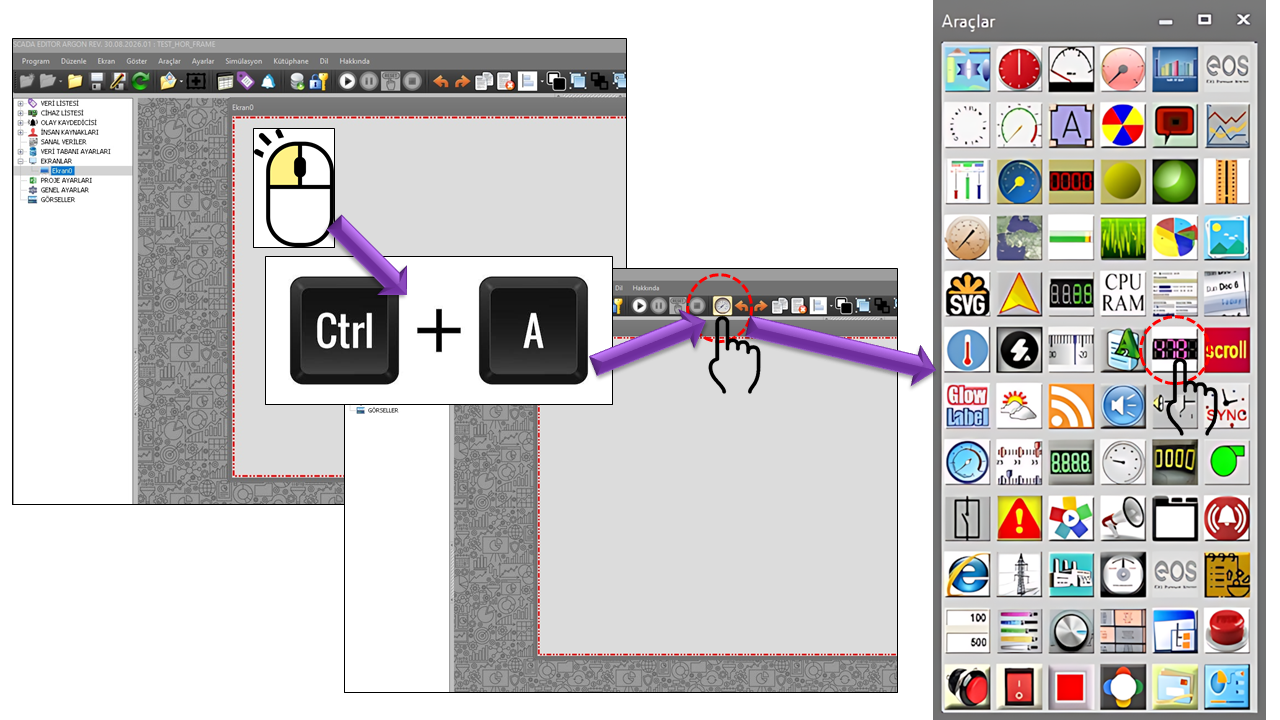
LED CONTROL allows numeric data to be presented on SCADA screens as a segment-based digital display, rather than in conventional text boxes. Its purpose is not merely to display a value, but to provide a distinctive visual structure that helps operators recognize numeric values quickly.
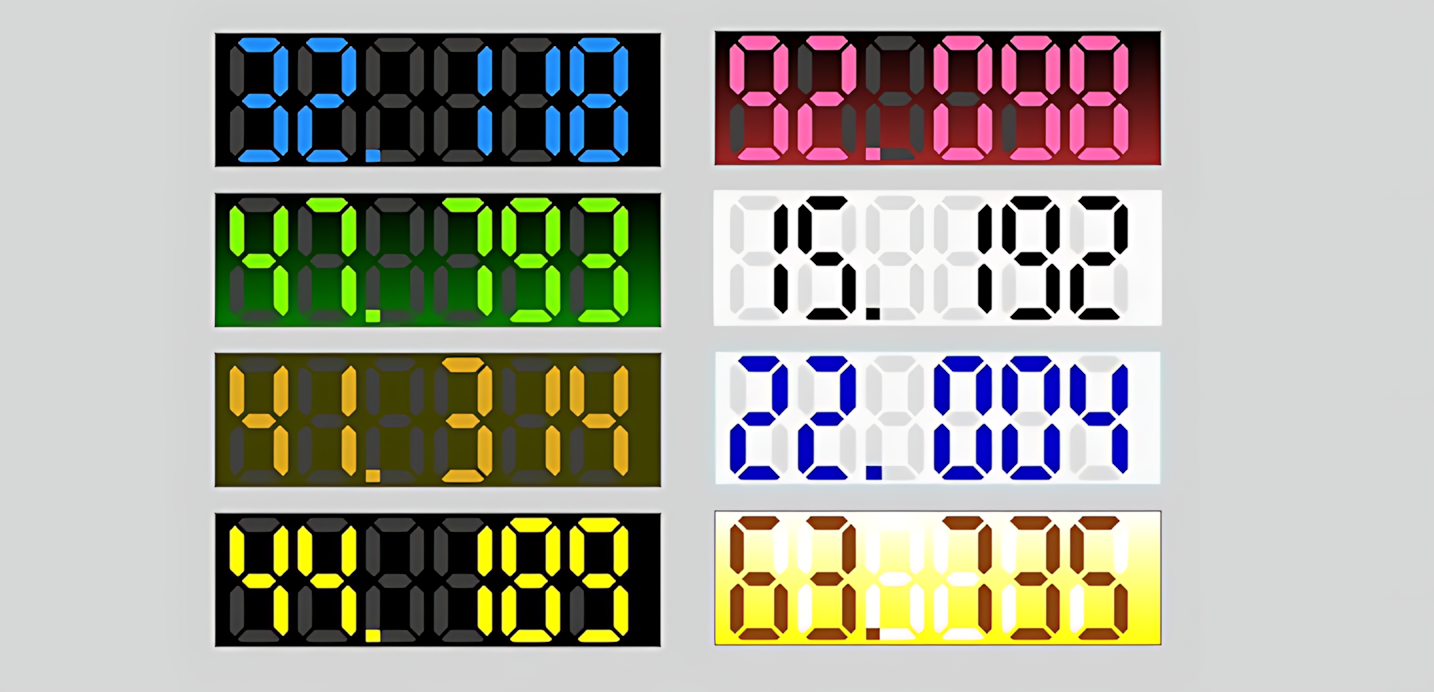
The indicator can be adapted to different screen designs using options such as character count, text alignment, segment spacing and width, inactive segment color, background colors, borders, bevels, corner styles, and highlights.
Numeric value → LED segment display → visual configuration → quick trend inspection
The visual structure of LED_CONTROL involves more than simply displaying a numeric value using segments. The overall appearance of the control on a SCADA screen can be defined by configuring the appearance of active and inactive segment areas, the background of the display, spacing between segments, segment widths, and surface effects together.
This allows the same numeric display control to be configured in a more compact, prominent, simple, or visually striking style, depending on the screen design and the operator's viewing distance.
TotalCharCount determines the number of numeric character positions allocated on the display. In addition, SegmentIntervalRatio and SegmentWidthRatio adjust the spacing and width relationships between segments.
Adjusting these properties together allows the display to use a tighter or more spacious segment layout while retaining the same number of characters. This is particularly important when many numeric indicators are used on the same SCADA screen, as segments must remain sufficiently distinct for values to be read at a glance.
The visual character of the LED_CONTROL segment display can be changed not only through segment colors but also through the way the display surface is rendered. When GradientBackground is enabled, a gradient background can be created using BackColor1 and BackColor2.
BevelRate adds a bevel effect to the display surface, while ShowHighlight enables an additional highlight. The visual intensity of this highlight can be adjusted using HighlightOpaque. This allows the indicator to be adapted to different SCADA screen designs, ranging from a flat, simple appearance to one with more pronounced surface effects.
In addition, RoundCorner and CornerRadius adjust the corners of the display area, helping the control maintain visual consistency with other graphical components on the screen.
Segment layout + background + surface effects + highlight = a readable digital display adaptable to the screen design
LED_CONTROL offers multiple visual options to adapt the same numeric display approach to different SCADA screen designs. These properties do not change the value itself; they determine how the value is perceived on the screen.
| Property | English Meaning | Description |
|---|---|---|
GradientBackground |
Gradient Background | Determines whether a gradient is used for the display background. |
TotalCharCount |
Total Character Count | Determines the number of character positions allocated for the numeric display. |
TextAlignment |
Text Alignment | Determines the horizontal alignment of the numeric display. |
BackColor1 |
Background Color 1 | Determines the first background color. |
BackColor2 |
Background Color 2 | Determines the second background color when a gradient is used. |
FadedColor |
Inactive Segment Color | Determines the visual color of inactive segments. |
SegmentIntervalRatio |
Segment Spacing Ratio | Adjusts the spacing between segments. |
SegmentWidthRatio |
Segment Width Ratio | Adjusts the width ratio of the segments. |
BorderColor |
Border Color | Determines the color of the display border. |
BorderWidth |
Border Width | Determines the width of the display border. |
BevelRate |
Bevel Rate | Determines the intensity of the bevel effect on the display surface. |
RoundCorner |
Rounded Corners | Enables rounded corners for the display. |
CornerRadius |
Corner Radius | Determines the radius of the rounded corners. |
ShowHighlight |
Show Highlight | Enables the highlight effect on the display. |
HighlightOpaque |
Highlight Opacity | Determines the opacity level of the highlight effect. |
The TextAlignment property determines the horizontal position of the numeric display within the control area. The source defines two options.
| Option | English Meaning | Usage |
|---|---|---|
Left |
Left | Aligns the numeric value to the left. |
Right |
Right | Aligns the numeric value to the right. |
When UseFastGraph is enabled, a small quick graph icon can appear on the control. When the user moves the mouse pointer over this icon, a quick graph displays the trend of the selected data over the chosen time interval. The quick graph closes when the pointer moves away from the icon.
This approach helps the operator quickly check the recent direction and behavior of the value without switching to a separate trend screen.
| Option | English Meaning |
|---|---|
Last10minutes |
Last 10 Minutes |
Last30minutes |
Last 30 Minutes |
Last1hour |
Last 1 Hour |
Last3hours |
Last 3 Hours |
Last6hours |
Last 6 Hours |
Last12hours |
Last 12 Hours |
Last1day |
Last 1 Day |
Rather than replacing a detailed trend analysis screen, the Quick Graph can be considered a practical supplementary view for quickly checking how the displayed value has behaved in the recent past.
LED_CONTROL can be used in SCADA designs where many numeric values must be monitored compactly on the same screen. The segment display emphasizes the value, while the visual configuration options allow the control to be adapted to the design language of different process screens.
Can be used for compact displays of numeric electrical values such as voltage, current, power, and energy.
Can be used to display continuous numeric process values such as temperature, pressure, level, and flow rate.
Can be used to quickly read numeric machine information such as rotational speed, speed, load, capacity, and operating values.
Can present measurement values from various types of equipment in a standardized, compact digital display format.
Can be used in designs where many numeric values must be monitored in an organized way on the same SCADA screen.
When Quick Graph is enabled, the recent trend of a numeric value can be inspected quickly from the indicator itself.
The segment structure of LED_CONTROL provides a distinctive visual identity, especially in compact displays. However, when many controls are used simultaneously, character count, segment size, and color contrast should be considered together.
Segment width, character count, background, and text/segment contrast should be selected according to the screen's viewing distance so that operators can read values quickly.
Using similar segment, alignment, and background settings for measurements of the same type on a SCADA screen can help operators recognize indicators more quickly.
The Quick Graph feature can be planned for use only on indicators where short-term trend inspection is genuinely needed. Enabling it unnecessarily on many indicators may introduce additional graph-processing operations in the user interface.
Especially on dense SCADA screens, deciding in advance which indicators actually need the quick graph feature helps keep the screen simple and manageable.
| Property | English Meaning | Default | Description |
|---|---|---|---|
UCType |
Control Type | LED_CONTROL |
Defines the type of the control. |
UpdateInterval |
Update Interval | 1000 |
Determines the control's data update interval. |
DecimalPoint |
Decimal Places | 0 |
Determines the number of decimal places used in the numeric display. |
UCBackColor |
Control Background Color | Transparent |
Determines the control's overall background color. |
UCForeColor |
Control Foreground Color | HotPink |
Determines the control's default foreground color. |
UCFont |
Control Font | Arial Narrow 8.25 Bold |
Determines the control's font settings. |
LED_CONTROL provides a more distinctive LED segment display style than conventional numeric text indicators. Its detailed visual configuration options allow the same control to be used in different SCADA screen designs.
The control's Use Quick Graph feature combines numeric display with short-term trend inspection at the same point of use. This allows the operator to monitor the primary value continuously and quickly check its recent behavior when needed.
The value is displayed → the LED segment structure is read → visual properties are configured to suit the state → the quick trend is inspected when needed.

Free Software Download Center
Software for industrial data collection, monitoring, and analysis.

Technical Support
Software documentation, sample code, and practical technical information.
You can contact us regarding EOS software, technical documentation, or industrial data communication.