
Free Software Download Center
Software for industrial data collection, monitoring, and analysis.
LINEAR GAUGE • INDICATOR TUBE • THERMOMETER • TANK • LED BAR • VISUAL PROCESS DISPLAY
ADVANCED LINEAR INDICATOR is designed to create five different visual linear indicators within a single user control. Its key feature is the ability to present a numerical process value not merely as a bar, but as a visual representation suited to the nature of the process.
The Linear Gauge, Indicator Tube, Thermometer, Tank, and LED Bar options are distinct types of visual representation.

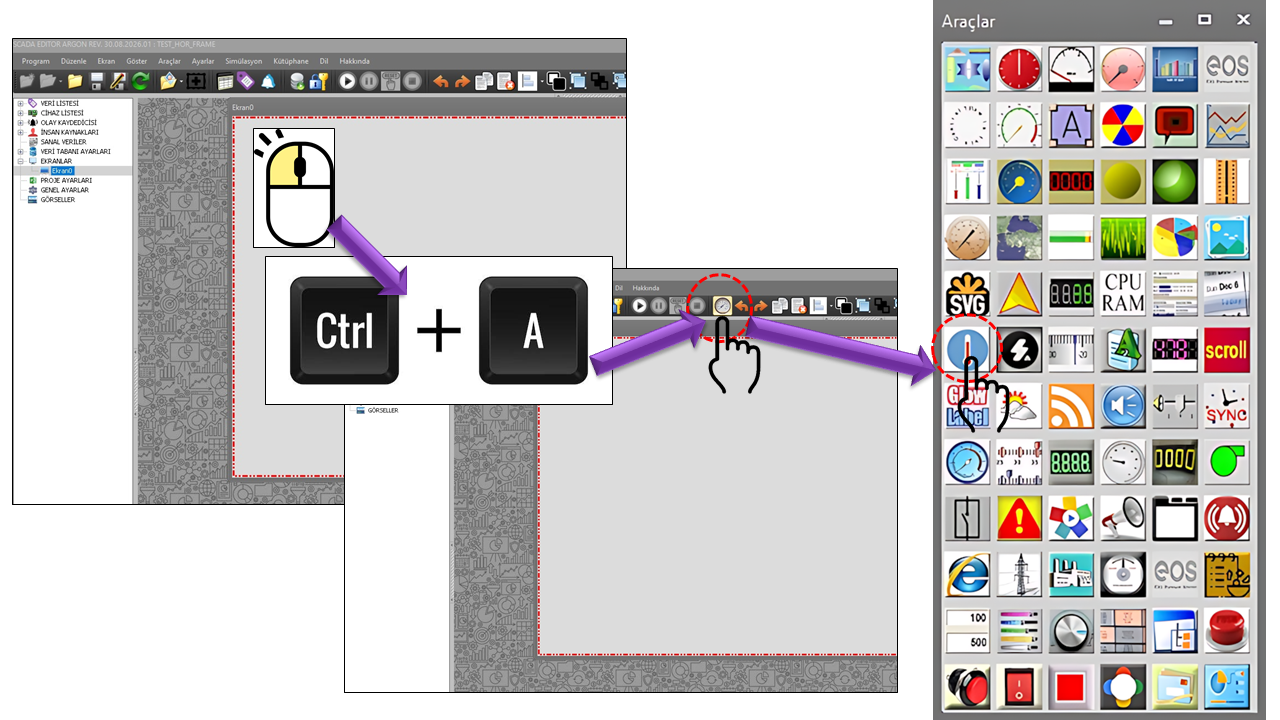
The distinguishing feature of the ADVANCED LINEAR GAUGE is its visual presentation. By configuring the gauge type, scale, color sections, pointers, rotation angle, tube, and LED properties together, the same process data can be presented in different visual forms.
The following five options determine the visual character of the control and should be considered individually.
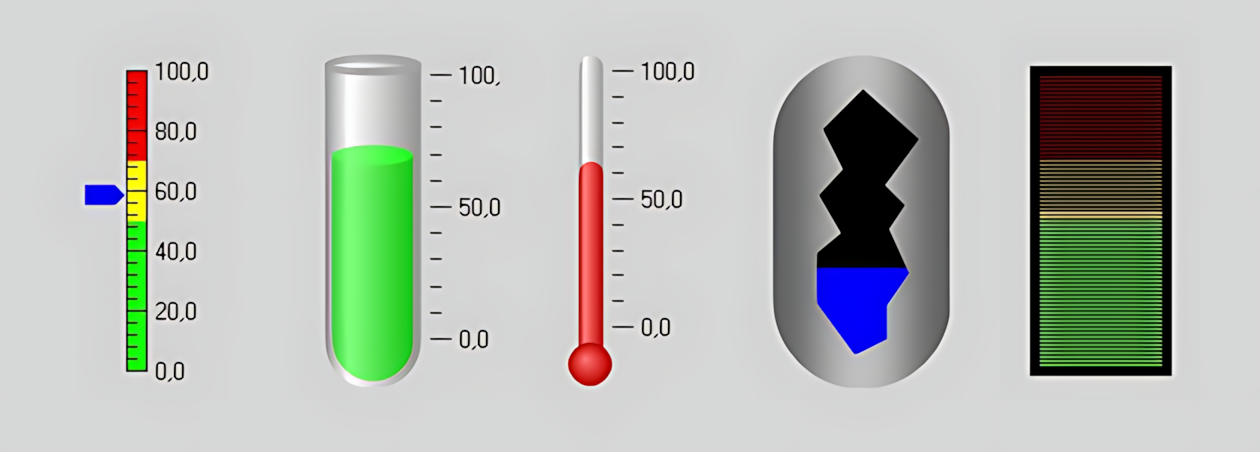
Gaugelinear — A general-purpose linear process value display. It can be used for values such as level, pressure, flow rate, speed, or load.
Gaugetube — Displays the value within a tube-like structure. The tube fill and wall appearance are emphasized.
Thermometer — Designed to visualize values such as temperature in the form of a thermometer.
Tank — The liquid level inside a tank can be visually monitored through a cross-sectional representation of the tank body.
Ledbar — Displays the value compactly using consecutive LED segments.
The Tank type is one of the most distinctive visual applications of the ADVANCED LINEAR GAUGE. The measured level can be displayed inside the tank body as a cross-section showing the liquid fill level. This allows the operator to perceive not only the numerical value but also the tank's visual fill state.
Tank body + liquid cross-section = visual level representation.
The COLOR_SECTION collection allows different colors to be assigned to specific portions of the gauge range. The visibility, color, start value, and end value of each section can be configured independently.
| Property | Description | Details |
|---|---|---|
| SectionVisible | Section Visibility | Determines whether the section is displayed. |
| SectionColor | Section Color | Specifies the color of the relevant value range. |
| SectionStart | Section Start | The value at which the section begins. |
| SectionEnd | Section End | The value at which the section ends. |
This structure can be used, for example, to visually distinguish different process operating regions. The meanings of colors, such as normal, caution, or alarm, should be defined according to the application's own color standard.
POINTER_COLLECTION allows different data values to be displayed on the gauge using separate pointers. In addition to pointer visibility, color, size, and margin, five different pointer styles can be selected.
| Option Set | Description | Details |
|---|---|---|
| Pointer | Pointer | Classic needle/pointer. |
| Triangle | Triangle | Triangle-shaped pointer. |
| Tline | T-Line | T-shaped linear marker. |
| Colorbar | Color Bar | Displays the value using a color-bar representation. |
| Tube | Tube | Tube-shaped visual marker. |
An important part of the control's visual capability comes from its scale structure. The length, thickness, color, and text properties of major, intermediate, and minor ticks can be configured independently.
| Property | Description | Default |
|---|---|---|
| TickMajorTextMargin | Major Tick Text Margin | 2 |
| TickMajorThickness | Major Tick Thickness | 1 |
| TickMajorLength | Major Tick Length | 10 |
| DisplayMajorScale | Display Major Scale | true |
| TickMajorTextVisible | Major Tick Text Visible | true |
| TickMidLength | Intermediate Tick Length | 5 |
| TickMidThickness | Intermediate Tick Thickness | 1 |
| DisplayMidScale | Display Intermediate Scale | true |
| TickMinorLength | Minor Tick Length | 5 |
| TickMinorThickness | Minor Tick Thickness | 1 |
| Property | Option Set | Description |
|---|---|---|
| ScaleType | Linear | Linear |
| ScaleType | Log10 | Log10 |
| ScaleType | Splitlog10 | Split Log10 |
| GeneratorStyle | Auto | Automatic |
| GeneratorStyle | Fixed | Fixed |
| RotationAngle | 0 / 90 / 180 / 270 | 0, 90, 180, 270 degrees |
RangeMin defines the start of the display range, while RangeSpan defines the range span. ScaleReverse enables a reversed scale. RotationAngle allows the gauge to be rotated into four principal orientations.
TubeFillColor — Tube Fill Color
TubeWallColor — Tube Wall Color
TubeWidth — Tube Width
TubeWallThickness — Tube Wall Thickness
TubeTilt — Tube Tilt
LedSeparation — LED Separation
LedWidth — LED Width
LedThickness — LED Thickness
LedColor — LED Color
OutlineThickness — Outline Thickness
NILEDStili
Flat → Flat
Gradient → Gradient
The ADVANCED LINEAR GAUGE user control is a versatile family of linear gauges designed to help operators monitor process values quickly, clearly, and visually. The different gauge types available within the control allow the same process data to be presented as a linear gauge, gauge tube, thermometer, tank, or LED bar. This makes it possible to select the appropriate gauge structure according to the nature of the data being displayed and the operator's visual interpretation needs.
Minimum and maximum values, major and intermediate scale marks, value labels, color sections, and pointers can be used together on the gauge. Color sections can be defined to visually distinguish specific value ranges. This helps operators quickly differentiate between normal operating ranges, values requiring attention, and high-risk values. The pointer structure also allows the same value to be represented in different visual forms.
The ADVANCED LINEAR GAUGE can be used particularly on screens where it is important to perceive a value's position on a scale, rather than displaying the numerical value as text alone. For example, the height of liquid in a tank, the temperature position on a thermometer, or defined threshold regions for a process value can be monitored visually.
The Tank type provides a structure that allows the liquid level inside the tank to be perceived visually, rather than merely displaying a numerical value. This enables the operator to assess the current level directly through the visual cross-section of the tank. This approach can be used on process screens where rapid level monitoring is required.
Meaningful operating regions can be created on the gauge by dividing the value range into sections of different colors. A separate color can be defined for each section, along with its start and end values. This visually distinguishes different regions, such as normal operation, warning, and high values, on the same gauge.
The value on the gauge is not limited to a conventional pointer. One of several display styles can be selected: pointer, triangle, T-line, color bar, or tube. This feature helps create a display that suits the visual design of the process screen where the gauge is used.
Major, intermediate, and minor scale marks can be configured together. The scale can be created in linear or logarithmic form. Properties such as the value range, number of divisions, tick lengths, tick thicknesses, and text-formatting precision allow the gauge to be tailored to the characteristics of the process value being monitored.
These features allow the ADVANCED LINEAR GAUGE to be used on process screens not only to read measurement values, but also as a visual presentation layer that helps operators perceive the relative positions of values, operating regions, and threshold conditions.
| Property | Description | Default |
|---|---|---|
| UCType | Control Type | ADVANCED LINEAR GAUGE |
| UpdateInterval | Update Interval | 1000 |
| DecimalPoint | Decimal Places | 0 |
| GaugeType | Gauge Type | Gaugelinear |
| ScaleReverse | Reverse Scale | false |
| RotationAngle | Rotation Angle | 0 |
| RangeMin | Range Minimum | 0 |
| RangeSpan | Range Span | 100 |
| ScaleType | Scale Type | Linear |
| GeneratorStyle | Generator Style | Auto |
| TubeFillColor | Tube Fill Color | Blue |
| TubeWallColor | Tube Wall Color | Silver |
| TubeWidth | Tube Width | 48 |
| TubeWallThickness | Tube Wall Thickness | 4 |
| TubeTilt | Tube Tilt | 5 |
| LedSeparation | LED Separation | 1 |
| LedWidth | LED Width | 12 |
| LedThickness | LED Thickness | 1 |
| OutlineThickness | Outline Thickness | 5 |
| LedColor | LED Color | Black |
| LedStyle | LED Style | Flat |
| Option Set | Options |
|---|---|
| NITurBilgisi — Gauge Type | Linear Gauge, Gauge Tube, Thermometer, Tank, LED Bar |
| GNAciBilgisi — Rotation Angle | 0 Degrees, 90 Degrees, 180 Degrees, 270 Degrees |
| NIIgneBilgisi — Pointer Style | Pointer, Triangle, T-Line, Color Bar, Tube |
| NICetvelTuru — Scale Type | Linear, Log10, Split Log10 |
| NIOlcekTuru — Generator Style | Automatic, Fixed |
| GTHizalama — Mid-Tick Alignment | Near, Center, Far |
| NILEDStili — LED Style | Flat, Gradient |
Color sections, pointers, and scales can be used together. The meanings of colors, such as normal, warning, or alarm, should be defined according to the application's own process and alarm standards.
The ADVANCED LINEAR GAUGE expands the linear gauge beyond a single bar-shaped display, offering five different visual forms: Linear Gauge, Gauge Tube, Thermometer, Tank, and LED Bar. The liquid cross-section in the Tank type, color ranges, and different pointer shapes particularly emphasize the control's visual design-oriented character.
For this reason, the control is a comprehensive family of linear gauges suitable for SCADA/HMI screens where the goal is not merely to read a process value, but to communicate the process value visually.
Free Software Download Center
Software for industrial data collection, monitoring, and analysis.

Technical Support
Software documentation, sample code, and practical technical information.
You can contact us regarding EOS software, technical documentation, or industrial data communication.