
Free Software Download Center
Software for industrial data collection, monitoring, and analysis.
LIVE EVENTS • AUTOMATIC NOTIFICATION • ALARM FILTERING • EMAIL • SMS • WHATSAPP • TELEGRAM
Alarm Notification System (ANS), EOS LIVE EVENTS is an alarm notification module developed as part of EOS LIVE EVENTS to deliver critical alarms at power generation facilities to the relevant user groups quickly and in a controlled manner.
ANS enables selected alarms to be delivered Email, SMS, WhatsApp ve Telegram through different communication channels according to predefined users and notification rules. In this way, alarm management becomes an active operational mechanism that ensures the relevant personnel are informed in time rather than remaining merely an event displayed on the SCADA screen.
 ANS automatically delivers critical alarms and events occurring at power generation facilities to predefined user groups. The system can be configured according to different areas of responsibility, such as operators, maintenance teams, management, the central organization, and special user groups.
The fundamental objective of this approach is to deliver the right alarm to the right person, at the right time, through the appropriate communication channel This helps reduce unnecessary notification traffic and improve response times to critical events.
This user guide explains ANS configuration, starting with EOSliveevents.xml starting with its activation through EOSliveevents.xml and continuing AlarmManager.exe with the configuration of communication channels, user groups, alarm filters, communication rules, and network requirements using AlarmManager.exe.
For the ANS feature to operate, first EOSliveevents.xml the parameter indicating that ANS is active must be correctly configured in the configuration file.
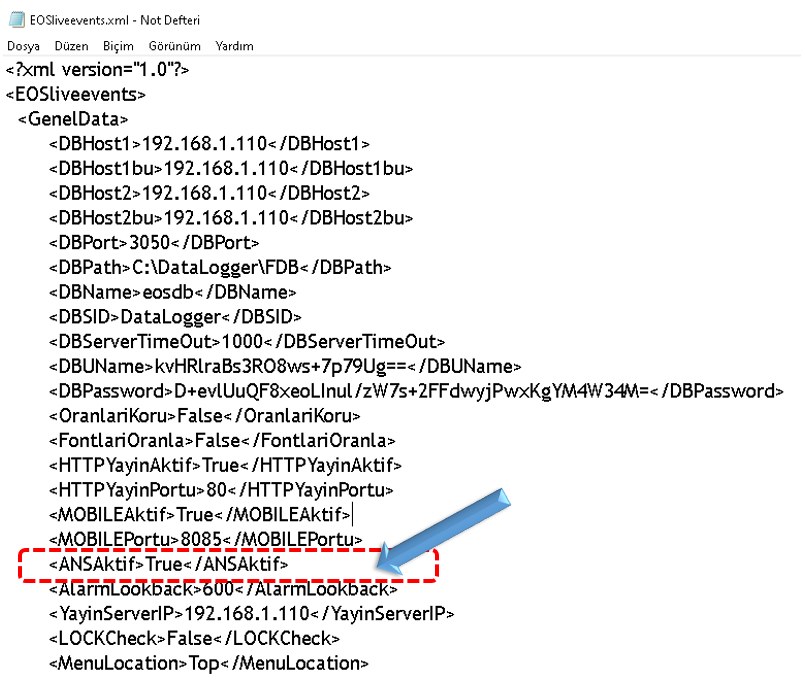 The following line must be present in the configuration file, and its value must be True
set as follows:
The following line must be present in the configuration file, and its value must be True
set as follows:
<ANSAktif>True</ANSAktif>
ANSAktif parameter determines whether the Alarm Notification System is enabled. When the parameter True is set to True, the ANS feature becomes active within LIVE EVENTS.
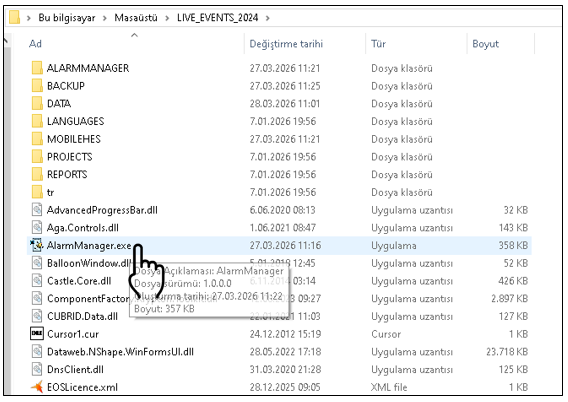
The primary tool for configuring ANS is AlarmManager.exe' is AlarmManager.exe. Communication channels, user groups, alarm filters, and notification rules are created through AlarmManager.
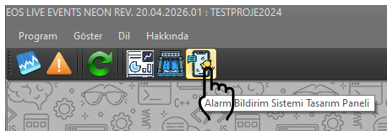
After opening LIVE EVENTS, QUICK START in the QUICK START menu Alarm Notification System Design Panel clicking the button starts AlarmManager.
 Alternatively, the
AlarmManager.exe file can be double-clicked to start the program directly.
Alternatively, the
AlarmManager.exe file can be double-clicked to start the program directly.
The AlarmManager interface consists of three main sub-panels that separate the different configuration requirements of the ANS system . Configuring these panels together forms the foundation for controlled operation of the alarm notification system.
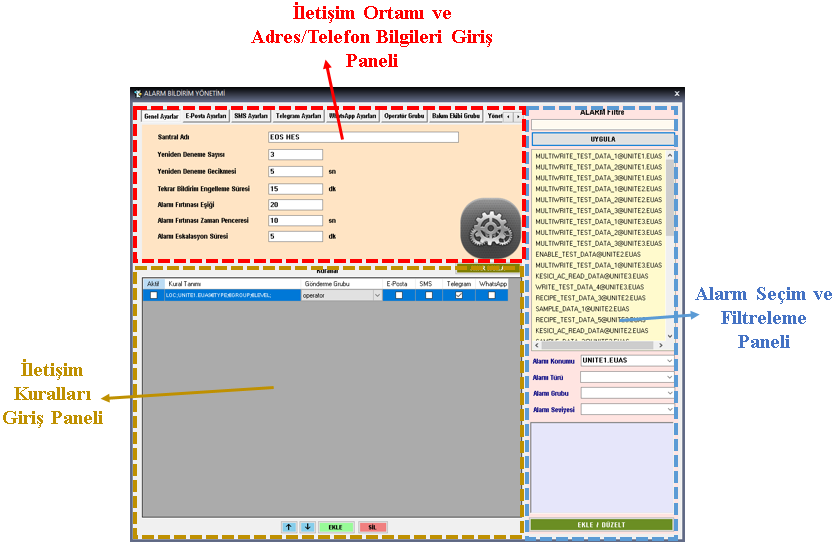 This panel defines the communication infrastructure that ANS will use and the information of users who will receive notifications. Email, SMS, Telegram ve
WhatsApp Connection and access information for these channels is configured here.
This panel defines the communication infrastructure that ANS will use and the information of users who will receive notifications. Email, SMS, Telegram ve
WhatsApp Connection and access information for these channels is configured here.
Within the same panel, 7 different address/phone lists can be created. This allows users with different areas of responsibility to be managed as separate groups.
This panel is where the conditions for sending generated alarms under which conditions, to which user groups, and through which communication channels are defined.
For each alarm group, the Email, SMS, Telegram, and WhatsApp channels to be used can be selected individually. This allows more comprehensive notification scenarios for critical alarms and more limited scenarios for lower-priority alarms.
This panel allows the alarms to be reported by ANS to be selected from the alarm list defined in the SCADA system. Instead of sending all SCADA alarms to users, only the alarms that are required and considered critical can be included in the notification scope.
 Communication Channels and Address/Phone Information Entry Panel
The General Settings tab on this panel contains the main parameters that determine ANS operating behavior.
Communication Channels and Address/Phone Information Entry Panel
The General Settings tab on this panel contains the main parameters that determine ANS operating behavior.
These parameters are intended not only to send notifications, but also to retry during temporary communication problems, reduce unnecessary repetitions of the same alarm, detect high alarm volumes, and escalate unresolved critical alarms to higher-level groups.
| Parametre | Function |
|---|---|
| Plant Name | Specifies the facility name to be used as the source information in notifications. |
| Retry Count | Determines how many times a failed notification delivery will be retried. |
| Retry Delay | Determines the waiting time between failed delivery attempts. |
| Notification Suppression Period | Prevents the same alarm from being unnecessarily sent again within a short period. |
| Alarm Storm Threshold | Defines the threshold at which the number of alarms generated within a specified time period is considered an alarm storm. |
| Alarm Storm Time Window | Defines the time interval over which alarm intensity is evaluated. |
| Alarm Escalation Period | Defines the time after which an unresolved or unacknowledged alarm is forwarded to higher-level user groups. |
ANS supports multiple communication channels, allowing notification scenarios to be created according to the facility's communication infrastructure. Connection and authentication information for each channel is configured on its respective tab.
 For email notifications, the SMTP connection must be configured correctly. The main parameters are SMTP Server, SMTP Port,
Email Username, Email Password, Use SSL ve
Timeout and
For email notifications, the SMTP connection must be configured correctly. The main parameters are SMTP Server, SMTP Port,
Email Username, Email Password, Use SSL ve
Timeout and
If required by the email service, provider-specific authentication methods such as an application password should be used. ANS also provides quick configuration options for GMAIL, HOTMAIL, YAHOO, YANDEX, and OUTLOOK.
 SMS delivery is performed using the API information of the selected service provider. SMS API Address, SMS API Key,
SMS Access Token, SMS Username ve
SMS Password can be configured according to the provider's requirements.
SMS delivery is performed using the API information of the selected service provider. SMS API Address, SMS API Key,
SMS Access Token, SMS Username ve
SMS Password can be configured according to the provider's requirements.
You can choose whether API key, access token, and password information will be used and, if so, whether they will be sent query parametresi veya message header in the selected location. This structure provides flexibility for compatibility with different SMS API standards.
 Telegram integration is performed through a bot. The main parameters are Telegram API Address, Telegram Bot Access
Key (Bot Token) ve Telegram Chat ID bilgileridir.
Telegram integration is performed through a bot. The main parameters are Telegram API Address, Telegram Bot Access
Key (Bot Token) ve Telegram Chat ID bilgileridir.
The Chat ID identifies the target user, group, or channel to which notifications will be sent.
 WhatsApp notifications are configured through an API service. The main parameters are WhatsApp API Address, WhatsApp Access
Key ve WhatsApp Phone ID and
WhatsApp notifications are configured through an API service. The main parameters are WhatsApp API Address, WhatsApp Access
Key ve WhatsApp Phone ID and
After the communication channels are defined, the user groups that will receive notifications are created. A total of 7 separate communication groups can be defined in ANS.
For each group, email addresses and telephone numbers can be managed in the relevant list using the ADD ve DELETE buttons.
This structure ensures that notifications are directed to the appropriate user group according to its area of responsibility instead of being sent to all personnel.
The Communication Rules Panel forms the core of the ANS decision mechanism. Here, the user defines under which conditions an alarm is sent, which user groups receive it, and which communication channels are used.
Large SCADA projects may contain hundreds or even thousands of alarms. Sending all of them as notifications to mobile devices or communication channels can overwhelm users with unnecessary messages and cause critical alarms to be lost among other notifications.
Therefore, the basic approach in ANS is to select alarms that require notification and filter out unnecessary notifications.
A specific alarm can be selected directly from the alarm list. Text filtering by alarm name or description makes it easier to find the required record among hundreds of alarms.
Alarms can be filtered according to location information in the SCADA project. For example, Unit 1, Unit 2, or Switchyard can be selected so that only alarms belonging to a specific area are included in the notification scope.
Include and exclude expressions can be used for alarm type, group, or level.
For ANS to send notifications through Email, SMS, WhatsApp, and Telegram, the ANS server must be able to communicate with the relevant external services. Therefore, firewall, proxy, and network security policies must be configured with ANS operating requirements in mind.
| Hizmet | Contact | Temel Gereksinim |
|---|---|---|
| SMTP | Outbound access to port 587 for TLS or port 465 for SSL, for example. | |
| SMS | HTTP / HTTPS API | Outbound access to the provider's API; for example, port 443 or 80. |
| API / HTTPS | API access, typically through TCP 443. | |
| Telegram | Bot API / HTTPS | API access, typically through TCP 443. |
If access to the web interface from an external network is planned, the web port in use must be forwarded to the ANS server on the firewall or modem. If the default HTTP port is 80, the interface can be accessed using the IP address; if a different port is used, :port eklenmelidir.
For Email, SMS, WhatsApp, and Telegram notifications, the ANS server must be able to establish an outbound connection to external services. It is particularly important that ports such as TCP 443, 587, and 465 are not blocked by security policies.
For ANS to operate reliably, completing the configuration on a single screen is not sufficient. The system should be checked end to end, from activation and alarm selection to user groups and communication channels.
Thus, instead of directly and uncontrollably sending every SCADA alarm to all users, ANS considers the alarm's priority, location, type, target group, and communication channel and operates as a controlled notification system.
Free Software Download Center
Software for industrial data collection, monitoring, and analysis.

Technical Support
Software documentation, example code, and practical implementation information.
You can contact us about EOS software, technical documentation, or industrial data communication.